Description
Note:
1: Only Sales Adapter Card,Images Of SSD And Mainboard Is Not Sales!
2: The Adapter Card Only Support 22*80 Mm Size Of M.2 NGFF PCIE x4 AHCI SSD,It Can Not Support M.2 NGFF PCIE x4 NVME Solid State Drives.
3: The Power-Saving Sleep Mode May Not Be Able To Use.Please Enter "System Preferences"/ "Energy Saver",Then Close"Power Adapter"/ "Put Hard Disks To Sleep When Possible" And"Battery"/ "Put Hard Disks To Sleep When Possible".Then Moved The "Turn Display Off After" Arrow To "Never" Position.
4: Please Open The Trim Function After Mac Os Installed, It Does Not Need To Manually Open If Install Windows Operating System.
5:Pls Prepare USB Disk Driver Before Using The Adapter.
MacBook Air SSD interface standard:
1: 2010 and 2011 version MacBook Air SSD is 6+12 pin, only one side have contact,size is 109 mm*24 mm.It's SATA interface.
2: 2012 version MacBook Air SSD is 7+17 pin, size is 109 mm*24 mm.2012 version MacBook Pro SSD is 7+17 pin, size is 89 mm*33 mm.It's SATA interface.
3: 2013 and 2014 and 2015 version MacBook Air SSD is both side have contact,one sid is 16+12 pin,the other side is 11+14 pin,size is 89 mm*24 mm.It's PCIe X4 interface.
4: 2013 and 2014 and 2015 version MacBook Pro SSD is both side have contact,one sid is 16+12 pin,the other side is 11+14 pin,size is 89 mm*33 mm.It's PCIe X4 interface.
Warning:
1.Support M.2 (NGFF) PCIE-AHCI SSD:
Samsung XP941 (MZHPU128HCGM MZHPU256HCGL MZHPU512HCGL)
Samsung SM951 PCIE-AHCI (MZHPV128HDGM MZHPV256HDGL MZHPV512HDGL)
Kingston SHPM2280P2/ 240G/ 480G
Only newest MAC OS support following NGFF PCIE SSD:
SM951 PCIE-NVME (MZVPV128HDGM MZVPV256HDGL MZVPV512HDGL),
PM951 PCIE-NVME (MZFLV128HCGR MZFLV256HCHP MZFLV512HCJH),
950 PRO (MZVKV256 MZVKV512) and other PCIE-NVMe SSD.
2.Please Turn Off The Sleep Function of The System After Installing The Operating System.
1: Only Sales Adapter Card,Images Of SSD And Mainboard Is Not Sales!
2: The Adapter Card Only Support 22*80 Mm Size Of M.2 NGFF PCIE x4 AHCI SSD,It Can Not Support M.2 NGFF PCIE x4 NVME Solid State Drives.
3: The Power-Saving Sleep Mode May Not Be Able To Use.Please Enter "System Preferences"/ "Energy Saver",Then Close"Power Adapter"/ "Put Hard Disks To Sleep When Possible" And"Battery"/ "Put Hard Disks To Sleep When Possible".Then Moved The "Turn Display Off After" Arrow To "Never" Position.
4: Please Open The Trim Function After Mac Os Installed, It Does Not Need To Manually Open If Install Windows Operating System.
5:Pls Prepare USB Disk Driver Before Using The Adapter.
MacBook Air SSD interface standard:
1: 2010 and 2011 version MacBook Air SSD is 6+12 pin, only one side have contact,size is 109 mm*24 mm.It's SATA interface.
2: 2012 version MacBook Air SSD is 7+17 pin, size is 109 mm*24 mm.2012 version MacBook Pro SSD is 7+17 pin, size is 89 mm*33 mm.It's SATA interface.
3: 2013 and 2014 and 2015 version MacBook Air SSD is both side have contact,one sid is 16+12 pin,the other side is 11+14 pin,size is 89 mm*24 mm.It's PCIe X4 interface.
4: 2013 and 2014 and 2015 version MacBook Pro SSD is both side have contact,one sid is 16+12 pin,the other side is 11+14 pin,size is 89 mm*33 mm.It's PCIe X4 interface.
Warning:
1.Support M.2 (NGFF) PCIE-AHCI SSD:
Samsung XP941 (MZHPU128HCGM MZHPU256HCGL MZHPU512HCGL)
Samsung SM951 PCIE-AHCI (MZHPV128HDGM MZHPV256HDGL MZHPV512HDGL)
Kingston SHPM2280P2/ 240G/ 480G
Only newest MAC OS support following NGFF PCIE SSD:
SM951 PCIE-NVME (MZVPV128HDGM MZVPV256HDGL MZVPV512HDGL),
PM951 PCIE-NVME (MZFLV128HCGR MZFLV256HCHP MZFLV512HCJH),
950 PRO (MZVKV256 MZVKV512) and other PCIE-NVMe SSD.
2.Please Turn Off The Sleep Function of The System After Installing The Operating System.
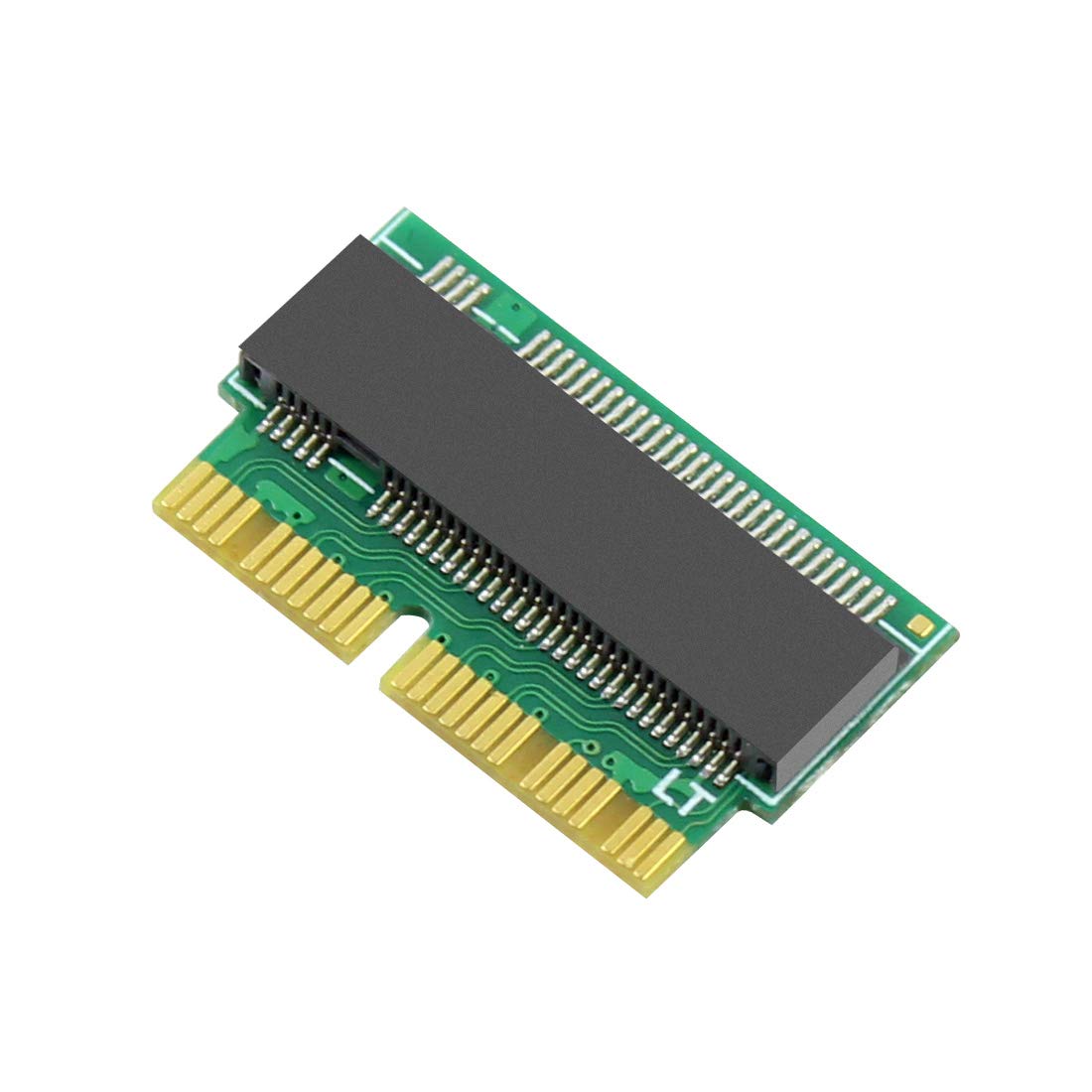
BGNing M Key M.2 PCIe NGFF AHCI 2280 SSD 12+16Pin Adapter Card as SSD for MacBook Air 2013 2014 2015 A1465 A1466 Mac Pro A1398 A1502
Current Price
$8.07
Average
$8.07
Min Price
$8.07
Max Price
$8.07
Description
Note:
1: Only Sales Adapter Card,Images Of SSD And Mainboard Is Not Sales!
2: The Adapter Card Only Support 22*80 Mm Size Of M.2 NGFF PCIE x4 AHCI SSD,It Can Not Support M.2 NGFF PCIE x4 NVME Solid State Drives.
3: The Power-Saving Sleep Mode May Not Be Able To Use.Please Enter "System Preferences"/ "Energy Saver",Then Close"Power Adapter"/ "Put Hard Disks To Sleep When Possible" And"Battery"/ "Put Hard Disks To Sleep When Possible".Then Moved The "Turn Display Off After" Arrow To "Never" Position.
4: Please Open The Trim Function After Mac Os Installed, It Does Not Need To Manually Open If Install Windows Operating System.
5:Pls Prepare USB Disk Driver Before Using The Adapter.
MacBook Air SSD interface standard:
1: 2010 and 2011 version MacBook Air SSD is 6+12 pin, only one side have contact,size is 109 mm*24 mm.It's SATA interface.
2: 2012 version MacBook Air SSD is 7+17 pin, size is 109 mm*24 mm.2012 version MacBook Pro SSD is 7+17 pin, size is 89 mm*33 mm.It's SATA interface.
3: 2013 and 2014 and 2015 version MacBook Air SSD is both side have contact,one sid is 16+12 pin,the other side is 11+14 pin,size is 89 mm*24 mm.It's PCIe X4 interface.
4: 2013 and 2014 and 2015 version MacBook Pro SSD is both side have contact,one sid is 16+12 pin,the other side is 11+14 pin,size is 89 mm*33 mm.It's PCIe X4 interface.
Warning:
1.Support M.2 (NGFF) PCIE-AHCI SSD:
Samsung XP941 (MZHPU128HCGM MZHPU256HCGL MZHPU512HCGL)
Samsung SM951 PCIE-AHCI (MZHPV128HDGM MZHPV256HDGL MZHPV512HDGL)
Kingston SHPM2280P2/ 240G/ 480G
Only newest MAC OS support following NGFF PCIE SSD:
SM951 PCIE-NVME (MZVPV128HDGM MZVPV256HDGL MZVPV512HDGL),
PM951 PCIE-NVME (MZFLV128HCGR MZFLV256HCHP MZFLV512HCJH),
950 PRO (MZVKV256 MZVKV512) and other PCIE-NVMe SSD.
2.Please Turn Off The Sleep Function of The System After Installing The Operating System.
1: Only Sales Adapter Card,Images Of SSD And Mainboard Is Not Sales!
2: The Adapter Card Only Support 22*80 Mm Size Of M.2 NGFF PCIE x4 AHCI SSD,It Can Not Support M.2 NGFF PCIE x4 NVME Solid State Drives.
3: The Power-Saving Sleep Mode May Not Be Able To Use.Please Enter "System Preferences"/ "Energy Saver",Then Close"Power Adapter"/ "Put Hard Disks To Sleep When Possible" And"Battery"/ "Put Hard Disks To Sleep When Possible".Then Moved The "Turn Display Off After" Arrow To "Never" Position.
4: Please Open The Trim Function After Mac Os Installed, It Does Not Need To Manually Open If Install Windows Operating System.
5:Pls Prepare USB Disk Driver Before Using The Adapter.
MacBook Air SSD interface standard:
1: 2010 and 2011 version MacBook Air SSD is 6+12 pin, only one side have contact,size is 109 mm*24 mm.It's SATA interface.
2: 2012 version MacBook Air SSD is 7+17 pin, size is 109 mm*24 mm.2012 version MacBook Pro SSD is 7+17 pin, size is 89 mm*33 mm.It's SATA interface.
3: 2013 and 2014 and 2015 version MacBook Air SSD is both side have contact,one sid is 16+12 pin,the other side is 11+14 pin,size is 89 mm*24 mm.It's PCIe X4 interface.
4: 2013 and 2014 and 2015 version MacBook Pro SSD is both side have contact,one sid is 16+12 pin,the other side is 11+14 pin,size is 89 mm*33 mm.It's PCIe X4 interface.
Warning:
1.Support M.2 (NGFF) PCIE-AHCI SSD:
Samsung XP941 (MZHPU128HCGM MZHPU256HCGL MZHPU512HCGL)
Samsung SM951 PCIE-AHCI (MZHPV128HDGM MZHPV256HDGL MZHPV512HDGL)
Kingston SHPM2280P2/ 240G/ 480G
Only newest MAC OS support following NGFF PCIE SSD:
SM951 PCIE-NVME (MZVPV128HDGM MZVPV256HDGL MZVPV512HDGL),
PM951 PCIE-NVME (MZFLV128HCGR MZFLV256HCHP MZFLV512HCJH),
950 PRO (MZVKV256 MZVKV512) and other PCIE-NVMe SSD.
2.Please Turn Off The Sleep Function of The System After Installing The Operating System.
Price will be lower
in next 2 weeks
in next 2 weeks
According to the data, price will be lower in next two weeks, so not waste your money and track better price!
Similar products