Description
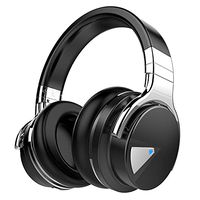
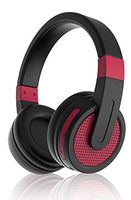
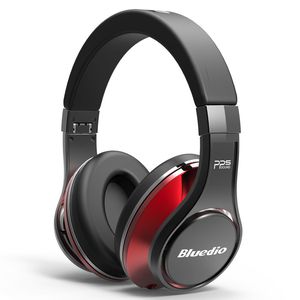
Bluedio U (UFO)Premium Wireless Headphone is first and foremost committed to one thing: the superb sound, achieved by Bluedio exclusive PPS8 acoustics technology and the built-in DSP processor. And its incredible 25 hours battery life is ensured by the latest Bluetooth 4.1 low-power technology. Furthermore, UFO is beautifully crafted with top notch aviation material: Al-Ti alloy, sturdy enough to be durable for long periods of time. Altogether, Bluedio U (UFO) redefines what reference-level wireless audio is all about.
Troubleshooting steps
Does not work well with PC: Enter the computer settings and enable the mic. Disable all the other devices and set the headphones as Default Device. If the PC has a built-in Bluetooth, please try to install the Toshiba Bluetooth stack (choose the newest one or whatever is recommended online).If you use a Bluetooth dongle, you may need to buy a CSR 4.0 Bluetooth adapter, the CSR 4.0 Bluetooth adapter would work perfectly with our headphones.
No sound or one side has no sound: Please try to reset the headphone: Power on the headphones.Charge the headphones for 10 seconds or so, the headphones would power off on their own(you can see the LED goes out), unplug the cable.Power on the headphones again.And remove the pairing memory of your device,then pair again.
Specifications
Bluetooth version: Bluetooth 4.1
Supported profiles: A2DP, AVRCP, HSP, HFP
Drivers: 50mm x 2 ; 20mm x 6
Impedance: 32Ω
SPL: 120 dB
Frequency response: 5Hz -25000Hz
Wireless range: 30ft (no obstructions)
Music time: about 25hours
Charging time: 3 hours for full charge
Troubleshooting steps
Does not work well with PC: Enter the computer settings and enable the mic. Disable all the other devices and set the headphones as Default Device. If the PC has a built-in Bluetooth, please try to install the Toshiba Bluetooth stack (choose the newest one or whatever is recommended online).If you use a Bluetooth dongle, you may need to buy a CSR 4.0 Bluetooth adapter, the CSR 4.0 Bluetooth adapter would work perfectly with our headphones.
No sound or one side has no sound: Please try to reset the headphone: Power on the headphones.Charge the headphones for 10 seconds or so, the headphones would power off on their own(you can see the LED goes out), unplug the cable.Power on the headphones again.And remove the pairing memory of your device,then pair again.
Specifications
Bluetooth version: Bluetooth 4.1
Supported profiles: A2DP, AVRCP, HSP, HFP
Drivers: 50mm x 2 ; 20mm x 6
Impedance: 32Ω
SPL: 120 dB
Frequency response: 5Hz -25000Hz
Wireless range: 30ft (no obstructions)
Music time: about 25hours
Charging time: 3 hours for full charge
Bluedio U (UFO) PPS 8 Drivers High-End Bluetooth headphones Revolution/3D Sound Effect/Aluminum alloy build/Hi-Fi Rank wireless&wired Over-Ear headsets with carrying hard case Gift (Black and Red)
Current Price
$95.99
Average
$95.03
Min Price
$53.99
Max Price
$159.99
Price dynamics
1%
Description
Bluedio U (UFO)Premium Wireless Headphone is first and foremost committed to one thing: the superb sound, achieved by Bluedio exclusive PPS8 acoustics technology and the built-in DSP processor. And its incredible 25 hours battery life is ensured by the latest Bluetooth 4.1 low-power technology. Furthermore, UFO is beautifully crafted with top notch aviation material: Al-Ti alloy, sturdy enough to be durable for long periods of time. Altogether, Bluedio U (UFO) redefines what reference-level wireless audio is all about.
Troubleshooting steps
Does not work well with PC: Enter the computer settings and enable the mic. Disable all the other devices and set the headphones as Default Device. If the PC has a built-in Bluetooth, please try to install the Toshiba Bluetooth stack (choose the newest one or whatever is recommended online).If you use a Bluetooth dongle, you may need to buy a CSR 4.0 Bluetooth adapter, the CSR 4.0 Bluetooth adapter would work perfectly with our headphones.
No sound or one side has no sound: Please try to reset the headphone: Power on the headphones.Charge the headphones for 10 seconds or so, the headphones would power off on their own(you can see the LED goes out), unplug the cable.Power on the headphones again.And remove the pairing memory of your device,then pair again.
Specifications
Bluetooth version: Bluetooth 4.1
Supported profiles: A2DP, AVRCP, HSP, HFP
Drivers: 50mm x 2 ; 20mm x 6
Impedance: 32Ω
SPL: 120 dB
Frequency response: 5Hz -25000Hz
Wireless range: 30ft (no obstructions)
Music time: about 25hours
Charging time: 3 hours for full charge
Troubleshooting steps
Does not work well with PC: Enter the computer settings and enable the mic. Disable all the other devices and set the headphones as Default Device. If the PC has a built-in Bluetooth, please try to install the Toshiba Bluetooth stack (choose the newest one or whatever is recommended online).If you use a Bluetooth dongle, you may need to buy a CSR 4.0 Bluetooth adapter, the CSR 4.0 Bluetooth adapter would work perfectly with our headphones.
No sound or one side has no sound: Please try to reset the headphone: Power on the headphones.Charge the headphones for 10 seconds or so, the headphones would power off on their own(you can see the LED goes out), unplug the cable.Power on the headphones again.And remove the pairing memory of your device,then pair again.
Specifications
Bluetooth version: Bluetooth 4.1
Supported profiles: A2DP, AVRCP, HSP, HFP
Drivers: 50mm x 2 ; 20mm x 6
Impedance: 32Ω
SPL: 120 dB
Frequency response: 5Hz -25000Hz
Wireless range: 30ft (no obstructions)
Music time: about 25hours
Charging time: 3 hours for full charge
Price will be lower
in next 2 weeks
in next 2 weeks
According to the data, price will be lower in next two weeks, so not waste your money and track better price!
Product review & video
hey guys welcome back to another video and this one were looking at the blue do you or UFO at headphones V feature eight drivers which give port on quite an experience deep and powerful yet balanced music experience you also have a nice option to enable 3d sound experience that's powered from 3d DSP processes to create an immersive concert hall effect you've also got 24-bit signal processing as well for high fidelity sound it uses Bluetooth 4.1 or you can also use a wired connection which is nice and they also state that in just three hours of charging you'll get twenty five hours of playback they are available with eight different colors we've got black black and red white red silver and black purple titanium and gold I'm just going to put the link in the description for you to see because it's a lot better would you see them rather than just me saying it now as I mentioned this does h


Similar products