Description
Features:
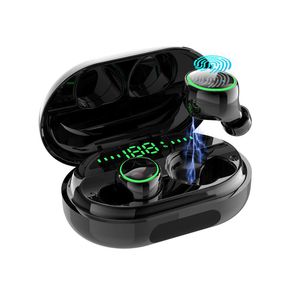
True Wireless Earbuds, Yinyoo Wireless Bluetooth Earbuds in-Ear Stereo IPX8 Waterproof Bluetooth Headphones TWS Wireless Earphones (Bluetooth 5.0, Built-in Mic, Stereo Calls)
Before use the product please read the manual carefully and keep it properly.
Bluetooth pairing:
A.The earbuds will now power on automatically once you take them out of the case.
B.Put the L and R earbuds into your ears. The L and R earbud will find each other and pair. Next, the tone "connected" will be heard.
C.When the two earbuds successfully pair, the tone "Left channel, Right channel" will be heard Activate Bluetooth on your phone. On the device list, connect to the "Touch Two C5" and then the tone second device connected will be heard.
How to use the single ear:Take out the single earbud from the charging box to enter the red and blue lights alternately which is connection succeeded. If the Bluetooth device name is not found, touch the surface twice to search and connected.
Touch Functions:
Next: Double click on the right ear touch surface.
Volume reduction:Long press 2S of right ear surface.
Shut down:Long press left ear touch area for 4S.
Volume increase:Long press left ear touch area for 2S.
Activate voice assistant:Continuously click the touch panel three Times.
Call function:Click once on the touch surface to answer or hang up the phone.
Reject the call:Double click on the touch surface.
Play or pause musicClick once on the touch area.
Specification:
Bluetooth version: V5.0
→Impedance:32Ω
→Speaker sensitivity: 105db
→Playtime: 6H
→Standby time: 80H
→Operation frequency: 20HZ-20KHZ
→Operation sensitivity: -42dB±2dB
→Earbud working range: 10M
→Compatible : A2DP/HFP/HSP/AVRCP
True Wireless Earbuds, Yinyoo Wireless Bluetooth Earbuds in-Ear Stereo IPX8 Waterproof Bluetooth Headphones TWS Wireless Earphones (Bluetooth 5.0, Built-in Mic, Stereo Calls)
Before use the product please read the manual carefully and keep it properly.
Bluetooth pairing:
A.The earbuds will now power on automatically once you take them out of the case.
B.Put the L and R earbuds into your ears. The L and R earbud will find each other and pair. Next, the tone "connected" will be heard.
C.When the two earbuds successfully pair, the tone "Left channel, Right channel" will be heard Activate Bluetooth on your phone. On the device list, connect to the "Touch Two C5" and then the tone second device connected will be heard.
How to use the single ear:Take out the single earbud from the charging box to enter the red and blue lights alternately which is connection succeeded. If the Bluetooth device name is not found, touch the surface twice to search and connected.
Touch Functions:
Next: Double click on the right ear touch surface.
Volume reduction:Long press 2S of right ear surface.
Shut down:Long press left ear touch area for 4S.
Volume increase:Long press left ear touch area for 2S.
Activate voice assistant:Continuously click the touch panel three Times.
Call function:Click once on the touch surface to answer or hang up the phone.
Reject the call:Double click on the touch surface.
Play or pause musicClick once on the touch area.
Specification:
Bluetooth version: V5.0
→Impedance:32Ω
→Speaker sensitivity: 105db
→Playtime: 6H
→Standby time: 80H
→Operation frequency: 20HZ-20KHZ
→Operation sensitivity: -42dB±2dB
→Earbud working range: 10M
→Compatible : A2DP/HFP/HSP/AVRCP
Bluetooth Earphones,Yinyoo IPX8 Waterproof True Wireless Headphones Blutooth 5.0 TWS in-Ear Earbuds Mini Headset 120H Playtime 3D Stereo Sound Sport Earpiece with Mic and Portable Charging Case
Current Price
$39.99
Average
$39.99
Min Price
$39.99
Max Price
$39.99
Description
Features:
True Wireless Earbuds, Yinyoo Wireless Bluetooth Earbuds in-Ear Stereo IPX8 Waterproof Bluetooth Headphones TWS Wireless Earphones (Bluetooth 5.0, Built-in Mic, Stereo Calls)
Before use the product please read the manual carefully and keep it properly.
Bluetooth pairing:
A.The earbuds will now power on automatically once you take them out of the case.
B.Put the L and R earbuds into your ears. The L and R earbud will find each other and pair. Next, the tone "connected" will be heard.
C.When the two earbuds successfully pair, the tone "Left channel, Right channel" will be heard Activate Bluetooth on your phone. On the device list, connect to the "Touch Two C5" and then the tone second device connected will be heard.
How to use the single ear:Take out the single earbud from the charging box to enter the red and blue lights alternately which is connection succeeded. If the Bluetooth device name is not found, touch the surface twice to search and connected.
Touch Functions:
Next: Double click on the right ear touch surface.
Volume reduction:Long press 2S of right ear surface.
Shut down:Long press left ear touch area for 4S.
Volume increase:Long press left ear touch area for 2S.
Activate voice assistant:Continuously click the touch panel three Times.
Call function:Click once on the touch surface to answer or hang up the phone.
Reject the call:Double click on the touch surface.
Play or pause musicClick once on the touch area.
Specification:
Bluetooth version: V5.0
→Impedance:32Ω
→Speaker sensitivity: 105db
→Playtime: 6H
→Standby time: 80H
→Operation frequency: 20HZ-20KHZ
→Operation sensitivity: -42dB±2dB
→Earbud working range: 10M
→Compatible : A2DP/HFP/HSP/AVRCP
True Wireless Earbuds, Yinyoo Wireless Bluetooth Earbuds in-Ear Stereo IPX8 Waterproof Bluetooth Headphones TWS Wireless Earphones (Bluetooth 5.0, Built-in Mic, Stereo Calls)
Before use the product please read the manual carefully and keep it properly.
Bluetooth pairing:
A.The earbuds will now power on automatically once you take them out of the case.
B.Put the L and R earbuds into your ears. The L and R earbud will find each other and pair. Next, the tone "connected" will be heard.
C.When the two earbuds successfully pair, the tone "Left channel, Right channel" will be heard Activate Bluetooth on your phone. On the device list, connect to the "Touch Two C5" and then the tone second device connected will be heard.
How to use the single ear:Take out the single earbud from the charging box to enter the red and blue lights alternately which is connection succeeded. If the Bluetooth device name is not found, touch the surface twice to search and connected.
Touch Functions:
Next: Double click on the right ear touch surface.
Volume reduction:Long press 2S of right ear surface.
Shut down:Long press left ear touch area for 4S.
Volume increase:Long press left ear touch area for 2S.
Activate voice assistant:Continuously click the touch panel three Times.
Call function:Click once on the touch surface to answer or hang up the phone.
Reject the call:Double click on the touch surface.
Play or pause musicClick once on the touch area.
Specification:
Bluetooth version: V5.0
→Impedance:32Ω
→Speaker sensitivity: 105db
→Playtime: 6H
→Standby time: 80H
→Operation frequency: 20HZ-20KHZ
→Operation sensitivity: -42dB±2dB
→Earbud working range: 10M
→Compatible : A2DP/HFP/HSP/AVRCP
Price will be lower
in next 2 weeks
in next 2 weeks
According to the data, price will be lower in next two weeks, so not waste your money and track better price!
Product review & video
yo sup guys this is going to be a quick review on this wireless earbuds a part from Amazon now the name-brand on this aha I have to go back to my order again the name-brand of this is called let's look at this kiss role and this earbuds are very nice I've been using it for a while now he actually supports Bluetooth 5.0 so if you have like a new smartphone you're gonna notice the quality of those airports being like ridiculously better and also there could like connect on and off significantly faster than an old 4.0 bluetooth now this one has 3000 milliamp our charging battery which is like insane we gotta talk about that soon which equivalents to 90 hours of a plate at 90 hours of playtime in your ear I mean we're gonna talk about all that all I could tell you is 90 hours is ridiculously high in comparison apples have Apple earbud I believe to only has 24 hours of playback time which is


Similar products



































