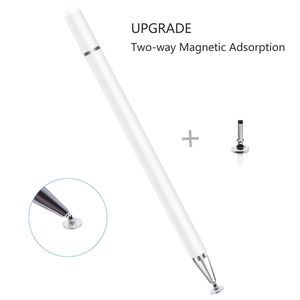
Description
【IMPORTANT INSTRUCTIONS】
1. Due to the materiel of the disc is conductive hard plastic, before using the stylus pen on your device, please make sure both the device screen and the disc are clean, dirt can catch onto the disc which may result in reduced sensitivity, and in some cases may even scratch your screen.
2. If you suspect that your disc has been damaged in any way, discontinue use. A damage disc may scratch the screen. Please replace with a new disc.
3. Please don't remove the clear plastic disc from the tip, or the tip won't work. Use it with the clear disc. There is no passive stylus tip as small as a pencil tip in this market.
4. When you use this pen for different Apps or devices, some of them need to switch to drawing mode or switch to hand writing mode. For example, when you use this pen in Apple Notes App, you will need to click the small pen writing icon, and then you can make drawing or writing.
【HOW TO CHANGE THE DISC TIP】
If you want to change the disc, please unscrew the silver cap. You will see the tip of the replaceable disc.
To replace the disc tip, please pull it out by holding the middle part of the small metal bar, then push a new disc tip into the stylus.
【COMPATIBILITY】
Compatible with all capacitive touchscreen smartphones, tablets, laptops, computers, kindles
Package Included:
1 x Stylus pen
2 x Replaceable disc tip
1. Due to the materiel of the disc is conductive hard plastic, before using the stylus pen on your device, please make sure both the device screen and the disc are clean, dirt can catch onto the disc which may result in reduced sensitivity, and in some cases may even scratch your screen.
2. If you suspect that your disc has been damaged in any way, discontinue use. A damage disc may scratch the screen. Please replace with a new disc.
3. Please don't remove the clear plastic disc from the tip, or the tip won't work. Use it with the clear disc. There is no passive stylus tip as small as a pencil tip in this market.
4. When you use this pen for different Apps or devices, some of them need to switch to drawing mode or switch to hand writing mode. For example, when you use this pen in Apple Notes App, you will need to click the small pen writing icon, and then you can make drawing or writing.
【HOW TO CHANGE THE DISC TIP】
If you want to change the disc, please unscrew the silver cap. You will see the tip of the replaceable disc.
To replace the disc tip, please pull it out by holding the middle part of the small metal bar, then push a new disc tip into the stylus.
【COMPATIBILITY】
Compatible with all capacitive touchscreen smartphones, tablets, laptops, computers, kindles
Package Included:
1 x Stylus pen
2 x Replaceable disc tip
Capacitive Stylus Pen for Touch Screens, High Sensitivity Pencil Magnetism Cover Cap for iPad Pro/iPad Mini/iPad Air/iPhone Series All Capacitive Touch Screens (White)
Current Price
$9.99
Average
$8.99
Min Price
$5.99
Max Price
$12.99
Price dynamics
10%
Description
【IMPORTANT INSTRUCTIONS】
1. Due to the materiel of the disc is conductive hard plastic, before using the stylus pen on your device, please make sure both the device screen and the disc are clean, dirt can catch onto the disc which may result in reduced sensitivity, and in some cases may even scratch your screen.
2. If you suspect that your disc has been damaged in any way, discontinue use. A damage disc may scratch the screen. Please replace with a new disc.
3. Please don't remove the clear plastic disc from the tip, or the tip won't work. Use it with the clear disc. There is no passive stylus tip as small as a pencil tip in this market.
4. When you use this pen for different Apps or devices, some of them need to switch to drawing mode or switch to hand writing mode. For example, when you use this pen in Apple Notes App, you will need to click the small pen writing icon, and then you can make drawing or writing.
【HOW TO CHANGE THE DISC TIP】
If you want to change the disc, please unscrew the silver cap. You will see the tip of the replaceable disc.
To replace the disc tip, please pull it out by holding the middle part of the small metal bar, then push a new disc tip into the stylus.
【COMPATIBILITY】
Compatible with all capacitive touchscreen smartphones, tablets, laptops, computers, kindles
Package Included:
1 x Stylus pen
2 x Replaceable disc tip
1. Due to the materiel of the disc is conductive hard plastic, before using the stylus pen on your device, please make sure both the device screen and the disc are clean, dirt can catch onto the disc which may result in reduced sensitivity, and in some cases may even scratch your screen.
2. If you suspect that your disc has been damaged in any way, discontinue use. A damage disc may scratch the screen. Please replace with a new disc.
3. Please don't remove the clear plastic disc from the tip, or the tip won't work. Use it with the clear disc. There is no passive stylus tip as small as a pencil tip in this market.
4. When you use this pen for different Apps or devices, some of them need to switch to drawing mode or switch to hand writing mode. For example, when you use this pen in Apple Notes App, you will need to click the small pen writing icon, and then you can make drawing or writing.
【HOW TO CHANGE THE DISC TIP】
If you want to change the disc, please unscrew the silver cap. You will see the tip of the replaceable disc.
To replace the disc tip, please pull it out by holding the middle part of the small metal bar, then push a new disc tip into the stylus.
【COMPATIBILITY】
Compatible with all capacitive touchscreen smartphones, tablets, laptops, computers, kindles
Package Included:
1 x Stylus pen
2 x Replaceable disc tip
Price will be lower
in next 2 weeks
in next 2 weeks
According to the data, price will be lower in next two weeks, so not waste your money and track better price!
Product review & video
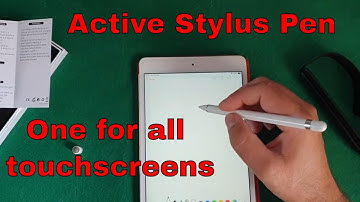
hello guys if you're following this channel for a long time you know that the one thing I miss the most from my note 4 is the s-pen I've recently got this iPad Mini 4 and I wanted to use something like this all the styles available are very very thick pointer so they're not really doing the job and I decided to go for this one active styles pen I'm going to link it in the description so let's try and connect it and see if it works as it's supposed to be and let's zoom using this little box here so I have this little twin once timespan two-in-one active style pen instruction it's suitable for most capacitive touchscreen devices and so on so on so on so I have the microUSB port for charging the power button and to have something on the language I don't understand here and something on the language I do understand so that's the model is the built in battery and all the information that you


Similar products


































