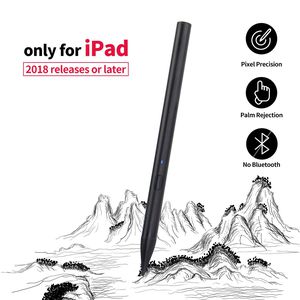
Description
Compatibility:
Design for the 2018 release or later, iPad Pro, iPad Air
iPad Air (3rd generation)【A2152 A2153 A2154 A2123】
iPad mini (5th generation)【A2124 A2125 A2126 A2133】
iPad 2018 (6th)【A1893 / A1954】
iPad Pro 12.9 inch (3rd) 【A1876/A2014/A1895/A1983】
iPad Pro 11-inch 【A1980/A2013/A1934/A1979】
Note:
All iPad models should be updated to IOS 12.2 or above.
Not work for iPhone, android, Microsoft devices, earlier versions of iPad(iPad Pro 12.9" (1st Gen and 2nd Gen), iPad Pro 9.7", iPad Pro 10.5").
NO Bluetooth connection needed, just press the button on the pen the LED will show blue, the pen is working mode.
Quick Guide:
1.Turn on
Press the button once to turn on the Pencil. Once the indicator light turns blue, the Pencil is active.
2.Turn off.
Press the button once to turn the Pencil off. The Pencil will also automatically turn itself off after 20 minutes of inactivity. Once the indicator light is off, the Pencil is off.
3.Charging.
The indicator will blink red when the battery is low. Connect the Micro USB cable to the charger port to charge the Pencil. The indicator will be red while charging, and turn blue when it is fully charged.
4.Replace the pen tip.
Unscrew the tip counter-clockwise to extract, and clockwise to secure.
Specification:
Size: (L)153mm (D)9.2mm
Tips: with 1.55mm superfine tip
Battery: 150mAh Li Battery
Charging cable:Micro USB cable
Charging Time : 30-60minutes
Charging specification:5V/1A
Using Time: work continuously about 12 hours
After Sales Service:
Support 100% refund or replacement within 30 days and provide 12-monthe quality warranty for all items.
Packaging List:
Colerare Pencil*1 Micro USB Cable*1 User Manual*1 Pen Tip*1
Design for the 2018 release or later, iPad Pro, iPad Air
iPad Air (3rd generation)【A2152 A2153 A2154 A2123】
iPad mini (5th generation)【A2124 A2125 A2126 A2133】
iPad 2018 (6th)【A1893 / A1954】
iPad Pro 12.9 inch (3rd) 【A1876/A2014/A1895/A1983】
iPad Pro 11-inch 【A1980/A2013/A1934/A1979】
Note:
All iPad models should be updated to IOS 12.2 or above.
Not work for iPhone, android, Microsoft devices, earlier versions of iPad(iPad Pro 12.9" (1st Gen and 2nd Gen), iPad Pro 9.7", iPad Pro 10.5").
NO Bluetooth connection needed, just press the button on the pen the LED will show blue, the pen is working mode.
Quick Guide:
1.Turn on
Press the button once to turn on the Pencil. Once the indicator light turns blue, the Pencil is active.
2.Turn off.
Press the button once to turn the Pencil off. The Pencil will also automatically turn itself off after 20 minutes of inactivity. Once the indicator light is off, the Pencil is off.
3.Charging.
The indicator will blink red when the battery is low. Connect the Micro USB cable to the charger port to charge the Pencil. The indicator will be red while charging, and turn blue when it is fully charged.
4.Replace the pen tip.
Unscrew the tip counter-clockwise to extract, and clockwise to secure.
Specification:
Size: (L)153mm (D)9.2mm
Tips: with 1.55mm superfine tip
Battery: 150mAh Li Battery
Charging cable:Micro USB cable
Charging Time : 30-60minutes
Charging specification:5V/1A
Using Time: work continuously about 12 hours
After Sales Service:
Support 100% refund or replacement within 30 days and provide 12-monthe quality warranty for all items.
Packaging List:
Colerare Pencil*1 Micro USB Cable*1 User Manual*1 Pen Tip*1
Colerare Stylus for Apple iPad Pencil Palm Rejection,Digital Pen for iPad Pro (3rd Gen), iPad (6th Gen), iPad Air (3rd Gen) and iPad Mini (5th Gen) 2018 Version or Later-Black
Current Price
$39.99
Average
$39.99
Min Price
$39.99
Max Price
$39.99
Description
Compatibility:
Design for the 2018 release or later, iPad Pro, iPad Air
iPad Air (3rd generation)【A2152 A2153 A2154 A2123】
iPad mini (5th generation)【A2124 A2125 A2126 A2133】
iPad 2018 (6th)【A1893 / A1954】
iPad Pro 12.9 inch (3rd) 【A1876/A2014/A1895/A1983】
iPad Pro 11-inch 【A1980/A2013/A1934/A1979】
Note:
All iPad models should be updated to IOS 12.2 or above.
Not work for iPhone, android, Microsoft devices, earlier versions of iPad(iPad Pro 12.9" (1st Gen and 2nd Gen), iPad Pro 9.7", iPad Pro 10.5").
NO Bluetooth connection needed, just press the button on the pen the LED will show blue, the pen is working mode.
Quick Guide:
1.Turn on
Press the button once to turn on the Pencil. Once the indicator light turns blue, the Pencil is active.
2.Turn off.
Press the button once to turn the Pencil off. The Pencil will also automatically turn itself off after 20 minutes of inactivity. Once the indicator light is off, the Pencil is off.
3.Charging.
The indicator will blink red when the battery is low. Connect the Micro USB cable to the charger port to charge the Pencil. The indicator will be red while charging, and turn blue when it is fully charged.
4.Replace the pen tip.
Unscrew the tip counter-clockwise to extract, and clockwise to secure.
Specification:
Size: (L)153mm (D)9.2mm
Tips: with 1.55mm superfine tip
Battery: 150mAh Li Battery
Charging cable:Micro USB cable
Charging Time : 30-60minutes
Charging specification:5V/1A
Using Time: work continuously about 12 hours
After Sales Service:
Support 100% refund or replacement within 30 days and provide 12-monthe quality warranty for all items.
Packaging List:
Colerare Pencil*1 Micro USB Cable*1 User Manual*1 Pen Tip*1
Design for the 2018 release or later, iPad Pro, iPad Air
iPad Air (3rd generation)【A2152 A2153 A2154 A2123】
iPad mini (5th generation)【A2124 A2125 A2126 A2133】
iPad 2018 (6th)【A1893 / A1954】
iPad Pro 12.9 inch (3rd) 【A1876/A2014/A1895/A1983】
iPad Pro 11-inch 【A1980/A2013/A1934/A1979】
Note:
All iPad models should be updated to IOS 12.2 or above.
Not work for iPhone, android, Microsoft devices, earlier versions of iPad(iPad Pro 12.9" (1st Gen and 2nd Gen), iPad Pro 9.7", iPad Pro 10.5").
NO Bluetooth connection needed, just press the button on the pen the LED will show blue, the pen is working mode.
Quick Guide:
1.Turn on
Press the button once to turn on the Pencil. Once the indicator light turns blue, the Pencil is active.
2.Turn off.
Press the button once to turn the Pencil off. The Pencil will also automatically turn itself off after 20 minutes of inactivity. Once the indicator light is off, the Pencil is off.
3.Charging.
The indicator will blink red when the battery is low. Connect the Micro USB cable to the charger port to charge the Pencil. The indicator will be red while charging, and turn blue when it is fully charged.
4.Replace the pen tip.
Unscrew the tip counter-clockwise to extract, and clockwise to secure.
Specification:
Size: (L)153mm (D)9.2mm
Tips: with 1.55mm superfine tip
Battery: 150mAh Li Battery
Charging cable:Micro USB cable
Charging Time : 30-60minutes
Charging specification:5V/1A
Using Time: work continuously about 12 hours
After Sales Service:
Support 100% refund or replacement within 30 days and provide 12-monthe quality warranty for all items.
Packaging List:
Colerare Pencil*1 Micro USB Cable*1 User Manual*1 Pen Tip*1
Price will be lower
in next 2 weeks
in next 2 weeks
According to the data, price will be lower in next two weeks, so not waste your money and track better price!
Product review & video
this video is brought to you by - lien one of my main men my big brother of sorts in this youtube tech community isaac AKA canoopsy sent me a text yesterday as I was slowly passing out while doing homework in a common area at my university and he said hey dude check this product out is pretty intriguing and I was like okay I clicked the link I saw what it was I saw the ratings and I saw the price and I immediately clicked by now and this thing shipped to me within 24 hours and arrived at my doorstep this morning and today we're gonna find out if this product the stylus pen super fine nib active capacitive sold on Amazon for about $40 USD $50 Canadian is in fact a good and effective and affordable Apple pencil alternative for iPad Mini iPad air iPad 10.2 and iPad pro 11 and 12 point 9 but before we get into this I really appreciate it if you leave a like on this video comment if you have


Similar products


































