Description
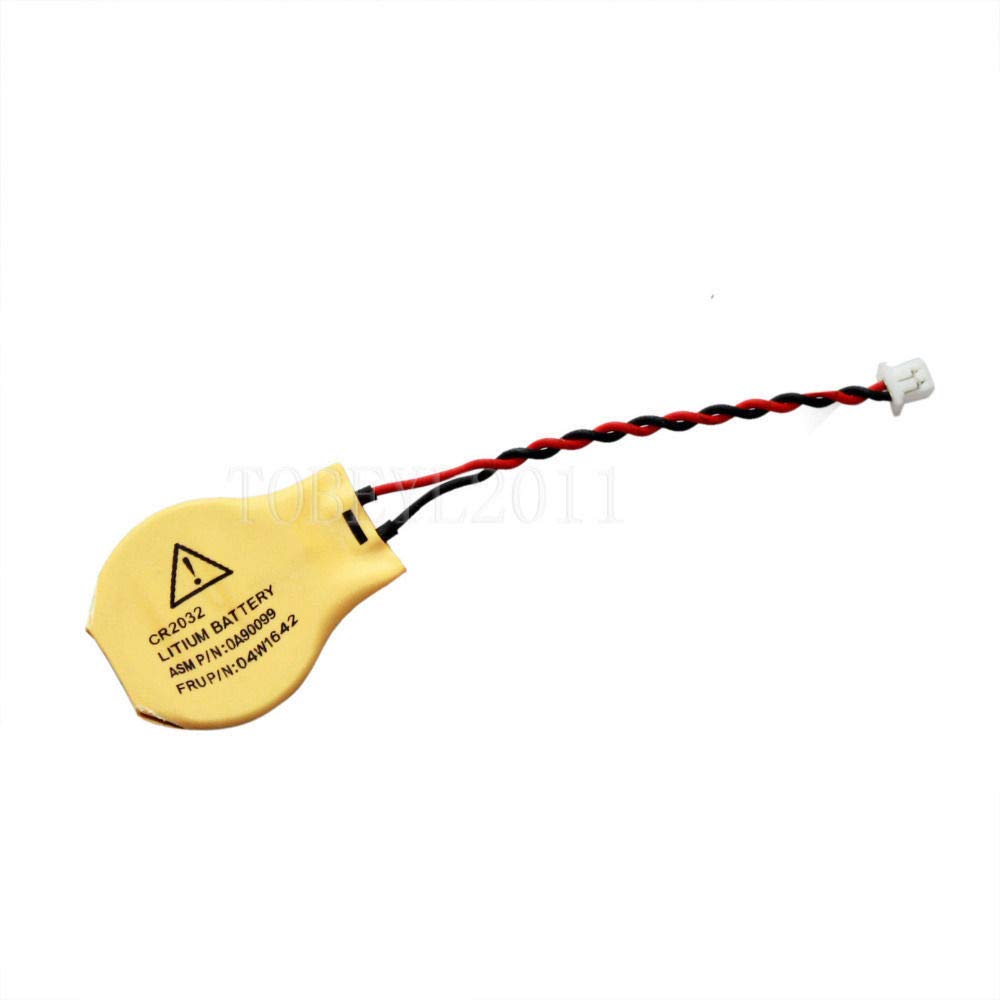
Attention! Please carefully check the last photo as these stated laptop models contain 2 pin batteries which can have two differently shaped/ sized connectors don't be misled by the part number - Even if your model matches one given on the title you need to be certain that the connector is identical to this or it may not fit due to revisions of the same models
Laptop BIOS CMOS battery100% new product 100% high-quality battery with a high capacity contents: 1 x CMOS Battery
Technical details:Socket type: 2pin version Cable length: 5cm Nominal voltage: 3V Nominal capacity: 220mAh Recommended continuous drain: 0.2mA Recommended pulse drain: 16mA Diameter: 20.0mm Height: 3.20mm Weight: 3.0g Low self-discharge rate and stable discharge voltage Wide working temperature range: -20 to 60°C
Please check all the specs and ensure this battery meets your devices' needs
Please be aware that even the same model laptops can have different parts so please be sure your laptop needs a 2 pin connector and not 3 pin
It may be suitable for many other models
I kept my terms short as possible, please read before purchasing!1. If the item MPN "Manufacturers part number " is stated, please confirm the compatibility! Buying by the model never guarantees compatibility! If you are unsure? Please contact before buying! Return cost for the wrong purchases will be at buyers expense. 2. Some item photos are for illustration purposes unless stated. 3. Unless listing states otherwise, used items come with 14 days warranty. ( Please check item specifics section for the actual warranty). 4. You can return the item in 14 days without a reason as long as you return it in th
Laptop BIOS CMOS battery
Technical details:
Please check all the specs and ensure this battery meets your devices' needs
Please be aware that even the same model laptops can have different parts so please be sure your laptop needs a 2 pin connector and not 3 pin
It may be suitable for many other models
I kept my terms short as possible, please read before purchasing!1. If the item MPN "Manufacturers part number " is stated, please confirm the compatibility! Buying by the model never guarantees compatibility! If you are unsure? Please contact before buying! Return cost for the wrong purchases will be at buyers expense. 2. Some item photos are for illustration purposes unless stated. 3. Unless listing states otherwise, used items come with 14 days warranty. ( Please check item specifics section for the actual warranty). 4. You can return the item in 14 days without a reason as long as you return it in th
Compatible for ASUS X5DAD, A45VS, S200E, X72V, X71, N55SF, X501A, S550CA BIOS CMOS Battery
Current Price
$6.25
Average
$6.25
Min Price
$6.25
Max Price
$6.25
Description
Attention! Please carefully check the last photo as these stated laptop models contain 2 pin batteries which can have two differently shaped/ sized connectors don't be misled by the part number - Even if your model matches one given on the title you need to be certain that the connector is identical to this or it may not fit due to revisions of the same models
Laptop BIOS CMOS battery100% new product 100% high-quality battery with a high capacity contents: 1 x CMOS Battery
Technical details:Socket type: 2pin version Cable length: 5cm Nominal voltage: 3V Nominal capacity: 220mAh Recommended continuous drain: 0.2mA Recommended pulse drain: 16mA Diameter: 20.0mm Height: 3.20mm Weight: 3.0g Low self-discharge rate and stable discharge voltage Wide working temperature range: -20 to 60°C
Please check all the specs and ensure this battery meets your devices' needs
Please be aware that even the same model laptops can have different parts so please be sure your laptop needs a 2 pin connector and not 3 pin
It may be suitable for many other models
I kept my terms short as possible, please read before purchasing!1. If the item MPN "Manufacturers part number " is stated, please confirm the compatibility! Buying by the model never guarantees compatibility! If you are unsure? Please contact before buying! Return cost for the wrong purchases will be at buyers expense. 2. Some item photos are for illustration purposes unless stated. 3. Unless listing states otherwise, used items come with 14 days warranty. ( Please check item specifics section for the actual warranty). 4. You can return the item in 14 days without a reason as long as you return it in th
Laptop BIOS CMOS battery
Technical details:
Please check all the specs and ensure this battery meets your devices' needs
Please be aware that even the same model laptops can have different parts so please be sure your laptop needs a 2 pin connector and not 3 pin
It may be suitable for many other models
I kept my terms short as possible, please read before purchasing!1. If the item MPN "Manufacturers part number " is stated, please confirm the compatibility! Buying by the model never guarantees compatibility! If you are unsure? Please contact before buying! Return cost for the wrong purchases will be at buyers expense. 2. Some item photos are for illustration purposes unless stated. 3. Unless listing states otherwise, used items come with 14 days warranty. ( Please check item specifics section for the actual warranty). 4. You can return the item in 14 days without a reason as long as you return it in th
Price will be lower
in next 2 weeks
in next 2 weeks
According to the data, price will be lower in next two weeks, so not waste your money and track better price!
Product review & video
hey guys this is Jamin with pc monkey we're bringing you another do-it-yourself computer video today we're working on an ace sous laptop that's not turning on freezing or turning on and then turning off now a BIOS reset procedure is not the easiest do-it-yourself project because we will be accessing the inside of the computer and we will be working off of the motherboard so if your computer showing these symptoms if you haven't already try out our laptop no power freezes turns on then off video first go into the description it'll be video number 1 that's a less invasive easier cheaper fix that you should try first before moving on to this if that doesn't work so again if you haven't tried that yet stop the video try that first if you've already been there and you've come here then we'll proceed with the BIOS reset tutorial now in order to perform a BIOS reset you have to remove the CMOS



Similar products