- HomeElectronicsAccessories & SuppliesAudio & Video AccessoriesCables & InterconnectsVideo CablesHDMI Cables
Description
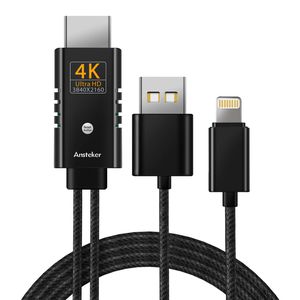
Ansteker Compatible with iPad iPhone to HDMI Cable, Mirror the Screen for your iOS Device onto a Bigger Screen
How to Use:
1. Connect the male HDMI to your HDMI-equipped device.
2. Connect the USB connector&lightning connector to power supply up to 5V(Better 2A) and your device.
3. Click "trust" on your device and wait about 5-10 secs them it will sync successfully.
Features:
-- Support audio/video/picture in the Phone&Pad convert into HD digital signal to all devices with HDMI ports.
-- Support all formats of audio, video and picture.
-- Support iOS 12, if your iPhone system is iOS 13 and above, you need to connect personal hot spot (MAY COST) to upgrade this HDMI cable. Please contact us to ask for the upgrade file to upgrade and then get it work.
-- Resolution: 480p, 720p, 1080p.
Compatible with iOS 8.0 above Devices:
-- Compatible with iPhone 11/ 11 Pro/11 Pro Max/XS Max/XS/X/8/8 plus/7/7 plus/6s/6s plus/6/6 plus/5s/SE/5/5c.
-- Compatible with iPad mini 2/mini 3/mini 4/Air 2/ Air 3/ Air 4/Pad Pro.
-- Compatible with iPod Touch 5th/6th Generation.
Notes:
-- Please make sure to plug the USB into power supply before using this HDMI adapter cable.
-- If the digital av adapter get hot while in use, it is normal. Please take a rest after a long time use.
-- The digital AV to HDMI adapter cord is not designed to charge iPhone, iPad or iPod touch.
-- If this HDMI connector cable can not work, make sure that your cellphone port is good and clean enough.
-- Please note that this cord does Not supports CBS, Netflix, hulu, Directv, Amazon video and other paid Apps.
-- Please select the correct HDMI port on the TV or port (Choose HDMI 1 or HDMI 2 to try), The TV mode should NOT be PC mode while using.
-- Please choose the right adapter, 5V/1A for iPhone, 5V/2A+ for iPad. The iPhone / iPad original adapters
How to Use:
1. Connect the male HDMI to your HDMI-equipped device.
2. Connect the USB connector&lightning connector to power supply up to 5V(Better 2A) and your device.
3. Click "trust" on your device and wait about 5-10 secs them it will sync successfully.
Features:
-- Support audio/video/picture in the Phone&Pad convert into HD digital signal to all devices with HDMI ports.
-- Support all formats of audio, video and picture.
-- Support iOS 12, if your iPhone system is iOS 13 and above, you need to connect personal hot spot (MAY COST) to upgrade this HDMI cable. Please contact us to ask for the upgrade file to upgrade and then get it work.
-- Resolution: 480p, 720p, 1080p.
Compatible with iOS 8.0 above Devices:
-- Compatible with iPhone 11/ 11 Pro/11 Pro Max/XS Max/XS/X/8/8 plus/7/7 plus/6s/6s plus/6/6 plus/5s/SE/5/5c.
-- Compatible with iPad mini 2/mini 3/mini 4/Air 2/ Air 3/ Air 4/Pad Pro.
-- Compatible with iPod Touch 5th/6th Generation.
Notes:
-- Please make sure to plug the USB into power supply before using this HDMI adapter cable.
-- If the digital av adapter get hot while in use, it is normal. Please take a rest after a long time use.
-- The digital AV to HDMI adapter cord is not designed to charge iPhone, iPad or iPod touch.
-- If this HDMI connector cable can not work, make sure that your cellphone port is good and clean enough.
-- Please note that this cord does Not supports CBS, Netflix, hulu, Directv, Amazon video and other paid Apps.
-- Please select the correct HDMI port on the TV or port (Choose HDMI 1 or HDMI 2 to try), The TV mode should NOT be PC mode while using.
-- Please choose the right adapter, 5V/1A for iPhone, 5V/2A+ for iPad. The iPhone / iPad original adapters
Compatible with iPad iPhone to HDMI Cable Adapter, Ansteker 4K 6.0ft HDMI Cord Digital AV HDMI Converter Cable to HDTV,Projector Monitor
Price is below average
Current Price
$18.99
Average
$19.64
Min Price
$0.11
Max Price
$59.99
Price dynamics
3%
Description
Ansteker Compatible with iPad iPhone to HDMI Cable, Mirror the Screen for your iOS Device onto a Bigger Screen
How to Use:
1. Connect the male HDMI to your HDMI-equipped device.
2. Connect the USB connector&lightning connector to power supply up to 5V(Better 2A) and your device.
3. Click "trust" on your device and wait about 5-10 secs them it will sync successfully.
Features:
-- Support audio/video/picture in the Phone&Pad convert into HD digital signal to all devices with HDMI ports.
-- Support all formats of audio, video and picture.
-- Support iOS 12, if your iPhone system is iOS 13 and above, you need to connect personal hot spot (MAY COST) to upgrade this HDMI cable. Please contact us to ask for the upgrade file to upgrade and then get it work.
-- Resolution: 480p, 720p, 1080p.
Compatible with iOS 8.0 above Devices:
-- Compatible with iPhone 11/ 11 Pro/11 Pro Max/XS Max/XS/X/8/8 plus/7/7 plus/6s/6s plus/6/6 plus/5s/SE/5/5c.
-- Compatible with iPad mini 2/mini 3/mini 4/Air 2/ Air 3/ Air 4/Pad Pro.
-- Compatible with iPod Touch 5th/6th Generation.
Notes:
-- Please make sure to plug the USB into power supply before using this HDMI adapter cable.
-- If the digital av adapter get hot while in use, it is normal. Please take a rest after a long time use.
-- The digital AV to HDMI adapter cord is not designed to charge iPhone, iPad or iPod touch.
-- If this HDMI connector cable can not work, make sure that your cellphone port is good and clean enough.
-- Please note that this cord does Not supports CBS, Netflix, hulu, Directv, Amazon video and other paid Apps.
-- Please select the correct HDMI port on the TV or port (Choose HDMI 1 or HDMI 2 to try), The TV mode should NOT be PC mode while using.
-- Please choose the right adapter, 5V/1A for iPhone, 5V/2A+ for iPad. The iPhone / iPad original adapters
How to Use:
1. Connect the male HDMI to your HDMI-equipped device.
2. Connect the USB connector&lightning connector to power supply up to 5V(Better 2A) and your device.
3. Click "trust" on your device and wait about 5-10 secs them it will sync successfully.
Features:
-- Support audio/video/picture in the Phone&Pad convert into HD digital signal to all devices with HDMI ports.
-- Support all formats of audio, video and picture.
-- Support iOS 12, if your iPhone system is iOS 13 and above, you need to connect personal hot spot (MAY COST) to upgrade this HDMI cable. Please contact us to ask for the upgrade file to upgrade and then get it work.
-- Resolution: 480p, 720p, 1080p.
Compatible with iOS 8.0 above Devices:
-- Compatible with iPhone 11/ 11 Pro/11 Pro Max/XS Max/XS/X/8/8 plus/7/7 plus/6s/6s plus/6/6 plus/5s/SE/5/5c.
-- Compatible with iPad mini 2/mini 3/mini 4/Air 2/ Air 3/ Air 4/Pad Pro.
-- Compatible with iPod Touch 5th/6th Generation.
Notes:
-- Please make sure to plug the USB into power supply before using this HDMI adapter cable.
-- If the digital av adapter get hot while in use, it is normal. Please take a rest after a long time use.
-- The digital AV to HDMI adapter cord is not designed to charge iPhone, iPad or iPod touch.
-- If this HDMI connector cable can not work, make sure that your cellphone port is good and clean enough.
-- Please note that this cord does Not supports CBS, Netflix, hulu, Directv, Amazon video and other paid Apps.
-- Please select the correct HDMI port on the TV or port (Choose HDMI 1 or HDMI 2 to try), The TV mode should NOT be PC mode while using.
-- Please choose the right adapter, 5V/1A for iPhone, 5V/2A+ for iPad. The iPhone / iPad original adapters
Price will be lower
in next 2 weeks
in next 2 weeks
According to the data, price will be lower in next two weeks, so not waste your money and track better price!

Similar products






































