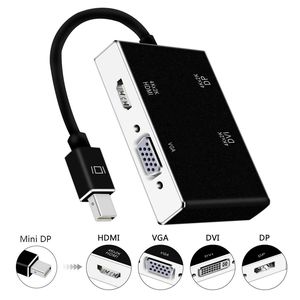
4 in 1 Mini DisplayPort (Thunderbolt) to DVI DP VGA HDMI Adapter
Product Specification:
Input Signal: Mini Display Port 1.1a
Output Video: HDMI/DVI/VGA/DP
Input: Mini DisplayPort and Thunderbolt port(NOT THUNDERBOLT 2/3)
Output: HDMI Female Type A 19pin
Connector: DVI Female (24+1) VGA Female 15Pin
Vertical Frequency Range:50/60Hz
Video Amplifier Bandwidth:2.25Gbps/225MHz
HDMI/DVI/VGA/DP:480i/480p,576p,720p,1080i/1080p
External Power Supply: No external power needed
Power consumption (Max):700mW
The Length of the cable:28cm
Package weight:1.9 oz/54g
How to use: The product is easily and conveniently use, with three output ports: DVI VGA HDMI DP and a Mini Display Port. And you can use one of them at a time as your demand, when you want to use the DVI output; you just need to connect the DVI devices by a DVI cable. And when you want to use the HDMI/DP output, you just need to connect the HDMI/DP devices by a HDMI/DP cable. When you want to use the VGA output, you just need to connect the VGA devices by a VGA cable. And, the Mini Display Port needs to connect with Mac Book, Mac Book Pro, or Mac Book Air
Note:
Please make sure if your Mac has one of the following two kinds of port: mini DP port and Thunderbolt port
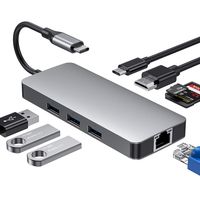
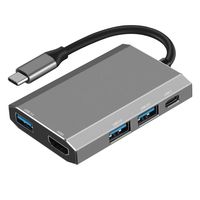
USB Type-C Hub to HDMI DVI VGA USB Adapter, 4K X 2K HDMI and DVI Converter Thunderbolt 4 in 1 Compatible MacBook Pro 2017 2016,Google Chromebook Pixel (Black)
4 in 1 Mini DisplayPort (Thunderbolt) to DVI DP VGA HDMI Adapter
Product Specification:
Input Signal: Mini Display Port 1.1a
Output Video: HDMI/DVI/VGA/DP
Input: Mini DisplayPort and Thunderbolt port(NOT THUNDERBOLT 2/3)
Output: HDMI Female Type A 19pin
Connector: DVI Female (24+1) VGA Female 15Pin
Vertical Frequency Range:50/60Hz
Video Amplifier Bandwidth:2.25Gbps/225MHz
HDMI/DVI/VGA/DP:480i/480p,576p,720p,1080i/1080p
External Power Supply: No external power needed
Power consumption (Max):700mW
The Length of the cable:28cm
Package weight:1.9 oz/54g
How to use: The product is easily and conveniently use, with three output ports: DVI VGA HDMI DP and a Mini Display Port. And you can use one of them at a time as your demand, when you want to use the DVI output; you just need to connect the DVI devices by a DVI cable. And when you want to use the HDMI/DP output, you just need to connect the HDMI/DP devices by a HDMI/DP cable. When you want to use the VGA output, you just need to connect the VGA devices by a VGA cable. And, the Mini Display Port needs to connect with Mac Book, Mac Book Pro, or Mac Book Air
Note:
Please make sure if your Mac has one of the following two kinds of port: mini DP port and Thunderbolt port
in next 2 weeks