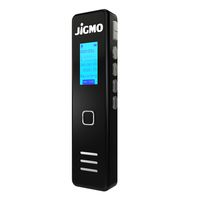
Description
Recording/Save Recording
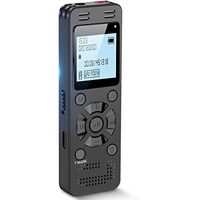
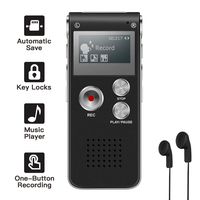
Long press recording button→Red light is turning on→Red light flashed 3 times→Red light is turning off→Voice activated recording.(Attention: The item only records sounds larger than 45DB, and the file will be automatically saved every 2 hours.) Long press recording button → Red light flash 1 time →Save recording files
Check the recording function: Press the recording button once when it is recording, if the red light flashes one time which means it is normal.
Mobile power
This product is equipped with a mobile power function that can be used to charge mobile phones or other digital products.
When the mobile power is fully charged, the mobile phone can be charged about 1-2 times, which is subject to actual use.
Charging
Please plug one end of the standard USB cable to the product's usb port, another end plug to computer or other USB port adaptor, in general, 10 hours can be fully charged, when it is charging, the Blue light indicator will flash and the red light will long bright. When it is full charged,, the four blue light and the red light will long bright.
Please attention: When the battery power is low, the recroding function can't be turned on, please charge the product before use.
Connect Computer
It can transfer file with computer by USB cable, if you want to copy the music file, please copy the music file to MUSIC folder. Android-OTG Function
When the item is off, you can transfer files with your Android phone directly by the OTG data cable (Attention: Your Android phone must support OTG function, otherwise it can be recognized, or it can't support IOS system.
Synchronous system time
It will show a System time synchronization exe when you connect it with your computer
Double click the SetTime.exe, the item will Synchronize Windows computer time, and it will be used to name your recording file.
Long press recording button→Red light is turning on→Red light flashed 3 times→Red light is turning off→Voice activated recording.(Attention: The item only records sounds larger than 45DB, and the file will be automatically saved every 2 hours.) Long press recording button → Red light flash 1 time →Save recording files
Check the recording function: Press the recording button once when it is recording, if the red light flashes one time which means it is normal.
Mobile power
This product is equipped with a mobile power function that can be used to charge mobile phones or other digital products.
When the mobile power is fully charged, the mobile phone can be charged about 1-2 times, which is subject to actual use.
Charging
Please plug one end of the standard USB cable to the product's usb port, another end plug to computer or other USB port adaptor, in general, 10 hours can be fully charged, when it is charging, the Blue light indicator will flash and the red light will long bright. When it is full charged,, the four blue light and the red light will long bright.
Please attention: When the battery power is low, the recroding function can't be turned on, please charge the product before use.
Connect Computer
It can transfer file with computer by USB cable, if you want to copy the music file, please copy the music file to MUSIC folder. Android-OTG Function
When the item is off, you can transfer files with your Android phone directly by the OTG data cable (Attention: Your Android phone must support OTG function, otherwise it can be recognized, or it can't support IOS system.
Synchronous system time
It will show a System time synchronization exe when you connect it with your computer
Double click the SetTime.exe, the item will Synchronize Windows computer time, and it will be used to name your recording file.
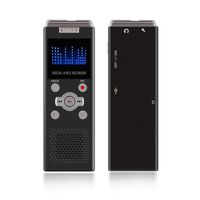
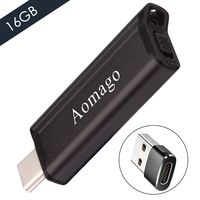
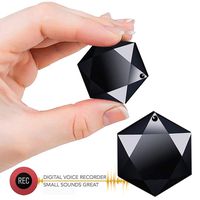
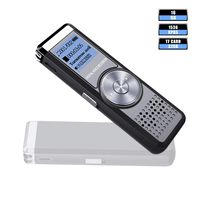
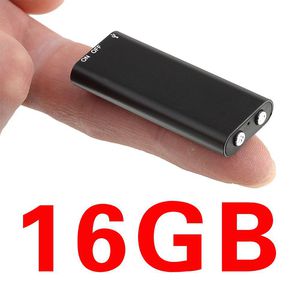
Digital Voice Recorder Mini Voice Recorder with 16GB USB Flash Drive/170 Hours Recording Capacity Small Audio Dictaphone for Meetings and Transfer Files ...
Current Price
$23.99
Average
$22.43
Min Price
$18.98
Max Price
$25.99
Price dynamics
7%
Description
Recording/Save Recording
Long press recording button→Red light is turning on→Red light flashed 3 times→Red light is turning off→Voice activated recording.(Attention: The item only records sounds larger than 45DB, and the file will be automatically saved every 2 hours.) Long press recording button → Red light flash 1 time →Save recording files
Check the recording function: Press the recording button once when it is recording, if the red light flashes one time which means it is normal.
Mobile power
This product is equipped with a mobile power function that can be used to charge mobile phones or other digital products.
When the mobile power is fully charged, the mobile phone can be charged about 1-2 times, which is subject to actual use.
Charging
Please plug one end of the standard USB cable to the product's usb port, another end plug to computer or other USB port adaptor, in general, 10 hours can be fully charged, when it is charging, the Blue light indicator will flash and the red light will long bright. When it is full charged,, the four blue light and the red light will long bright.
Please attention: When the battery power is low, the recroding function can't be turned on, please charge the product before use.
Connect Computer
It can transfer file with computer by USB cable, if you want to copy the music file, please copy the music file to MUSIC folder. Android-OTG Function
When the item is off, you can transfer files with your Android phone directly by the OTG data cable (Attention: Your Android phone must support OTG function, otherwise it can be recognized, or it can't support IOS system.
Synchronous system time
It will show a System time synchronization exe when you connect it with your computer
Double click the SetTime.exe, the item will Synchronize Windows computer time, and it will be used to name your recording file.
Long press recording button→Red light is turning on→Red light flashed 3 times→Red light is turning off→Voice activated recording.(Attention: The item only records sounds larger than 45DB, and the file will be automatically saved every 2 hours.) Long press recording button → Red light flash 1 time →Save recording files
Check the recording function: Press the recording button once when it is recording, if the red light flashes one time which means it is normal.
Mobile power
This product is equipped with a mobile power function that can be used to charge mobile phones or other digital products.
When the mobile power is fully charged, the mobile phone can be charged about 1-2 times, which is subject to actual use.
Charging
Please plug one end of the standard USB cable to the product's usb port, another end plug to computer or other USB port adaptor, in general, 10 hours can be fully charged, when it is charging, the Blue light indicator will flash and the red light will long bright. When it is full charged,, the four blue light and the red light will long bright.
Please attention: When the battery power is low, the recroding function can't be turned on, please charge the product before use.
Connect Computer
It can transfer file with computer by USB cable, if you want to copy the music file, please copy the music file to MUSIC folder. Android-OTG Function
When the item is off, you can transfer files with your Android phone directly by the OTG data cable (Attention: Your Android phone must support OTG function, otherwise it can be recognized, or it can't support IOS system.
Synchronous system time
It will show a System time synchronization exe when you connect it with your computer
Double click the SetTime.exe, the item will Synchronize Windows computer time, and it will be used to name your recording file.
Price will be lower
in next 2 weeks
in next 2 weeks
According to the data, price will be lower in next two weeks, so not waste your money and track better price!
Product review & video
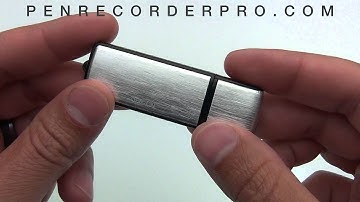
this is a close look at the USB flash drive with built-in digital voice recorder if you've done some research you may have seen other flash drives that look identical to this one however we have upgraded two things on this first of all we have upgraded the battery life as well as the recording quality typically most units out on the market you'll see a four hour battery but we have put a 15 hour battery in this unit also as far as the audio quality you will get a CD quality type sound out of this recorder it's encoded at 192 whereas other flash drive recorders you'll see that look like this are only encoded at 32 so you're going to get a little bit scratchier sound out of some of those other models where this is going to be a little bit more crisp and clear the voice recording function on this is really easy to use there's a little switch here on the side just slide it into the on posit