Description
DURAGADGET's new capacitive touchscreen stylus pen, specially designed for use with all touchscreen tablets and smartphone devices, allowing you the freedom to create amazingly precise pictures in apps like Art Set and Draw Something!
This fantastic product makes creating art on your device feel just like the real thing, eliminating frustrating errors caused by using your fingers and leaving you free to enjoy the creative process. Our stylus is also ideal for those who just want to preserve a clean screen, free of annoying smudgy fingerprints.
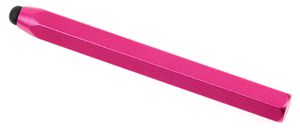
Featuring a funky 'crayon' design, the stylus has a solid slimline construction, soft rubber tip to protect your screen from scratches, and an ergonomic hexagonal shape to aid grip.
Ideal for drawing apps as well as apps that require precision such as: Draw Something, Art Set, Adobe Ideas, iDraw, iMockups, SketchBook Ink, Brushes App, Drawing Pad, LiveSketch HD, SketchyPad, SketchPad HD, Mindnode, Freeform, Autodesk SketchBook Mobile, TypeDrawing, PhotoPad, Filterstorm, Omnigraffle, Omnigraph Sketcher, Penultimate, Moodboard Pro, HelvetiNote, Layers Pro, Artist's Touch, ArtRage, Masque, Draw for iPad, SketchBook Express, Art Studio, Procreate, Auryn Ink, Brushes, Zen Brush, Inspire Pro, Sudoku Tablet, Sushi Tycoon, Paper by Fiftythree or even just to improve precision in Angry Birds (we really could go on..).
This fantastic product makes creating art on your device feel just like the real thing, eliminating frustrating errors caused by using your fingers and leaving you free to enjoy the creative process. Our stylus is also ideal for those who just want to preserve a clean screen, free of annoying smudgy fingerprints.
Featuring a funky 'crayon' design, the stylus has a solid slimline construction, soft rubber tip to protect your screen from scratches, and an ergonomic hexagonal shape to aid grip.
Ideal for drawing apps as well as apps that require precision such as: Draw Something, Art Set, Adobe Ideas, iDraw, iMockups, SketchBook Ink, Brushes App, Drawing Pad, LiveSketch HD, SketchyPad, SketchPad HD, Mindnode, Freeform, Autodesk SketchBook Mobile, TypeDrawing, PhotoPad, Filterstorm, Omnigraffle, Omnigraph Sketcher, Penultimate, Moodboard Pro, HelvetiNote, Layers Pro, Artist's Touch, ArtRage, Masque, Draw for iPad, SketchBook Express, Art Studio, Procreate, Auryn Ink, Brushes, Zen Brush, Inspire Pro, Sudoku Tablet, Sushi Tycoon, Paper by Fiftythree or even just to improve precision in Angry Birds (we really could go on..).
DURAGADGET Pink Chunky Stylus w/Rubber Tip - Suitable for Use with Microsoft Surface Tablet & Surface Pro 10.6-Inch Tab
Current Price
$14.99
Average
$12.28
Min Price
$9.99
Max Price
$19.99
Price dynamics
18%
Description
DURAGADGET's new capacitive touchscreen stylus pen, specially designed for use with all touchscreen tablets and smartphone devices, allowing you the freedom to create amazingly precise pictures in apps like Art Set and Draw Something!
This fantastic product makes creating art on your device feel just like the real thing, eliminating frustrating errors caused by using your fingers and leaving you free to enjoy the creative process. Our stylus is also ideal for those who just want to preserve a clean screen, free of annoying smudgy fingerprints.
Featuring a funky 'crayon' design, the stylus has a solid slimline construction, soft rubber tip to protect your screen from scratches, and an ergonomic hexagonal shape to aid grip.
Ideal for drawing apps as well as apps that require precision such as: Draw Something, Art Set, Adobe Ideas, iDraw, iMockups, SketchBook Ink, Brushes App, Drawing Pad, LiveSketch HD, SketchyPad, SketchPad HD, Mindnode, Freeform, Autodesk SketchBook Mobile, TypeDrawing, PhotoPad, Filterstorm, Omnigraffle, Omnigraph Sketcher, Penultimate, Moodboard Pro, HelvetiNote, Layers Pro, Artist's Touch, ArtRage, Masque, Draw for iPad, SketchBook Express, Art Studio, Procreate, Auryn Ink, Brushes, Zen Brush, Inspire Pro, Sudoku Tablet, Sushi Tycoon, Paper by Fiftythree or even just to improve precision in Angry Birds (we really could go on..).
This fantastic product makes creating art on your device feel just like the real thing, eliminating frustrating errors caused by using your fingers and leaving you free to enjoy the creative process. Our stylus is also ideal for those who just want to preserve a clean screen, free of annoying smudgy fingerprints.
Featuring a funky 'crayon' design, the stylus has a solid slimline construction, soft rubber tip to protect your screen from scratches, and an ergonomic hexagonal shape to aid grip.
Ideal for drawing apps as well as apps that require precision such as: Draw Something, Art Set, Adobe Ideas, iDraw, iMockups, SketchBook Ink, Brushes App, Drawing Pad, LiveSketch HD, SketchyPad, SketchPad HD, Mindnode, Freeform, Autodesk SketchBook Mobile, TypeDrawing, PhotoPad, Filterstorm, Omnigraffle, Omnigraph Sketcher, Penultimate, Moodboard Pro, HelvetiNote, Layers Pro, Artist's Touch, ArtRage, Masque, Draw for iPad, SketchBook Express, Art Studio, Procreate, Auryn Ink, Brushes, Zen Brush, Inspire Pro, Sudoku Tablet, Sushi Tycoon, Paper by Fiftythree or even just to improve precision in Angry Birds (we really could go on..).
Price will be lower
in next 2 weeks
in next 2 weeks
According to the data, price will be lower in next two weeks, so not waste your money and track better price!
Product review & video
i have a digital pen problem there i've set it ever since i got the surface pro 4 i've been on the lookout for alternatives to the surface pen i really like the surface pro 3 pen since i'm a note taker not an artist i really don't care about things like tilt sensitivity or latency what matters to me is the feel on the screen the noise of the pen and the functions like the eraser and the lasso select the surface pro 3 pen had two buttons on the side one for erasing and the other for right clicking or lassoing content depending on the app that you're in when the pro 4 came out with a new pen it had an eraser on the back and it was a great pen with a magnetic attachment four times the battery life 12 months up from three months and a new pen tip system but i actually missed the surface pro 3 pen a little people love the eraser on the back of the current surface pen it was actually a stroke



Similar products


































