Description
Features:
Designed for all Apple iMac Macbooks Powerbook G4 Mini with Mini DVI connector (Does not fit new 2009 Unibody Mackbooks, 2009 Mac Mini)
Perfect for connecting your Mini DVI source devices to HDMI Monitors, A/V Receivers, and HDTV. Supports all HDMI/ Mini DVI Devices
Please note there are no audio signals on the Mini-DVI connector. You'll have to run a separate audio cable from the iMac's audio output to the TV
Please note only digital video is carried over DVI interface.
Audio will not be pass to HDMI
Transfer Bandwidth: From 165MHz(4.95Gbps) to 340MHz(10.2Gbps)
Cable Type: Triple
Shielding Signal Type: Transition Minimized Differential
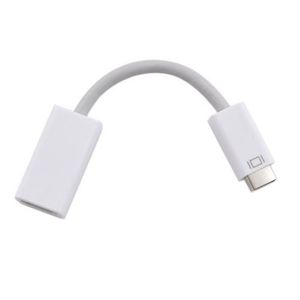
Signaling (TMDS) Connector Type: Mini DVI Male to HDMI Female
Compatible:
MacBook (13-inch, Mid 2009)
MacBook (13-inch, Early 2009)
MacBook (13-inch, Late 2008)
MacBook (13-inch, Early 2008)
MacBook (13-inch, Late 2007)
MacBook (13-inch, Mid 2007)
MacBook (13-inch, Late 2006)
MacBook (13-inch)
PowerBook G4 (12-inch DVI)
Mac mini (Late 2009)
Mac mini (Early 2009)
iMac (Early 2008)
iMac (Mid 2007)
iMac (Late 2006)
iMac (Early 2006)
Note:
Before ordering it, please check whether your computer includes mini DVI port.
Designed for all Apple iMac Macbooks Powerbook G4 Mini with Mini DVI connector (Does not fit new 2009 Unibody Mackbooks, 2009 Mac Mini)
Perfect for connecting your Mini DVI source devices to HDMI Monitors, A/V Receivers, and HDTV. Supports all HDMI/ Mini DVI Devices
Please note there are no audio signals on the Mini-DVI connector. You'll have to run a separate audio cable from the iMac's audio output to the TV
Please note only digital video is carried over DVI interface.
Audio will not be pass to HDMI
Transfer Bandwidth: From 165MHz(4.95Gbps) to 340MHz(10.2Gbps)
Cable Type: Triple
Shielding Signal Type: Transition Minimized Differential
Signaling (TMDS) Connector Type: Mini DVI Male to HDMI Female
Compatible:
MacBook (13-inch, Mid 2009)
MacBook (13-inch, Early 2009)
MacBook (13-inch, Late 2008)
MacBook (13-inch, Early 2008)
MacBook (13-inch, Late 2007)
MacBook (13-inch, Mid 2007)
MacBook (13-inch, Late 2006)
MacBook (13-inch)
PowerBook G4 (12-inch DVI)
Mac mini (Late 2009)
Mac mini (Early 2009)
iMac (Early 2008)
iMac (Mid 2007)
iMac (Late 2006)
iMac (Early 2006)
Note:
Before ordering it, please check whether your computer includes mini DVI port.
Ebest Mini DVI Male to HDMI Female Video Adapter Cable for Apple MacBook, iMac,12-inch PowerBook G4
Current Price
$7.27
Average
$3.93
Min Price
$0.09
Max Price
$22.3
Price dynamics
46%
Description
Features:
Designed for all Apple iMac Macbooks Powerbook G4 Mini with Mini DVI connector (Does not fit new 2009 Unibody Mackbooks, 2009 Mac Mini)
Perfect for connecting your Mini DVI source devices to HDMI Monitors, A/V Receivers, and HDTV. Supports all HDMI/ Mini DVI Devices
Please note there are no audio signals on the Mini-DVI connector. You'll have to run a separate audio cable from the iMac's audio output to the TV
Please note only digital video is carried over DVI interface.
Audio will not be pass to HDMI
Transfer Bandwidth: From 165MHz(4.95Gbps) to 340MHz(10.2Gbps)
Cable Type: Triple
Shielding Signal Type: Transition Minimized Differential
Signaling (TMDS) Connector Type: Mini DVI Male to HDMI Female
Compatible:
MacBook (13-inch, Mid 2009)
MacBook (13-inch, Early 2009)
MacBook (13-inch, Late 2008)
MacBook (13-inch, Early 2008)
MacBook (13-inch, Late 2007)
MacBook (13-inch, Mid 2007)
MacBook (13-inch, Late 2006)
MacBook (13-inch)
PowerBook G4 (12-inch DVI)
Mac mini (Late 2009)
Mac mini (Early 2009)
iMac (Early 2008)
iMac (Mid 2007)
iMac (Late 2006)
iMac (Early 2006)
Note:
Before ordering it, please check whether your computer includes mini DVI port.
Designed for all Apple iMac Macbooks Powerbook G4 Mini with Mini DVI connector (Does not fit new 2009 Unibody Mackbooks, 2009 Mac Mini)
Perfect for connecting your Mini DVI source devices to HDMI Monitors, A/V Receivers, and HDTV. Supports all HDMI/ Mini DVI Devices
Please note there are no audio signals on the Mini-DVI connector. You'll have to run a separate audio cable from the iMac's audio output to the TV
Please note only digital video is carried over DVI interface.
Audio will not be pass to HDMI
Transfer Bandwidth: From 165MHz(4.95Gbps) to 340MHz(10.2Gbps)
Cable Type: Triple
Shielding Signal Type: Transition Minimized Differential
Signaling (TMDS) Connector Type: Mini DVI Male to HDMI Female
Compatible:
MacBook (13-inch, Mid 2009)
MacBook (13-inch, Early 2009)
MacBook (13-inch, Late 2008)
MacBook (13-inch, Early 2008)
MacBook (13-inch, Late 2007)
MacBook (13-inch, Mid 2007)
MacBook (13-inch, Late 2006)
MacBook (13-inch)
PowerBook G4 (12-inch DVI)
Mac mini (Late 2009)
Mac mini (Early 2009)
iMac (Early 2008)
iMac (Mid 2007)
iMac (Late 2006)
iMac (Early 2006)
Note:
Before ordering it, please check whether your computer includes mini DVI port.
Price will be lower
in next 2 weeks
in next 2 weeks
According to the data, price will be lower in next two weeks, so not waste your money and track better price!
Product review & video
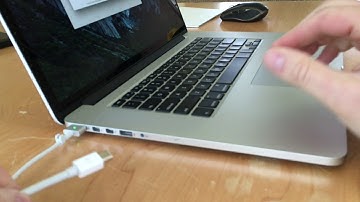
hi-tec 128 here today I want to show you how to connect a MacBook Pro to an external display or monitor now I have here a 15-inch MacBook Pro retina this is a mid 2015 model and the way you would connect your macbook to a display will depend on what type of Mac you have but I'll show you how to do it for mine now first thing you need to understand is what kind of ports you have on the side of your macbook or MacBook Pro now on my macbook pro you'll see I have the MagSafe 2 power connector and then there are 2 ports next to that these are Thunderbolt 2 ports and they use mini display connectors so with Mac's you need to understand what type of port it is and then what type of connector it uses so again Thunderbolt 2 with mini display connectors now we can use either of these ports for connecting your MacBook to a monitor now next to that there are a couple other ports there's a USB port

Similar products