- HomeElectronicsAccessories & SuppliesAudio & Video AccessoriesCables & InterconnectsVideo CablesHDMI Cables
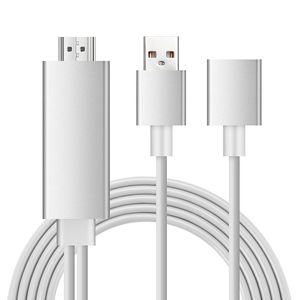
Description
【Compatible】:
For iPhone 5/5S/SE/6/6 Plus/6s/6s Plus/7/7 Plus/iPhone 8 8plus/X/XS/XS Max(iOS 8.0 or above)
For iPad mini/mini 2/mini 3/mini 4/Air/Air 2/Pro (Only 3G/4G version of iPads supported)
For Samsung S6/S8/S8+/S9/Note 5/Note 6/Note 7/Note 8/9
Note: Don't Support Samsung Galaxy S7/S7Edge
For Huawei P8/P9
For Google Nexus 5/ 5x/ 6p,LG,Sony,Motorola,Sony,HTC series and so on
【Installation】
Step 1: Connect it:
● Insert the USB port into the 5V/1A adapter, or 5V/2A USB interface on the TV / Monitor or Projector.
● Insert the HDMI out port of AISIF cable into the HDMI Port of TV / Monitor or Projector.
● Insert the Original power cable of IOS devices/ Samsung phone / Huawei phone into USB female port of AISIF cable.
Step 2: Trust for Different Devices
● For iOS Devices
Connect the phone and the lightning cable with the USB cable, just click"Trust", wait 10 seconds to synchronize the phone screen with the TV.
● For Samsung Cell phone
(1) Please open your cell phone "Developer Options", then choose "USB debugging", then click "OK", trust the devices.
(2) If there is no "Developer Options" on your phone, please click 6 times continuously in "Build number" of the "Software info" in the setting, then "Development Options" will be opened automatically.
●Android phones:
You need download "EZcast"
*Connect to TV or projector via digital AV adapter
*Plug HDMI cable to your Android devices
*Plug USB to power adapter or outlet
*Open "EZcast"to connect , which is also very easy and quick to operate
AISIF MHL Cable adapter backs 45-day money back, 18 Months worry-free & Lifetime technical support ensures your personal interests
For iPhone 5/5S/SE/6/6 Plus/6s/6s Plus/7/7 Plus/iPhone 8 8plus/X/XS/XS Max(iOS 8.0 or above)
For iPad mini/mini 2/mini 3/mini 4/Air/Air 2/Pro (Only 3G/4G version of iPads supported)
For Samsung S6/S8/S8+/S9/Note 5/Note 6/Note 7/Note 8/9
Note: Don't Support Samsung Galaxy S7/S7Edge
For Huawei P8/P9
For Google Nexus 5/ 5x/ 6p,LG,Sony,Motorola,Sony,HTC series and so on
【Installation】
Step 1: Connect it:
● Insert the USB port into the 5V/1A adapter, or 5V/2A USB interface on the TV / Monitor or Projector.
● Insert the HDMI out port of AISIF cable into the HDMI Port of TV / Monitor or Projector.
● Insert the Original power cable of IOS devices/ Samsung phone / Huawei phone into USB female port of AISIF cable.
Step 2: Trust for Different Devices
● For iOS Devices
Connect the phone and the lightning cable with the USB cable, just click"Trust", wait 10 seconds to synchronize the phone screen with the TV.
● For Samsung Cell phone
(1) Please open your cell phone "Developer Options", then choose "USB debugging", then click "OK", trust the devices.
(2) If there is no "Developer Options" on your phone, please click 6 times continuously in "Build number" of the "Software info" in the setting, then "Development Options" will be opened automatically.
●Android phones:
You need download "EZcast"
*Connect to TV or projector via digital AV adapter
*Plug HDMI cable to your Android devices
*Plug USB to power adapter or outlet
*Open "EZcast"to connect , which is also very easy and quick to operate
AISIF MHL Cable adapter backs 45-day money back, 18 Months worry-free & Lifetime technical support ensures your personal interests
AISIF 2019 Latest Mhl to HDMI Adapter Cable,6ft MHL Cable for Android with USB Charging 1080P to HDTV Monitor Projector,Support Android and iOS Phones
Price is below average
Current Price
$17.99
Average
$18.49
Min Price
$15.99
Max Price
$19.99
Price dynamics
3%
Description
【Compatible】:
For iPhone 5/5S/SE/6/6 Plus/6s/6s Plus/7/7 Plus/iPhone 8 8plus/X/XS/XS Max(iOS 8.0 or above)
For iPad mini/mini 2/mini 3/mini 4/Air/Air 2/Pro (Only 3G/4G version of iPads supported)
For Samsung S6/S8/S8+/S9/Note 5/Note 6/Note 7/Note 8/9
Note: Don't Support Samsung Galaxy S7/S7Edge
For Huawei P8/P9
For Google Nexus 5/ 5x/ 6p,LG,Sony,Motorola,Sony,HTC series and so on
【Installation】
Step 1: Connect it:
● Insert the USB port into the 5V/1A adapter, or 5V/2A USB interface on the TV / Monitor or Projector.
● Insert the HDMI out port of AISIF cable into the HDMI Port of TV / Monitor or Projector.
● Insert the Original power cable of IOS devices/ Samsung phone / Huawei phone into USB female port of AISIF cable.
Step 2: Trust for Different Devices
● For iOS Devices
Connect the phone and the lightning cable with the USB cable, just click"Trust", wait 10 seconds to synchronize the phone screen with the TV.
● For Samsung Cell phone
(1) Please open your cell phone "Developer Options", then choose "USB debugging", then click "OK", trust the devices.
(2) If there is no "Developer Options" on your phone, please click 6 times continuously in "Build number" of the "Software info" in the setting, then "Development Options" will be opened automatically.
●Android phones:
You need download "EZcast"
*Connect to TV or projector via digital AV adapter
*Plug HDMI cable to your Android devices
*Plug USB to power adapter or outlet
*Open "EZcast"to connect , which is also very easy and quick to operate
AISIF MHL Cable adapter backs 45-day money back, 18 Months worry-free & Lifetime technical support ensures your personal interests
For iPhone 5/5S/SE/6/6 Plus/6s/6s Plus/7/7 Plus/iPhone 8 8plus/X/XS/XS Max(iOS 8.0 or above)
For iPad mini/mini 2/mini 3/mini 4/Air/Air 2/Pro (Only 3G/4G version of iPads supported)
For Samsung S6/S8/S8+/S9/Note 5/Note 6/Note 7/Note 8/9
Note: Don't Support Samsung Galaxy S7/S7Edge
For Huawei P8/P9
For Google Nexus 5/ 5x/ 6p,LG,Sony,Motorola,Sony,HTC series and so on
【Installation】
Step 1: Connect it:
● Insert the USB port into the 5V/1A adapter, or 5V/2A USB interface on the TV / Monitor or Projector.
● Insert the HDMI out port of AISIF cable into the HDMI Port of TV / Monitor or Projector.
● Insert the Original power cable of IOS devices/ Samsung phone / Huawei phone into USB female port of AISIF cable.
Step 2: Trust for Different Devices
● For iOS Devices
Connect the phone and the lightning cable with the USB cable, just click"Trust", wait 10 seconds to synchronize the phone screen with the TV.
● For Samsung Cell phone
(1) Please open your cell phone "Developer Options", then choose "USB debugging", then click "OK", trust the devices.
(2) If there is no "Developer Options" on your phone, please click 6 times continuously in "Build number" of the "Software info" in the setting, then "Development Options" will be opened automatically.
●Android phones:
You need download "EZcast"
*Connect to TV or projector via digital AV adapter
*Plug HDMI cable to your Android devices
*Plug USB to power adapter or outlet
*Open "EZcast"to connect , which is also very easy and quick to operate
AISIF MHL Cable adapter backs 45-day money back, 18 Months worry-free & Lifetime technical support ensures your personal interests
Price will be lower
in next 2 weeks
in next 2 weeks
According to the data, price will be lower in next two weeks, so not waste your money and track better price!
Product review & video
[Music] you've gone to the net and you've looked for some HDMI cable so that you can connect your phone to a HDMI out source be it a TV or monitor what not so you've tried one and doesn't work if you don't know why so you go out and buy another one and that one doesn't work two people I've seen people on a net they're talking about something to do with them some of them got 11 pins some of them got 5 pins etc etc but the problem which I've got now is that it's intermittent you have a cable it connects up you can see it but for example if you're watching a film or something it says HDMI cable disconnected when you connect it to your phone like in the middle of a film or something like that so it just keeps going intermittently in and out in and out and it's very very frustrating when you're trying to watch something after pull so many so many so many hours I've done I've got an original



Similar products






































