Description
Package Content
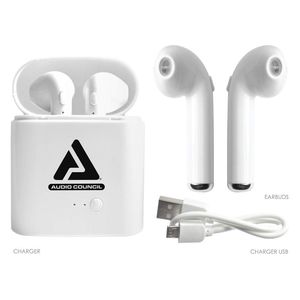
(2) Two Earbuds
(1) Charging Pod
(1) USB Cable
(1) Instruction Manual
Pairing Instructions
Pairing Both Earbuds
1.) Turn Bluetooth on from your device
2.) Press and hold the button on both earbuds at the same time until the LED light flashes red and blue
3.) Once flashing, double click on the button on either one of the earbuds
4.) Your earbuds are in paired mode once you hear "Ready to Pair" from the earbuds
3.) Search for AC Earbuds on your device to connect
4.) You are successfully paired when the earbuds flashed blue and says Connected
Pairing One Earbud
1.) Turn Bluetooth on from your device
2.) Press and hold the button on your earbud until the LED light flashes red and blue
3.) Search for AC Earbuds on your device to connect
4.) You are successfully paired when the earbud flashed blue and says Connected
Earbud Features
- Automatic Pairing once you have successfully paired your earbuds for the first time, simply press and turn your earbuds on by pressing and holding the buttons.
- Energy saving features with on and off buttons from your Earbuds
- Manage Calls from your Earbuds
1.) One click to Answer
2.) Double click to reject an incoming call
3.) Double click to call last number dialed
- Manage your Songs and Media from your Earbuds
1.) Once click for Stop or Pause
2.) Press and hold button to skip to the next song from your music playlist
(2) Two Earbuds
(1) Charging Pod
(1) USB Cable
(1) Instruction Manual
Pairing Instructions
Pairing Both Earbuds
1.) Turn Bluetooth on from your device
2.) Press and hold the button on both earbuds at the same time until the LED light flashes red and blue
3.) Once flashing, double click on the button on either one of the earbuds
4.) Your earbuds are in paired mode once you hear "Ready to Pair" from the earbuds
3.) Search for AC Earbuds on your device to connect
4.) You are successfully paired when the earbuds flashed blue and says Connected
Pairing One Earbud
1.) Turn Bluetooth on from your device
2.) Press and hold the button on your earbud until the LED light flashes red and blue
3.) Search for AC Earbuds on your device to connect
4.) You are successfully paired when the earbud flashed blue and says Connected
Earbud Features
- Automatic Pairing once you have successfully paired your earbuds for the first time, simply press and turn your earbuds on by pressing and holding the buttons.
- Energy saving features with on and off buttons from your Earbuds
- Manage Calls from your Earbuds
1.) One click to Answer
2.) Double click to reject an incoming call
3.) Double click to call last number dialed
- Manage your Songs and Media from your Earbuds
1.) Once click for Stop or Pause
2.) Press and hold button to skip to the next song from your music playlist
True Wireless Bluetooth Earbuds with Portable Charging Case, USB, MIC, Bluetooth Earpiece Cell Phone Mini Ear Headphone for Cellphones, Smartphone, Tablet, PC
Price is below average
Current Price
$19.99
Average
$34.99
Min Price
$19.99
Max Price
$49.99
Price dynamics
43%
Description
Package Content
(2) Two Earbuds
(1) Charging Pod
(1) USB Cable
(1) Instruction Manual
Pairing Instructions
Pairing Both Earbuds
1.) Turn Bluetooth on from your device
2.) Press and hold the button on both earbuds at the same time until the LED light flashes red and blue
3.) Once flashing, double click on the button on either one of the earbuds
4.) Your earbuds are in paired mode once you hear "Ready to Pair" from the earbuds
3.) Search for AC Earbuds on your device to connect
4.) You are successfully paired when the earbuds flashed blue and says Connected
Pairing One Earbud
1.) Turn Bluetooth on from your device
2.) Press and hold the button on your earbud until the LED light flashes red and blue
3.) Search for AC Earbuds on your device to connect
4.) You are successfully paired when the earbud flashed blue and says Connected
Earbud Features
- Automatic Pairing once you have successfully paired your earbuds for the first time, simply press and turn your earbuds on by pressing and holding the buttons.
- Energy saving features with on and off buttons from your Earbuds
- Manage Calls from your Earbuds
1.) One click to Answer
2.) Double click to reject an incoming call
3.) Double click to call last number dialed
- Manage your Songs and Media from your Earbuds
1.) Once click for Stop or Pause
2.) Press and hold button to skip to the next song from your music playlist
(2) Two Earbuds
(1) Charging Pod
(1) USB Cable
(1) Instruction Manual
Pairing Instructions
Pairing Both Earbuds
1.) Turn Bluetooth on from your device
2.) Press and hold the button on both earbuds at the same time until the LED light flashes red and blue
3.) Once flashing, double click on the button on either one of the earbuds
4.) Your earbuds are in paired mode once you hear "Ready to Pair" from the earbuds
3.) Search for AC Earbuds on your device to connect
4.) You are successfully paired when the earbuds flashed blue and says Connected
Pairing One Earbud
1.) Turn Bluetooth on from your device
2.) Press and hold the button on your earbud until the LED light flashes red and blue
3.) Search for AC Earbuds on your device to connect
4.) You are successfully paired when the earbud flashed blue and says Connected
Earbud Features
- Automatic Pairing once you have successfully paired your earbuds for the first time, simply press and turn your earbuds on by pressing and holding the buttons.
- Energy saving features with on and off buttons from your Earbuds
- Manage Calls from your Earbuds
1.) One click to Answer
2.) Double click to reject an incoming call
3.) Double click to call last number dialed
- Manage your Songs and Media from your Earbuds
1.) Once click for Stop or Pause
2.) Press and hold button to skip to the next song from your music playlist
Price will be lower
in next 2 weeks
in next 2 weeks
According to the data, price will be lower in next two weeks, so not waste your money and track better price!

Similar products



































