Description
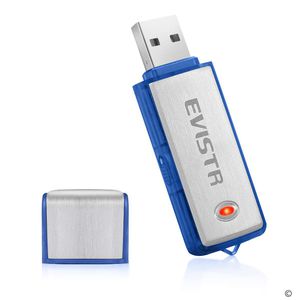
Why you need this EVISTR USB Voice Recorder?
- Large storage: 8GB flash memory, hold 150 hours audio file, so enough capacity, you could replace your normal flash drive now
- Record clear voice in a simple way, just one ON-OFF button, never be headache to learn how to use a voice recorder again
- Portable size, like normal flash drive, Copy & Transfer file in your daily office business task easily
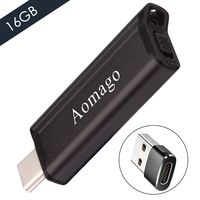
With Type C Adapter, we can easily use the USB voice recorder with type C port computer
- Long working time: never miss an important idea or memory, full charged, could work around 12 hours, enough power for daily task, your normal presentation, lecture, class, speech, conversation recording
- Time stamp: one click to setting recorder system time, your recording file with time and date information
- Plug & Play: Plug and playback your audio file -
Support Windows2000/XP/Vista 7/8/10/Mac.
Product Feature Storage: 8GB USB 2.0 Flash Drive
Battery: Rechargeable 120 mAH Li-battery
File Format: 128kbps WAV
Battery Time: ≤15hous S
ize:2.6 x 0.4 x 0.82inch
Weight:About 16g (0.56oz)
Notes 1. Cannot record and charge at the same, full charging, lights turn blue
2. Please kindly full charge it before you use it, just switch it off, and connect to your computer, it will charges
3. Switch REC, red blink, and then no lights, it is recording
4. when storage is fulled, the light will always blink, you could copy out your recordings to your computer, and then delete it or format your voice recorder
5. failed connect to computer? This is usually happened by 2 reason, the recorder is ON, just switch it OFF; or there is something wrong with computer connection, like many times flash drive will meet this issue, you could change a new USB socket, or try again later
6. Contact us, we help you solve the issues
- Large storage: 8GB flash memory, hold 150 hours audio file, so enough capacity, you could replace your normal flash drive now
- Record clear voice in a simple way, just one ON-OFF button, never be headache to learn how to use a voice recorder again
- Portable size, like normal flash drive, Copy & Transfer file in your daily office business task easily
With Type C Adapter, we can easily use the USB voice recorder with type C port computer
- Long working time: never miss an important idea or memory, full charged, could work around 12 hours, enough power for daily task, your normal presentation, lecture, class, speech, conversation recording
- Time stamp: one click to setting recorder system time, your recording file with time and date information
- Plug & Play: Plug and playback your audio file -
Support Windows2000/XP/Vista 7/8/10/Mac.
Product Feature Storage: 8GB USB 2.0 Flash Drive
Battery: Rechargeable 120 mAH Li-battery
File Format: 128kbps WAV
Battery Time: ≤15hous S
ize:2.6 x 0.4 x 0.82inch
Weight:About 16g (0.56oz)
Notes 1. Cannot record and charge at the same, full charging, lights turn blue
2. Please kindly full charge it before you use it, just switch it off, and connect to your computer, it will charges
3. Switch REC, red blink, and then no lights, it is recording
4. when storage is fulled, the light will always blink, you could copy out your recordings to your computer, and then delete it or format your voice recorder
5. failed connect to computer? This is usually happened by 2 reason, the recorder is ON, just switch it OFF; or there is something wrong with computer connection, like many times flash drive will meet this issue, you could change a new USB socket, or try again later
6. Contact us, we help you solve the issues
EVISTR USB Voice Recorder - VR01 Flash Drive Mini Recorder for Lecture, Meetings, Office, Recordings with TimeStamp
Current Price
$18.99
Average
$18.24
Min Price
$10.31
Max Price
$24.99
Price dynamics
4%
Description
Why you need this EVISTR USB Voice Recorder?
- Large storage: 8GB flash memory, hold 150 hours audio file, so enough capacity, you could replace your normal flash drive now
- Record clear voice in a simple way, just one ON-OFF button, never be headache to learn how to use a voice recorder again
- Portable size, like normal flash drive, Copy & Transfer file in your daily office business task easily
With Type C Adapter, we can easily use the USB voice recorder with type C port computer
- Long working time: never miss an important idea or memory, full charged, could work around 12 hours, enough power for daily task, your normal presentation, lecture, class, speech, conversation recording
- Time stamp: one click to setting recorder system time, your recording file with time and date information
- Plug & Play: Plug and playback your audio file -
Support Windows2000/XP/Vista 7/8/10/Mac.
Product Feature Storage: 8GB USB 2.0 Flash Drive
Battery: Rechargeable 120 mAH Li-battery
File Format: 128kbps WAV
Battery Time: ≤15hous S
ize:2.6 x 0.4 x 0.82inch
Weight:About 16g (0.56oz)
Notes 1. Cannot record and charge at the same, full charging, lights turn blue
2. Please kindly full charge it before you use it, just switch it off, and connect to your computer, it will charges
3. Switch REC, red blink, and then no lights, it is recording
4. when storage is fulled, the light will always blink, you could copy out your recordings to your computer, and then delete it or format your voice recorder
5. failed connect to computer? This is usually happened by 2 reason, the recorder is ON, just switch it OFF; or there is something wrong with computer connection, like many times flash drive will meet this issue, you could change a new USB socket, or try again later
6. Contact us, we help you solve the issues
- Large storage: 8GB flash memory, hold 150 hours audio file, so enough capacity, you could replace your normal flash drive now
- Record clear voice in a simple way, just one ON-OFF button, never be headache to learn how to use a voice recorder again
- Portable size, like normal flash drive, Copy & Transfer file in your daily office business task easily
With Type C Adapter, we can easily use the USB voice recorder with type C port computer
- Long working time: never miss an important idea or memory, full charged, could work around 12 hours, enough power for daily task, your normal presentation, lecture, class, speech, conversation recording
- Time stamp: one click to setting recorder system time, your recording file with time and date information
- Plug & Play: Plug and playback your audio file -
Support Windows2000/XP/Vista 7/8/10/Mac.
Product Feature Storage: 8GB USB 2.0 Flash Drive
Battery: Rechargeable 120 mAH Li-battery
File Format: 128kbps WAV
Battery Time: ≤15hous S
ize:2.6 x 0.4 x 0.82inch
Weight:About 16g (0.56oz)
Notes 1. Cannot record and charge at the same, full charging, lights turn blue
2. Please kindly full charge it before you use it, just switch it off, and connect to your computer, it will charges
3. Switch REC, red blink, and then no lights, it is recording
4. when storage is fulled, the light will always blink, you could copy out your recordings to your computer, and then delete it or format your voice recorder
5. failed connect to computer? This is usually happened by 2 reason, the recorder is ON, just switch it OFF; or there is something wrong with computer connection, like many times flash drive will meet this issue, you could change a new USB socket, or try again later
6. Contact us, we help you solve the issues
Price will be lower
in next 2 weeks
in next 2 weeks
According to the data, price will be lower in next two weeks, so not waste your money and track better price!
Product review & video
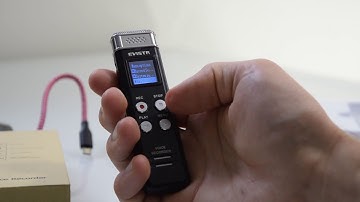
I received in the mail today the Avista l1 5/7 right out of taking out of the box I noticed that it is a solid metal recorder I don't think there are any plastic parts on the outside the buttons I think are metal the microphone is at the top it's a compact size so it fits nicely in your hand in your pocket your bag your purse whatever it fits in there nicely and it records well so first things first as soon as you get it pull out your USB cable plug it into your computer and charge up your recorder once your recorder is charged you can turn it on on the left hand side there is a switch or toggle slide that up that turns on your auto recorder there are four buttons on the front your record button your stop button your play pause button and your a menu to start recording push your record button now that it's recording your left and right audio bars will start moving and the light will bli