Description
Why Choose FALWEDI True Wireless Earbuds?
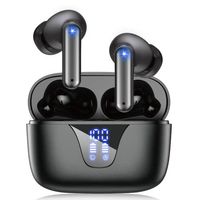
1.FALWEDI offers a pair of high-fidelity Bluetooth Wireless Earphones with up to 30 hours of battery life.
2.You won't be subject to master-slave restrictions and enjoy one-click manipulation.
3.Light weight, easy to carry, you can use it anytime anywhere, just enjoy your life.
How to Use Multifunction Button?
Previous Song: Long press L Multifuction Button 2s
Next Song: Long press R Multifuction Button 2s
Play / Pause: Short press Multifuction Button
Pick up / Hang up phone call: Short press Multifuction Button
Decline Incoming call: Long press Multifuction Button 2s
Activate / Disable Siri: Double-press the Multifunction Button
Package Contents:
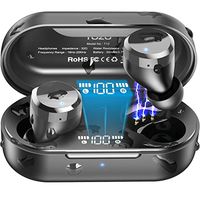
1x FALWEDI Wireless Earbuds
1x Earbud Charging Case
1x USB Charging Cable
1x User Manual
1 x Warranty Card
Notes:
If you receive a defective product or have any questions during use, please feel free to contact us.
When the two earphones can't pair with each other or can't connect to your device, How To Reset?
1. Forget the "Falwedi - T12" earbuds device from your bluetooth on your phone.
2. Take out two earbuds from the charging box and turn them off.
3. Long press the Multifunction Button of the left and the right earbud for 15 seconds until there are orange and white lights flashing for 1 second and then turn off automatically.
4. Turn on the earbuds again, after 2 seconds, double press Multifunction Button of both earbuds and they will connect to each other. After connected successfully, both LED lights will have orange and white lights flicker alternately.
After resetting, please connect the earbuds to your phone according to the above methods.
1.FALWEDI offers a pair of high-fidelity Bluetooth Wireless Earphones with up to 30 hours of battery life.
2.You won't be subject to master-slave restrictions and enjoy one-click manipulation.
3.Light weight, easy to carry, you can use it anytime anywhere, just enjoy your life.
How to Use Multifunction Button?
Previous Song: Long press L Multifuction Button 2s
Next Song: Long press R Multifuction Button 2s
Play / Pause: Short press Multifuction Button
Pick up / Hang up phone call: Short press Multifuction Button
Decline Incoming call: Long press Multifuction Button 2s
Activate / Disable Siri: Double-press the Multifunction Button
Package Contents:
1x FALWEDI Wireless Earbuds
1x Earbud Charging Case
1x USB Charging Cable
1x User Manual
1 x Warranty Card
Notes:
If you receive a defective product or have any questions during use, please feel free to contact us.
When the two earphones can't pair with each other or can't connect to your device, How To Reset?
1. Forget the "Falwedi - T12" earbuds device from your bluetooth on your phone.
2. Take out two earbuds from the charging box and turn them off.
3. Long press the Multifunction Button of the left and the right earbud for 15 seconds until there are orange and white lights flashing for 1 second and then turn off automatically.
4. Turn on the earbuds again, after 2 seconds, double press Multifunction Button of both earbuds and they will connect to each other. After connected successfully, both LED lights will have orange and white lights flicker alternately.
After resetting, please connect the earbuds to your phone according to the above methods.
Falwedi Bluetooth 5.0 True Wireless Earbuds with Charging Case for iPhone Android, 30H Cyclic Playtime Waterproof No Master-Slave TWS Stereo Headphones with mic, in-Ear Earphones Headset for Sport
Current Price
$42.99
Average
$38.44
Min Price
$29.99
Max Price
$42.99
Price dynamics
11%
Description
Why Choose FALWEDI True Wireless Earbuds?
1.FALWEDI offers a pair of high-fidelity Bluetooth Wireless Earphones with up to 30 hours of battery life.
2.You won't be subject to master-slave restrictions and enjoy one-click manipulation.
3.Light weight, easy to carry, you can use it anytime anywhere, just enjoy your life.
How to Use Multifunction Button?
Previous Song: Long press L Multifuction Button 2s
Next Song: Long press R Multifuction Button 2s
Play / Pause: Short press Multifuction Button
Pick up / Hang up phone call: Short press Multifuction Button
Decline Incoming call: Long press Multifuction Button 2s
Activate / Disable Siri: Double-press the Multifunction Button
Package Contents:
1x FALWEDI Wireless Earbuds
1x Earbud Charging Case
1x USB Charging Cable
1x User Manual
1 x Warranty Card
Notes:
If you receive a defective product or have any questions during use, please feel free to contact us.
When the two earphones can't pair with each other or can't connect to your device, How To Reset?
1. Forget the "Falwedi - T12" earbuds device from your bluetooth on your phone.
2. Take out two earbuds from the charging box and turn them off.
3. Long press the Multifunction Button of the left and the right earbud for 15 seconds until there are orange and white lights flashing for 1 second and then turn off automatically.
4. Turn on the earbuds again, after 2 seconds, double press Multifunction Button of both earbuds and they will connect to each other. After connected successfully, both LED lights will have orange and white lights flicker alternately.
After resetting, please connect the earbuds to your phone according to the above methods.
1.FALWEDI offers a pair of high-fidelity Bluetooth Wireless Earphones with up to 30 hours of battery life.
2.You won't be subject to master-slave restrictions and enjoy one-click manipulation.
3.Light weight, easy to carry, you can use it anytime anywhere, just enjoy your life.
How to Use Multifunction Button?
Previous Song: Long press L Multifuction Button 2s
Next Song: Long press R Multifuction Button 2s
Play / Pause: Short press Multifuction Button
Pick up / Hang up phone call: Short press Multifuction Button
Decline Incoming call: Long press Multifuction Button 2s
Activate / Disable Siri: Double-press the Multifunction Button
Package Contents:
1x FALWEDI Wireless Earbuds
1x Earbud Charging Case
1x USB Charging Cable
1x User Manual
1 x Warranty Card
Notes:
If you receive a defective product or have any questions during use, please feel free to contact us.
When the two earphones can't pair with each other or can't connect to your device, How To Reset?
1. Forget the "Falwedi - T12" earbuds device from your bluetooth on your phone.
2. Take out two earbuds from the charging box and turn them off.
3. Long press the Multifunction Button of the left and the right earbud for 15 seconds until there are orange and white lights flashing for 1 second and then turn off automatically.
4. Turn on the earbuds again, after 2 seconds, double press Multifunction Button of both earbuds and they will connect to each other. After connected successfully, both LED lights will have orange and white lights flicker alternately.
After resetting, please connect the earbuds to your phone according to the above methods.
Price will be lower
in next 2 weeks
in next 2 weeks
According to the data, price will be lower in next two weeks, so not waste your money and track better price!
Product review & video
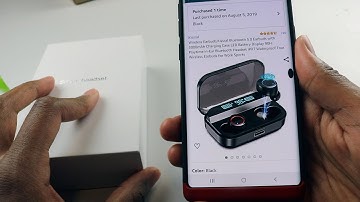
yo sup guys this is going to be a quick review on this wireless earbuds a part from Amazon now the name-brand on this aha I have to go back to my order again the name-brand of this is called let's look at this kiss role and this earbuds are very nice I've been using it for a while now he actually supports Bluetooth 5.0 so if you have like a new smartphone you're gonna notice the quality of those airports being like ridiculously better and also there could like connect on and off significantly faster than an old 4.0 bluetooth now this one has 3000 milliamp our charging battery which is like insane we gotta talk about that soon which equivalents to 90 hours of a plate at 90 hours of playtime in your ear I mean we're gonna talk about all that all I could tell you is 90 hours is ridiculously high in comparison apples have Apple earbud I believe to only has 24 hours of playback time which is


Similar products