Description
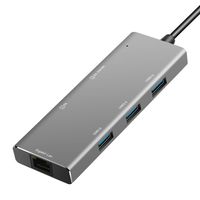
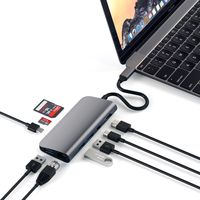
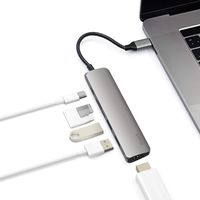
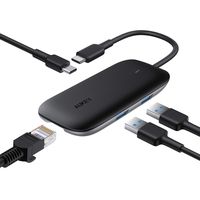
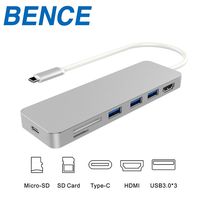
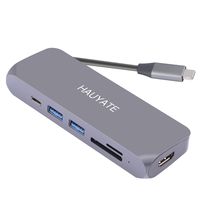
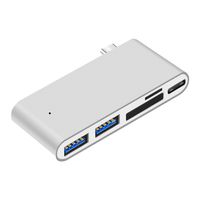
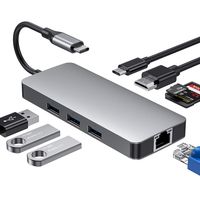
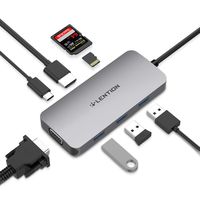
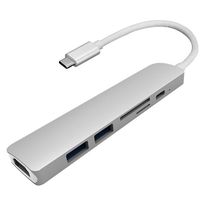
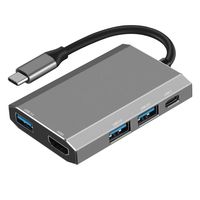
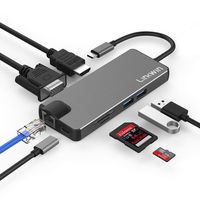
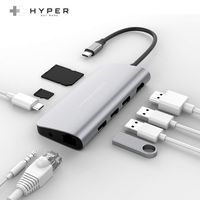
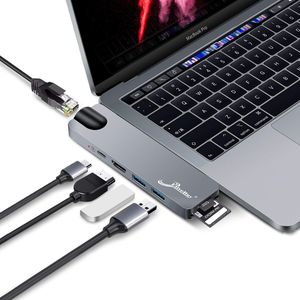
Multi-Port Hub for 2016 / 2017 / 2018 MacBook Pro 13" and 15" The Hub Adapter is Most Compact and Fastest Hub specifically designed for 2018/2017/2016 MacBook Pro. compatible with both 13" and 15". Expand the two USB-C ports on MacBook Pro into 7 ports including Thunderbolt 3, USB-C, HDMI, two USB 3.0 ports, and SD/Micro Card Reader.Complement your MacBook Pro with a beautiful color matched aluminum body sleek adapter. Available in Space Gray or Silver Specifications ● Color: Space Gray ● Dimensions: 117*32*10.7mm/4.6*1.3*0.4in ● Weight: 50g ● Compatibility: 13" and 15" MacBook Pro 2016 / 2017 / 2018 Match Your Macbook Pro We designed to feel like a natural extension of the Apple new Macbook Pro with similar product lines, thickness, right angled edges and rounded corners. Aluminum enclosure texture matched to your Mackbook Pro. Expand to multiple ports ● Thunderbolt 3 port: Support 5K or 2x4K @ 60Hz video, up to 40Gb/s data speed,pass through charging for both 13" (61W) and 15" (87W) MacBook Pro models. ● HDMI Video Output: Up to 1080P @60Hz, 4K @30Hz, supports HDCP1.4/2.2 ● 2*USB 3.0:Support USB 3.1 Gen1 5Gbps, compatible with USB2.0/1.1, Plug & Play ● USB-C:Up to USB3.1 Gen1 10Gb, Plug & Play ● SD/Micro SD Port:Up to 104MB/s Data read, Support SD/SDHC/SDXC, SD3.0 UHS-1, Capacity up to 2TB. Warm Notes 1) Fits only 2016/2017/2018 MacBook Pro (13" &15" models) 2) Can't read hard drives more than 2TB 3) Does not support the Apple external SuperDrive 4) Can Work with 1.2mm TPU case or thinner. 5) The working temperature of the hub is about 40℃/104F 6) keep away from water, fire and corrosive liquids
USB C Hub Adapter,7 in 1 Dual Type-C Docking Station Thunderbolt 3 Hub for 2016/2017/2018 MacBook Pro with 100W Power Delivery,Gigabit Ethernet Port,USB-C,4K HDMI,2xUSB3.0,SD and MicroSD Card Reader
Price is below average
Current Price
$39.99
Average
$45.82
Min Price
$39.99
Max Price
$49.99
Price dynamics
13%
Description
Multi-Port Hub for 2016 / 2017 / 2018 MacBook Pro 13" and 15" The Hub Adapter is Most Compact and Fastest Hub specifically designed for 2018/2017/2016 MacBook Pro. compatible with both 13" and 15". Expand the two USB-C ports on MacBook Pro into 7 ports including Thunderbolt 3, USB-C, HDMI, two USB 3.0 ports, and SD/Micro Card Reader.Complement your MacBook Pro with a beautiful color matched aluminum body sleek adapter. Available in Space Gray or Silver Specifications ● Color: Space Gray ● Dimensions: 117*32*10.7mm/4.6*1.3*0.4in ● Weight: 50g ● Compatibility: 13" and 15" MacBook Pro 2016 / 2017 / 2018 Match Your Macbook Pro We designed to feel like a natural extension of the Apple new Macbook Pro with similar product lines, thickness, right angled edges and rounded corners. Aluminum enclosure texture matched to your Mackbook Pro. Expand to multiple ports ● Thunderbolt 3 port: Support 5K or 2x4K @ 60Hz video, up to 40Gb/s data speed,pass through charging for both 13" (61W) and 15" (87W) MacBook Pro models. ● HDMI Video Output: Up to 1080P @60Hz, 4K @30Hz, supports HDCP1.4/2.2 ● 2*USB 3.0:Support USB 3.1 Gen1 5Gbps, compatible with USB2.0/1.1, Plug & Play ● USB-C:Up to USB3.1 Gen1 10Gb, Plug & Play ● SD/Micro SD Port:Up to 104MB/s Data read, Support SD/SDHC/SDXC, SD3.0 UHS-1, Capacity up to 2TB. Warm Notes 1) Fits only 2016/2017/2018 MacBook Pro (13" &15" models) 2) Can't read hard drives more than 2TB 3) Does not support the Apple external SuperDrive 4) Can Work with 1.2mm TPU case or thinner. 5) The working temperature of the hub is about 40℃/104F 6) keep away from water, fire and corrosive liquids
Price will be lower
in next 2 weeks
in next 2 weeks
According to the data, price will be lower in next two weeks, so not waste your money and track better price!
Product review & video
please hang up and try again hey what's up everyone louie tran here in this video we're going to take a look at the e vatar usb c dock that i use for my macbook desktop setup no idea how they came up with that name i've gone through several usbc hubs and have been living the dongle life since 2016 and haven't really been happy with any one of them going from the official usbc display adapter from apple to anker aki and several different brands i have a 3440 by 1440 100hz 35 inch gaming display and none of these have really been able to fully utilize high refresh rates using hdmi so of course the recommendation is to use a usb c to display port adapter such as this one the problem with this is the limited number of usb thunderbolt ports on some macbooks so you will have no ports left over after connecting a display and a power adapter to charge so the solution to that is to get a u to ge


Similar products