- HomeElectronicsAccessories & SuppliesAudio & Video AccessoriesCables & InterconnectsVideo CablesHDMI Cables
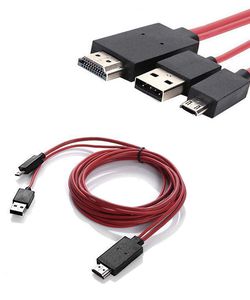
Description
NOTE:
-Please check your TV whether with HDMI port on first before you purchase this item.
-Only support Samsung Galaxy 11 Pin usb cord Devices
-The cable don't charger your phone. Do not connect the smallest Adapter to your device through the Desktop dock. The video output will not work properly.
Compatible with:
Galaxy S5, S4, S3
Samsung Galaxy Note 4, Note 3, Note 2 (N7100 N7105)
Galaxy Mega
Galaxy Tab 3 10.1, Tab 3 8.0
Galaxy Tab S 10.5, Tab S 8.4
Galaxy TabPRO 12.2, TabPRO 10.1, TabPRO 8.4
Galaxy Note 8, Note Pro
Not Work:
Samsung Galaxy S6 /S6 Edge
Samsung Galaxy S7
Samsung Galaxy Tab 3 7.0
Samsung Galaxy Note 3 N9008V
Samsung Galaxy Note 5
Samsung Galaxy Note 10.1
Samsung Galaxy Tab 4 7¡¯¡¯
Samsung Galaxy Tab 2
Samsung Galaxy S4 Mini/S3 Mini
How to operate:
1). Connect the Micro USB cable into your cell phone or tablet.
2). Plug the HDMI connector to the TV (Projector/Monitor) hdmi port.
3). Switch the TV to corresponding HDMI channel.
4). Connect the USB cable to a power adapter(at least 5V 1A) to supply power for the HDMI connector.
5). Restart your device after the whole connection finished.
Specifications:
* Video Resolution: 480i, 480P, 720i, 720P, 1080i, 1080P
* Audio: 8-channel (e.g.7.1 surround) digital audio
* Cable lengh: 6.5 feet
* Share your photos and videos on big screen with family and friends.
-Please check your TV whether with HDMI port on first before you purchase this item.
-Only support Samsung Galaxy 11 Pin usb cord Devices
-The cable don't charger your phone. Do not connect the smallest Adapter to your device through the Desktop dock. The video output will not work properly.
Compatible with:
Galaxy S5, S4, S3
Samsung Galaxy Note 4, Note 3, Note 2 (N7100 N7105)
Galaxy Mega
Galaxy Tab 3 10.1, Tab 3 8.0
Galaxy Tab S 10.5, Tab S 8.4
Galaxy TabPRO 12.2, TabPRO 10.1, TabPRO 8.4
Galaxy Note 8, Note Pro
Not Work:
Samsung Galaxy S6 /S6 Edge
Samsung Galaxy S7
Samsung Galaxy Tab 3 7.0
Samsung Galaxy Note 3 N9008V
Samsung Galaxy Note 5
Samsung Galaxy Note 10.1
Samsung Galaxy Tab 4 7¡¯¡¯
Samsung Galaxy Tab 2
Samsung Galaxy S4 Mini/S3 Mini
How to operate:
1). Connect the Micro USB cable into your cell phone or tablet.
2). Plug the HDMI connector to the TV (Projector/Monitor) hdmi port.
3). Switch the TV to corresponding HDMI channel.
4). Connect the USB cable to a power adapter(at least 5V 1A) to supply power for the HDMI connector.
5). Restart your device after the whole connection finished.
Specifications:
* Video Resolution: 480i, 480P, 720i, 720P, 1080i, 1080P
* Audio: 8-channel (e.g.7.1 surround) digital audio
* Cable lengh: 6.5 feet
* Share your photos and videos on big screen with family and friends.
Foseal 6.5 ft Special Shape 11Pin Cord Micro USB to HDMI Cable 1080P HDTV Adapter for MHL-Functioned Samsung Galaxy S5 S4 S3 Note3 Only-Fit Specific Phone Models Stated in Ad Description Page
Current Price
$9.99
Average
$9.44
Min Price
$3.49
Max Price
$19.99
Price dynamics
6%
Description
NOTE:
-Please check your TV whether with HDMI port on first before you purchase this item.
-Only support Samsung Galaxy 11 Pin usb cord Devices
-The cable don't charger your phone. Do not connect the smallest Adapter to your device through the Desktop dock. The video output will not work properly.
Compatible with:
Galaxy S5, S4, S3
Samsung Galaxy Note 4, Note 3, Note 2 (N7100 N7105)
Galaxy Mega
Galaxy Tab 3 10.1, Tab 3 8.0
Galaxy Tab S 10.5, Tab S 8.4
Galaxy TabPRO 12.2, TabPRO 10.1, TabPRO 8.4
Galaxy Note 8, Note Pro
Not Work:
Samsung Galaxy S6 /S6 Edge
Samsung Galaxy S7
Samsung Galaxy Tab 3 7.0
Samsung Galaxy Note 3 N9008V
Samsung Galaxy Note 5
Samsung Galaxy Note 10.1
Samsung Galaxy Tab 4 7¡¯¡¯
Samsung Galaxy Tab 2
Samsung Galaxy S4 Mini/S3 Mini
How to operate:
1). Connect the Micro USB cable into your cell phone or tablet.
2). Plug the HDMI connector to the TV (Projector/Monitor) hdmi port.
3). Switch the TV to corresponding HDMI channel.
4). Connect the USB cable to a power adapter(at least 5V 1A) to supply power for the HDMI connector.
5). Restart your device after the whole connection finished.
Specifications:
* Video Resolution: 480i, 480P, 720i, 720P, 1080i, 1080P
* Audio: 8-channel (e.g.7.1 surround) digital audio
* Cable lengh: 6.5 feet
* Share your photos and videos on big screen with family and friends.
-Please check your TV whether with HDMI port on first before you purchase this item.
-Only support Samsung Galaxy 11 Pin usb cord Devices
-The cable don't charger your phone. Do not connect the smallest Adapter to your device through the Desktop dock. The video output will not work properly.
Compatible with:
Galaxy S5, S4, S3
Samsung Galaxy Note 4, Note 3, Note 2 (N7100 N7105)
Galaxy Mega
Galaxy Tab 3 10.1, Tab 3 8.0
Galaxy Tab S 10.5, Tab S 8.4
Galaxy TabPRO 12.2, TabPRO 10.1, TabPRO 8.4
Galaxy Note 8, Note Pro
Not Work:
Samsung Galaxy S6 /S6 Edge
Samsung Galaxy S7
Samsung Galaxy Tab 3 7.0
Samsung Galaxy Note 3 N9008V
Samsung Galaxy Note 5
Samsung Galaxy Note 10.1
Samsung Galaxy Tab 4 7¡¯¡¯
Samsung Galaxy Tab 2
Samsung Galaxy S4 Mini/S3 Mini
How to operate:
1). Connect the Micro USB cable into your cell phone or tablet.
2). Plug the HDMI connector to the TV (Projector/Monitor) hdmi port.
3). Switch the TV to corresponding HDMI channel.
4). Connect the USB cable to a power adapter(at least 5V 1A) to supply power for the HDMI connector.
5). Restart your device after the whole connection finished.
Specifications:
* Video Resolution: 480i, 480P, 720i, 720P, 1080i, 1080P
* Audio: 8-channel (e.g.7.1 surround) digital audio
* Cable lengh: 6.5 feet
* Share your photos and videos on big screen with family and friends.
Price will be lower
in next 2 weeks
in next 2 weeks
According to the data, price will be lower in next two weeks, so not waste your money and track better price!
Product review & video
hey you two today I'm going to go over the this small adapter its original from Samsung it is made for Galaxy its HDTV small adapter with the MH l technology which is this one right here we the original box has a CEO right here so I know is the original and you can scan the the color right here for the compatibility and more informations and this is the rear of the box is this made in Korea I've been using this adapter for my note 3 and then my no.4 without any problem I believe this is what song on galaxy s5 - so this is the adapter give you closer look microusb to HDMI and on the side as a charging port right here so you could watch hmm with your phone while your phone is being charged at the same time so I we were saying that I his Samsung s5 is uh his screens unresponsive so I told him to go ahead and purchase this adapter so I could hook up to your TV and then you could unlock he c



Similar products






































