Description
What does Display Emulator / Dummy Plug do?
It fixes a problem you probably didn't even know you had - unlocking the full potential of your graphics card hardware.
By simulating the presence of an attached display, display emulator allows you to use all of the power and available resolutions locked away inside your graphics hardware,
which might otherwise be disabled when there is no screen available.
Why do you need a VGA/ HDMI / DVI Display Emulator?
HDMI/DVI/VGA Display emulator is a small, low-cost plug that work as a high resolution display, it makes a computer run "headless" (without a keyboard, mouse, and monitor).
It appears as a headless ghost display emulator (dummy plug) that fits discreetly in to the video output socket on your computer.
Once plugged, the headless PC detects a connected display thus enabling the GPU.
Remote desktop access to the headless PC is then available at high resolution - up to 4096x2160 and high frame rate.
With the GPU enabled, it is possible to perform for various tasks including high resolution hardware accelerated remote desktop and GPGPU operations like crypto currency mining, rendering and simulations.
It is a must-have for server and colocation farms, SOHO and home servers and remote-deployed headless PCs.
Resolutions Supported
FREEGENE HDMI dummy plug: Maximum 4096*2160@60Hz;
FREEGENE DVI dummy plug: Maximum 4096*2160@60Hz;
FREEGENE VGA dummy plug: Maximum 1920*1080@60Hz;
FREEGENE DP dummy plug: Maximum 3840x2160@17Hz;
FREEGENE Mini DP dummy plug: Maximum 3840x2160@17Hz
Important Note
The Maximum supported pixel of FREEGENE Dummy Plug is tested by our engineer, if you can't get this, please check your computer/laptop setting and relevant accessories, not every model support it.
FREEGENE dummy plug CAN NOT emulate a higher pixel that your computer/laptop don't support.
It fixes a problem you probably didn't even know you had - unlocking the full potential of your graphics card hardware.
By simulating the presence of an attached display, display emulator allows you to use all of the power and available resolutions locked away inside your graphics hardware,
which might otherwise be disabled when there is no screen available.
Why do you need a VGA/ HDMI / DVI Display Emulator?
HDMI/DVI/VGA Display emulator is a small, low-cost plug that work as a high resolution display, it makes a computer run "headless" (without a keyboard, mouse, and monitor).
It appears as a headless ghost display emulator (dummy plug) that fits discreetly in to the video output socket on your computer.
Once plugged, the headless PC detects a connected display thus enabling the GPU.
Remote desktop access to the headless PC is then available at high resolution - up to 4096x2160 and high frame rate.
With the GPU enabled, it is possible to perform for various tasks including high resolution hardware accelerated remote desktop and GPGPU operations like crypto currency mining, rendering and simulations.
It is a must-have for server and colocation farms, SOHO and home servers and remote-deployed headless PCs.
Resolutions Supported
FREEGENE HDMI dummy plug: Maximum 4096*2160@60Hz;
FREEGENE DVI dummy plug: Maximum 4096*2160@60Hz;
FREEGENE VGA dummy plug: Maximum 1920*1080@60Hz;
FREEGENE DP dummy plug: Maximum 3840x2160@17Hz;
FREEGENE Mini DP dummy plug: Maximum 3840x2160@17Hz
Important Note
The Maximum supported pixel of FREEGENE Dummy Plug is tested by our engineer, if you can't get this, please check your computer/laptop setting and relevant accessories, not every model support it.
FREEGENE dummy plug CAN NOT emulate a higher pixel that your computer/laptop don't support.
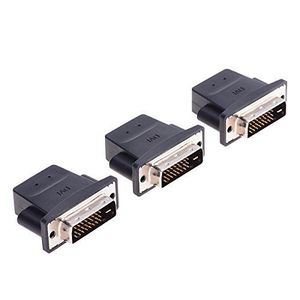
FREEGENE DVI Graphics Card Display GPU Detection Monitor DVI-D Dummy Plug Adapter 4K@60Hz, 3 Pack
Price is below average
Current Price
$16.19
Average
$18
Min Price
$14.37
Max Price
$19.99
Price dynamics
10%
Description
What does Display Emulator / Dummy Plug do?
It fixes a problem you probably didn't even know you had - unlocking the full potential of your graphics card hardware.
By simulating the presence of an attached display, display emulator allows you to use all of the power and available resolutions locked away inside your graphics hardware,
which might otherwise be disabled when there is no screen available.
Why do you need a VGA/ HDMI / DVI Display Emulator?
HDMI/DVI/VGA Display emulator is a small, low-cost plug that work as a high resolution display, it makes a computer run "headless" (without a keyboard, mouse, and monitor).
It appears as a headless ghost display emulator (dummy plug) that fits discreetly in to the video output socket on your computer.
Once plugged, the headless PC detects a connected display thus enabling the GPU.
Remote desktop access to the headless PC is then available at high resolution - up to 4096x2160 and high frame rate.
With the GPU enabled, it is possible to perform for various tasks including high resolution hardware accelerated remote desktop and GPGPU operations like crypto currency mining, rendering and simulations.
It is a must-have for server and colocation farms, SOHO and home servers and remote-deployed headless PCs.
Resolutions Supported
FREEGENE HDMI dummy plug: Maximum 4096*2160@60Hz;
FREEGENE DVI dummy plug: Maximum 4096*2160@60Hz;
FREEGENE VGA dummy plug: Maximum 1920*1080@60Hz;
FREEGENE DP dummy plug: Maximum 3840x2160@17Hz;
FREEGENE Mini DP dummy plug: Maximum 3840x2160@17Hz
Important Note
The Maximum supported pixel of FREEGENE Dummy Plug is tested by our engineer, if you can't get this, please check your computer/laptop setting and relevant accessories, not every model support it.
FREEGENE dummy plug CAN NOT emulate a higher pixel that your computer/laptop don't support.
It fixes a problem you probably didn't even know you had - unlocking the full potential of your graphics card hardware.
By simulating the presence of an attached display, display emulator allows you to use all of the power and available resolutions locked away inside your graphics hardware,
which might otherwise be disabled when there is no screen available.
Why do you need a VGA/ HDMI / DVI Display Emulator?
HDMI/DVI/VGA Display emulator is a small, low-cost plug that work as a high resolution display, it makes a computer run "headless" (without a keyboard, mouse, and monitor).
It appears as a headless ghost display emulator (dummy plug) that fits discreetly in to the video output socket on your computer.
Once plugged, the headless PC detects a connected display thus enabling the GPU.
Remote desktop access to the headless PC is then available at high resolution - up to 4096x2160 and high frame rate.
With the GPU enabled, it is possible to perform for various tasks including high resolution hardware accelerated remote desktop and GPGPU operations like crypto currency mining, rendering and simulations.
It is a must-have for server and colocation farms, SOHO and home servers and remote-deployed headless PCs.
Resolutions Supported
FREEGENE HDMI dummy plug: Maximum 4096*2160@60Hz;
FREEGENE DVI dummy plug: Maximum 4096*2160@60Hz;
FREEGENE VGA dummy plug: Maximum 1920*1080@60Hz;
FREEGENE DP dummy plug: Maximum 3840x2160@17Hz;
FREEGENE Mini DP dummy plug: Maximum 3840x2160@17Hz
Important Note
The Maximum supported pixel of FREEGENE Dummy Plug is tested by our engineer, if you can't get this, please check your computer/laptop setting and relevant accessories, not every model support it.
FREEGENE dummy plug CAN NOT emulate a higher pixel that your computer/laptop don't support.
Price will be lower
in next 2 weeks
in next 2 weeks
According to the data, price will be lower in next two weeks, so not waste your money and track better price!
Product review & video
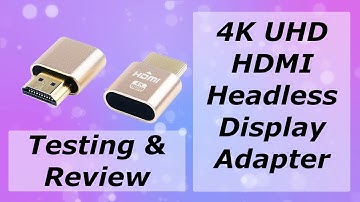
hi so today we're going to be looking at the HDMI dummy plug for a headless display so currently at the moment when I am using VNC and I go to my system preferences and displays I only get these two options here so one to a toe by 102 for 102 4 by 7 6 8 which is the default when you haven't got a screen or a monitor connected to your Mac Mini so I purchased a 4k uhd HDMI dummy dongle and hopefully that is going to trick the Mac into giving me additional resolutions so what I'm going to do is first of all I'm going to shut down the Mac and then I'm going to connect the HDMI dongle and then power back up and then we'll see what the situation is once we've done that so let's go ahead and shut down and then connect so here we're about to connect the dongle that goes into the HDMI ports on the back of the neck swats in there that's it pretty much done and then we'll power it on get somewhere

Similar products