Description
Specification:
Type: VoIP Gateway
Plug type: US (100-240V)
Model: PAP2T-NA PAP2T
DHCP: Support
SIP V2 protocol: Support
Support fax and multi-voice compression G.711, G.726, G.729, G.723.1
Easily complete configuration access encryption through a web browser to automate firmware upgrades
Standard: IEEE 802.3, IEEE 802.3u
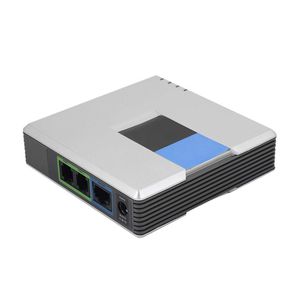
Port: 1 10/100 M RJ-45 network interface, 2 standard telephone interfaces, 1 power interface
Cable type: RJ45 Category 5 twisted pair; RJ11 standard telephone line
Base indicator: Power, Ethernet, telephone (1-2)
Network Protocol: SIP v2
Security features: Key management
Weight: Approx. 280g
Package list:
1 * VoIP Gateway
1 * Power Adapter
1 * User Manual
1 * Network Cable
VoIP Setup Manual:
1. Connect the PAP2 device to the router with a network cable. The phone is also connected to the PAP2 device and connected to the power supply.
2. After the PAP2 device is started, press the phone's :**** (four ''*'' keys) until the phone announces in English. Then, press: 110#, the phone will report the address assigned by the PAP2 device on the router. Of course, the address assigned by each device is different, and pay attention to the phone prompt tone.
For example, the IP address assigned by PAP2 on the router is: 192.168.1.102. Open IE and enter 192.168.1.102 in the address. The following interface will appear.
3. Then, find the administrative entry, admin login. Click the left button to find the following interface. Set up the Line 1 phone (line 2 is the second phone, corresponding to phone 1 and phone 2 on the device, the second phone is set up in the same way as the first phone), fill in the icon, Fill in the server's IP address (this is provided by the VoIP service provider). Fill in your account number and password.
4. The most important step - Save the settings, then VoIP is all set.
Type: VoIP Gateway
Plug type: US (100-240V)
Model: PAP2T-NA PAP2T
DHCP: Support
SIP V2 protocol: Support
Support fax and multi-voice compression G.711, G.726, G.729, G.723.1
Easily complete configuration access encryption through a web browser to automate firmware upgrades
Standard: IEEE 802.3, IEEE 802.3u
Port: 1 10/100 M RJ-45 network interface, 2 standard telephone interfaces, 1 power interface
Cable type: RJ45 Category 5 twisted pair; RJ11 standard telephone line
Base indicator: Power, Ethernet, telephone (1-2)
Network Protocol: SIP v2
Security features: Key management
Weight: Approx. 280g
Package list:
1 * VoIP Gateway
1 * Power Adapter
1 * User Manual
1 * Network Cable
VoIP Setup Manual:
1. Connect the PAP2 device to the router with a network cable. The phone is also connected to the PAP2 device and connected to the power supply.
2. After the PAP2 device is started, press the phone's :**** (four ''*'' keys) until the phone announces in English. Then, press: 110#, the phone will report the address assigned by the PAP2 device on the router. Of course, the address assigned by each device is different, and pay attention to the phone prompt tone.
For example, the IP address assigned by PAP2 on the router is: 192.168.1.102. Open IE and enter 192.168.1.102 in the address. The following interface will appear.
3. Then, find the administrative entry, admin login. Click the left button to find the following interface. Set up the Line 1 phone (line 2 is the second phone, corresponding to phone 1 and phone 2 on the device, the second phone is set up in the same way as the first phone), fill in the icon, Fill in the server's IP address (this is provided by the VoIP service provider). Fill in your account number and password.
4. The most important step - Save the settings, then VoIP is all set.
V BESTLIFE VoIP Gateway Internet Phone 2 Ports Adapter SIP RJ45 Cable for Linksys PAP2T (US Plug)
Current Price
$28.89
Average
$28.44
Min Price
$27.99
Max Price
$28.89
Price dynamics
2%
Description
Specification:
Type: VoIP Gateway
Plug type: US (100-240V)
Model: PAP2T-NA PAP2T
DHCP: Support
SIP V2 protocol: Support
Support fax and multi-voice compression G.711, G.726, G.729, G.723.1
Easily complete configuration access encryption through a web browser to automate firmware upgrades
Standard: IEEE 802.3, IEEE 802.3u
Port: 1 10/100 M RJ-45 network interface, 2 standard telephone interfaces, 1 power interface
Cable type: RJ45 Category 5 twisted pair; RJ11 standard telephone line
Base indicator: Power, Ethernet, telephone (1-2)
Network Protocol: SIP v2
Security features: Key management
Weight: Approx. 280g
Package list:
1 * VoIP Gateway
1 * Power Adapter
1 * User Manual
1 * Network Cable
VoIP Setup Manual:
1. Connect the PAP2 device to the router with a network cable. The phone is also connected to the PAP2 device and connected to the power supply.
2. After the PAP2 device is started, press the phone's :**** (four ''*'' keys) until the phone announces in English. Then, press: 110#, the phone will report the address assigned by the PAP2 device on the router. Of course, the address assigned by each device is different, and pay attention to the phone prompt tone.
For example, the IP address assigned by PAP2 on the router is: 192.168.1.102. Open IE and enter 192.168.1.102 in the address. The following interface will appear.
3. Then, find the administrative entry, admin login. Click the left button to find the following interface. Set up the Line 1 phone (line 2 is the second phone, corresponding to phone 1 and phone 2 on the device, the second phone is set up in the same way as the first phone), fill in the icon, Fill in the server's IP address (this is provided by the VoIP service provider). Fill in your account number and password.
4. The most important step - Save the settings, then VoIP is all set.
Type: VoIP Gateway
Plug type: US (100-240V)
Model: PAP2T-NA PAP2T
DHCP: Support
SIP V2 protocol: Support
Support fax and multi-voice compression G.711, G.726, G.729, G.723.1
Easily complete configuration access encryption through a web browser to automate firmware upgrades
Standard: IEEE 802.3, IEEE 802.3u
Port: 1 10/100 M RJ-45 network interface, 2 standard telephone interfaces, 1 power interface
Cable type: RJ45 Category 5 twisted pair; RJ11 standard telephone line
Base indicator: Power, Ethernet, telephone (1-2)
Network Protocol: SIP v2
Security features: Key management
Weight: Approx. 280g
Package list:
1 * VoIP Gateway
1 * Power Adapter
1 * User Manual
1 * Network Cable
VoIP Setup Manual:
1. Connect the PAP2 device to the router with a network cable. The phone is also connected to the PAP2 device and connected to the power supply.
2. After the PAP2 device is started, press the phone's :**** (four ''*'' keys) until the phone announces in English. Then, press: 110#, the phone will report the address assigned by the PAP2 device on the router. Of course, the address assigned by each device is different, and pay attention to the phone prompt tone.
For example, the IP address assigned by PAP2 on the router is: 192.168.1.102. Open IE and enter 192.168.1.102 in the address. The following interface will appear.
3. Then, find the administrative entry, admin login. Click the left button to find the following interface. Set up the Line 1 phone (line 2 is the second phone, corresponding to phone 1 and phone 2 on the device, the second phone is set up in the same way as the first phone), fill in the icon, Fill in the server's IP address (this is provided by the VoIP service provider). Fill in your account number and password.
4. The most important step - Save the settings, then VoIP is all set.
Price will be lower
in next 2 weeks
in next 2 weeks
According to the data, price will be lower in next two weeks, so not waste your money and track better price!