Description
How To Use?--------ONE-STEP LINK TECHNOLOGY
★First time use - Take out T01L from the charging case, then connect via phone's bluetooth menu.
★Second time use - Just take out T01L from the charging case, then T01L will connect with your mobile phone automatically.
Mono mode :open the charging case and take out two earbuds, two earbuds are automatic pairing,
open the mobile phone Bluetooth to find pairing name and connect to it.
Binaural mode :open the charging case and take out a earbud,open the mobile phone Bluetooth to find pairing name and connect to it.
Black Magic :The primary earbud is left earbud, pairing name is To1, the secondary earbud is right earbud ,pairing name is T01-1.
Before using, please take out the left earbud from the charging case and pair it with the mobile phone successfully,
then put the left earbud back to the charging case.
Next, please take out the right earbud from the charging case and pair it with the mobile phone successfully, then put the right earbud back to the charging case.
After this operation, when you use the single earbud, you can choose either left (T01) or right earbuds (T01-1) to
connect with your mobile phone automatically.
Earbuds reset :In the off state, press and hold the multi-function button for 10 seconds to clear the pairing record between the earbuds and the mobile phone.
Press and hold the multi-function button for 20 seconds to clear the TWS earbuds pairing record.
It is clear that the red and blue lights are on for 1 second at the same time.
( If the earbuds function is abnormal, use this function to reset the earbuds.
For example, the main and secondary earbuds cannot be connected automatically.)
★First time use - Take out T01L from the charging case, then connect via phone's bluetooth menu.
★Second time use - Just take out T01L from the charging case, then T01L will connect with your mobile phone automatically.
Mono mode :open the charging case and take out two earbuds, two earbuds are automatic pairing,
open the mobile phone Bluetooth to find pairing name and connect to it.
Binaural mode :open the charging case and take out a earbud,open the mobile phone Bluetooth to find pairing name and connect to it.
Black Magic :The primary earbud is left earbud, pairing name is To1, the secondary earbud is right earbud ,pairing name is T01-1.
Before using, please take out the left earbud from the charging case and pair it with the mobile phone successfully,
then put the left earbud back to the charging case.
Next, please take out the right earbud from the charging case and pair it with the mobile phone successfully, then put the right earbud back to the charging case.
After this operation, when you use the single earbud, you can choose either left (T01) or right earbuds (T01-1) to
connect with your mobile phone automatically.
Earbuds reset :In the off state, press and hold the multi-function button for 10 seconds to clear the pairing record between the earbuds and the mobile phone.
Press and hold the multi-function button for 20 seconds to clear the TWS earbuds pairing record.
It is clear that the red and blue lights are on for 1 second at the same time.
( If the earbuds function is abnormal, use this function to reset the earbuds.
For example, the main and secondary earbuds cannot be connected automatically.)
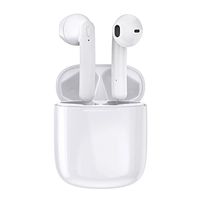
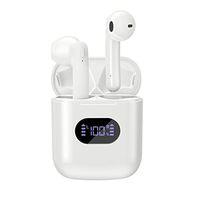
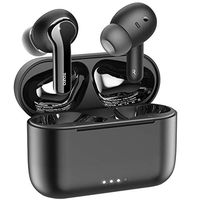
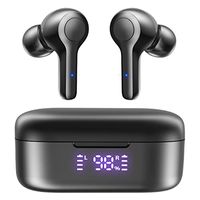
Goyibam TWS 5.0 Stereo Earbuds, True Wireless Bluetooth Headset with Microphone, Sweat Proof IPX5, 20H Playtime, Auto-Pair Wireless Earphones for Huawei iPhone (Black)
Price is below average
Current Price
$35.89
Average
$38.35
Min Price
$22.66
Max Price
$45.89
Price dynamics
6%
Description
How To Use?--------ONE-STEP LINK TECHNOLOGY
★First time use - Take out T01L from the charging case, then connect via phone's bluetooth menu.
★Second time use - Just take out T01L from the charging case, then T01L will connect with your mobile phone automatically.
Mono mode :open the charging case and take out two earbuds, two earbuds are automatic pairing,
open the mobile phone Bluetooth to find pairing name and connect to it.
Binaural mode :open the charging case and take out a earbud,open the mobile phone Bluetooth to find pairing name and connect to it.
Black Magic :The primary earbud is left earbud, pairing name is To1, the secondary earbud is right earbud ,pairing name is T01-1.
Before using, please take out the left earbud from the charging case and pair it with the mobile phone successfully,
then put the left earbud back to the charging case.
Next, please take out the right earbud from the charging case and pair it with the mobile phone successfully, then put the right earbud back to the charging case.
After this operation, when you use the single earbud, you can choose either left (T01) or right earbuds (T01-1) to
connect with your mobile phone automatically.
Earbuds reset :In the off state, press and hold the multi-function button for 10 seconds to clear the pairing record between the earbuds and the mobile phone.
Press and hold the multi-function button for 20 seconds to clear the TWS earbuds pairing record.
It is clear that the red and blue lights are on for 1 second at the same time.
( If the earbuds function is abnormal, use this function to reset the earbuds.
For example, the main and secondary earbuds cannot be connected automatically.)
★First time use - Take out T01L from the charging case, then connect via phone's bluetooth menu.
★Second time use - Just take out T01L from the charging case, then T01L will connect with your mobile phone automatically.
Mono mode :open the charging case and take out two earbuds, two earbuds are automatic pairing,
open the mobile phone Bluetooth to find pairing name and connect to it.
Binaural mode :open the charging case and take out a earbud,open the mobile phone Bluetooth to find pairing name and connect to it.
Black Magic :The primary earbud is left earbud, pairing name is To1, the secondary earbud is right earbud ,pairing name is T01-1.
Before using, please take out the left earbud from the charging case and pair it with the mobile phone successfully,
then put the left earbud back to the charging case.
Next, please take out the right earbud from the charging case and pair it with the mobile phone successfully, then put the right earbud back to the charging case.
After this operation, when you use the single earbud, you can choose either left (T01) or right earbuds (T01-1) to
connect with your mobile phone automatically.
Earbuds reset :In the off state, press and hold the multi-function button for 10 seconds to clear the pairing record between the earbuds and the mobile phone.
Press and hold the multi-function button for 20 seconds to clear the TWS earbuds pairing record.
It is clear that the red and blue lights are on for 1 second at the same time.
( If the earbuds function is abnormal, use this function to reset the earbuds.
For example, the main and secondary earbuds cannot be connected automatically.)
Price will be lower
in next 2 weeks
in next 2 weeks
According to the data, price will be lower in next two weeks, so not waste your money and track better price!
Similar products