- HomeElectronicsAccessories & SuppliesAudio & Video AccessoriesCables & InterconnectsVideo CablesHDMI Cables
Description
with this Macsen HDMI Sync Screen Adapter cable you can play games more fun or share the wonderful moments in your Journey / jobs with your family or friends together on your HDTV or Projector!
Product information
Cable length: 6.6 ft/ 2m.
Video-formats:avi, .divx, .mkv, .ts, .dat, .vob, .mpg, .mpeg, .mov, .mp4, .rm, .rmvb, .wmv,ect.
Picture-formats:JPEG, BMP, ect
Audio-formats:MP1/MP2,/MP3, WMA, OGG, ADPCM-WAV, PCM-WAV, AAC,ect.
File-formats:dobe PDF, MS Word, Ms Excel, Ms Powerpoint, I works,ect.
Screen Share Type:mirror
System support:8.0~12.1
Compatible with: iPhone 5,iphone5s,iphone6,iphone6 plus,iphone6s,iphone 6s plus,iphone7,iphone 7 plus, iPhone 8, iPhone 8 plus, iPhone X XR XS Max, ipad pro, ipad 2, ipad4, ipad air/ ipad air2, ipad mini, ipad mini 2, ipad mini 3, ipad mini 4, ipad Pro iPod touch,iPod nano ect.
Easy to enjoy your favorite local or online entertainment on your HDTV / Projector in up to 1080p HD display movies, TV shows, music, video, audio, photo and more from YouTube, IE browser, Chrome browser and etc.
Easy to Use
1.Connect to HDTV or projector via Macsen HDMI digital AV adapter cable
2.Plug HDMI digital AV adapter cable to your iPhone or iPad
3.Plug USB to power adapter / power bank or outlet
4.Click "trust" and it will sync successfully
NOTE:
1.Please make sure of right wall adapter, 5W for iPhone,10W for iPad. Original wall adapters are the best choices. If lower voltage, it will not work very well.
2.Due to copyright protection, you may not use multi-screen mirroring with some paid contents apps. NOT compatible with Netflix, Amazon Prime videos, Hulu,Comcast tv, HBO go, Honda motor, Xfinity, Vudu, DIRECTV etc, paid video APPs may not support.
Product information
Cable length: 6.6 ft/ 2m.
Video-formats:avi, .divx, .mkv, .ts, .dat, .vob, .mpg, .mpeg, .mov, .mp4, .rm, .rmvb, .wmv,ect.
Picture-formats:JPEG, BMP, ect
Audio-formats:MP1/MP2,/MP3, WMA, OGG, ADPCM-WAV, PCM-WAV, AAC,ect.
File-formats:dobe PDF, MS Word, Ms Excel, Ms Powerpoint, I works,ect.
Screen Share Type:mirror
System support:8.0~12.1
Compatible with: iPhone 5,iphone5s,iphone6,iphone6 plus,iphone6s,iphone 6s plus,iphone7,iphone 7 plus, iPhone 8, iPhone 8 plus, iPhone X XR XS Max, ipad pro, ipad 2, ipad4, ipad air/ ipad air2, ipad mini, ipad mini 2, ipad mini 3, ipad mini 4, ipad Pro iPod touch,iPod nano ect.
Easy to enjoy your favorite local or online entertainment on your HDTV / Projector in up to 1080p HD display movies, TV shows, music, video, audio, photo and more from YouTube, IE browser, Chrome browser and etc.
Easy to Use
1.Connect to HDTV or projector via Macsen HDMI digital AV adapter cable
2.Plug HDMI digital AV adapter cable to your iPhone or iPad
3.Plug USB to power adapter / power bank or outlet
4.Click "trust" and it will sync successfully
NOTE:
1.Please make sure of right wall adapter, 5W for iPhone,10W for iPad. Original wall adapters are the best choices. If lower voltage, it will not work very well.
2.Due to copyright protection, you may not use multi-screen mirroring with some paid contents apps. NOT compatible with Netflix, Amazon Prime videos, Hulu,Comcast tv, HBO go, Honda motor, Xfinity, Vudu, DIRECTV etc, paid video APPs may not support.
HDMI Adapter Cable 6.6ft, Digital AV Converter Compatible with iPhone Xs Max XR X 8 7 6 5 iPad Air Mini 2 4 to HDMI Cable, 1080P HDMI Cord for TV Monitor Projector Support 10.3 to 12 and Later
Current Price
$13.99
Average
$13.99
Min Price
$13.99
Max Price
$13.99
Description
with this Macsen HDMI Sync Screen Adapter cable you can play games more fun or share the wonderful moments in your Journey / jobs with your family or friends together on your HDTV or Projector!
Product information
Cable length: 6.6 ft/ 2m.
Video-formats:avi, .divx, .mkv, .ts, .dat, .vob, .mpg, .mpeg, .mov, .mp4, .rm, .rmvb, .wmv,ect.
Picture-formats:JPEG, BMP, ect
Audio-formats:MP1/MP2,/MP3, WMA, OGG, ADPCM-WAV, PCM-WAV, AAC,ect.
File-formats:dobe PDF, MS Word, Ms Excel, Ms Powerpoint, I works,ect.
Screen Share Type:mirror
System support:8.0~12.1
Compatible with: iPhone 5,iphone5s,iphone6,iphone6 plus,iphone6s,iphone 6s plus,iphone7,iphone 7 plus, iPhone 8, iPhone 8 plus, iPhone X XR XS Max, ipad pro, ipad 2, ipad4, ipad air/ ipad air2, ipad mini, ipad mini 2, ipad mini 3, ipad mini 4, ipad Pro iPod touch,iPod nano ect.
Easy to enjoy your favorite local or online entertainment on your HDTV / Projector in up to 1080p HD display movies, TV shows, music, video, audio, photo and more from YouTube, IE browser, Chrome browser and etc.
Easy to Use
1.Connect to HDTV or projector via Macsen HDMI digital AV adapter cable
2.Plug HDMI digital AV adapter cable to your iPhone or iPad
3.Plug USB to power adapter / power bank or outlet
4.Click "trust" and it will sync successfully
NOTE:
1.Please make sure of right wall adapter, 5W for iPhone,10W for iPad. Original wall adapters are the best choices. If lower voltage, it will not work very well.
2.Due to copyright protection, you may not use multi-screen mirroring with some paid contents apps. NOT compatible with Netflix, Amazon Prime videos, Hulu,Comcast tv, HBO go, Honda motor, Xfinity, Vudu, DIRECTV etc, paid video APPs may not support.
Product information
Cable length: 6.6 ft/ 2m.
Video-formats:avi, .divx, .mkv, .ts, .dat, .vob, .mpg, .mpeg, .mov, .mp4, .rm, .rmvb, .wmv,ect.
Picture-formats:JPEG, BMP, ect
Audio-formats:MP1/MP2,/MP3, WMA, OGG, ADPCM-WAV, PCM-WAV, AAC,ect.
File-formats:dobe PDF, MS Word, Ms Excel, Ms Powerpoint, I works,ect.
Screen Share Type:mirror
System support:8.0~12.1
Compatible with: iPhone 5,iphone5s,iphone6,iphone6 plus,iphone6s,iphone 6s plus,iphone7,iphone 7 plus, iPhone 8, iPhone 8 plus, iPhone X XR XS Max, ipad pro, ipad 2, ipad4, ipad air/ ipad air2, ipad mini, ipad mini 2, ipad mini 3, ipad mini 4, ipad Pro iPod touch,iPod nano ect.
Easy to enjoy your favorite local or online entertainment on your HDTV / Projector in up to 1080p HD display movies, TV shows, music, video, audio, photo and more from YouTube, IE browser, Chrome browser and etc.
Easy to Use
1.Connect to HDTV or projector via Macsen HDMI digital AV adapter cable
2.Plug HDMI digital AV adapter cable to your iPhone or iPad
3.Plug USB to power adapter / power bank or outlet
4.Click "trust" and it will sync successfully
NOTE:
1.Please make sure of right wall adapter, 5W for iPhone,10W for iPad. Original wall adapters are the best choices. If lower voltage, it will not work very well.
2.Due to copyright protection, you may not use multi-screen mirroring with some paid contents apps. NOT compatible with Netflix, Amazon Prime videos, Hulu,Comcast tv, HBO go, Honda motor, Xfinity, Vudu, DIRECTV etc, paid video APPs may not support.
Price will be lower
in next 2 weeks
in next 2 weeks
According to the data, price will be lower in next two weeks, so not waste your money and track better price!
Product review & video
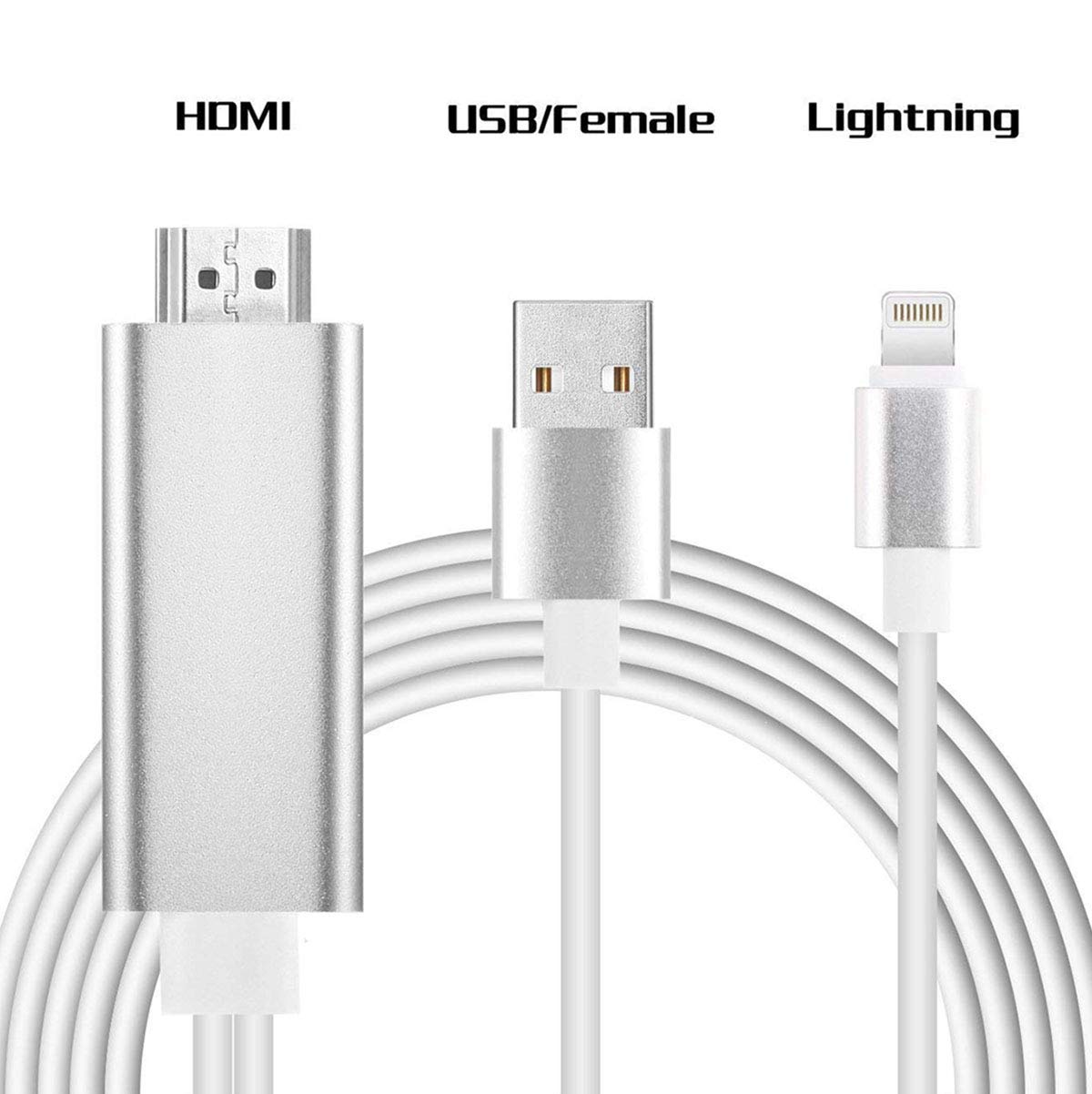
hi everyone today I'm going to introduce this HDMI cable can be for like Apple iPhone 5 iPhone 6 iPad 2 HDMI in this video I'm going to tell you how to connect and how to use this cable so the cable basically could I pull up your phone screen to the TV or to the monitor here I have the cables open so in the package you're going to see the cable and use the manual right in the menu will tell you step by step how to make a condition in this cable is a we have like three hat this hat is the HDMI to connect it to the TV or the monitor and this is a lining adapter complete for your phone and this is the USB lay power support it must be have the power support in order to supply the called cable right this cable is it's a six foot long the good thing about this cable comparing to the Apple is they have the HDMI cable you don't have to like buy the adapter and then you have to buy another HDMI


Similar products