Description
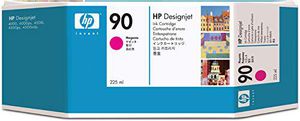
Smart choice. HP 90 ink cartridges produce consistently outstanding results from accurate line drawings to photo-quality color images. Patented dye color and pigment-based Black HP ink formulations are designed together with HP designed 4000 Printers for fast reliable cost-effective performance. To ensure consistent results HP smart printing technology makes automatic adjustments to optimize Print quality and enhance reliability. You get sharp black line accuracy rich color and smooth transitions. (Using genuine HP supplies ensures availability of all HP printing features). with 2 sizes of each color ink cartridge HP printing supplies offer a flexible and cost-effective solution. HP modular ink delivery system enables individual replacement of supplies and allows you to select the cartridge size that fits your usage needs. And HP smart printing technology provides alerts when ink is low or out. 3-Ink multipacks offer significant savings and convenience in addition to value pack bundles.Primary information Product type :&REMPTY nbsp; ink cartridges; printer technology;:&REMPTY nbsp; ink-jet output color :&REMPTY nbsp; magenta capacity :&REMPTY nbsp; 225 ml compatibility;:&REMPTY nbsp; HP designed 4000/4000Ps series printers; header/ model :&REMPTY nbsp; HP 90 225-ml Magenta ink cartridges; service & support type :&REMPTY nbsp; This product has a limited warranty special featurecoo :&REMPTY nbsp; singapore taiwan :&REMPTY nbsp; yes discontinue date :&REMPTY nbsp; 12/31/4712 UNSPSC codeunspsc code :&REMPTY nbsp; 44103105
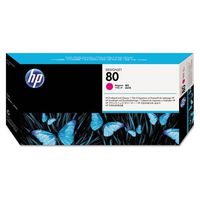
Hewlett Packard C5062A HP 90 Magenta 225 mL Ink Cartridge
Current Price
$186.79
Average
$138.37
Min Price
$107
Max Price
$186.79
Price dynamics
26%
Description
Smart choice. HP 90 ink cartridges produce consistently outstanding results from accurate line drawings to photo-quality color images. Patented dye color and pigment-based Black HP ink formulations are designed together with HP designed 4000 Printers for fast reliable cost-effective performance. To ensure consistent results HP smart printing technology makes automatic adjustments to optimize Print quality and enhance reliability. You get sharp black line accuracy rich color and smooth transitions. (Using genuine HP supplies ensures availability of all HP printing features). with 2 sizes of each color ink cartridge HP printing supplies offer a flexible and cost-effective solution. HP modular ink delivery system enables individual replacement of supplies and allows you to select the cartridge size that fits your usage needs. And HP smart printing technology provides alerts when ink is low or out. 3-Ink multipacks offer significant savings and convenience in addition to value pack bundles.Primary information Product type :&REMPTY nbsp; ink cartridges; printer technology;:&REMPTY nbsp; ink-jet output color :&REMPTY nbsp; magenta capacity :&REMPTY nbsp; 225 ml compatibility;:&REMPTY nbsp; HP designed 4000/4000Ps series printers; header/ model :&REMPTY nbsp; HP 90 225-ml Magenta ink cartridges; service & support type :&REMPTY nbsp; This product has a limited warranty special featurecoo :&REMPTY nbsp; singapore taiwan :&REMPTY nbsp; yes discontinue date :&REMPTY nbsp; 12/31/4712 UNSPSC codeunspsc code :&REMPTY nbsp; 44103105
Price will be lower
in next 2 weeks
in next 2 weeks
According to the data, price will be lower in next two weeks, so not waste your money and track better price!
Product review & video
Hi, this is Eric from LD Products and I'm
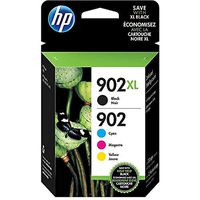
here today to show you how to replace an HP 902 cartridge in your HP Officejet 6978 printer. A brand new Officejet Pro 6978 includes: 902
setup cartridges which feature four different colors: black, cyan, magenta, and yellow. The nice about this printer is you can replace
each color as needed. If you're running low on black you can just
replace the black, or running low on magenta you can just replace the magenta. Cartridges are sold in a standard yield and
a high yield or XL size which offers considerably more ink. If you're getting poor print results, the
first thing you want to do is check the ink levels on your cartridge. The way you do that on this particular printer
is by hitting the setup button here, it's that little wheel in the corner. Scroll down to cartridge information and it's
going to show you your ink levels. Here we can see that


Similar products