Description
FAQ:
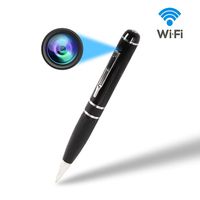
1: Q: Why can't i find/connect the wifi(CM......)(or can not the find the camera on app)? A:First, please wait for a minute ; Second, maybe the camera is low battery, you should charge the camera about 4-6hours; Third: Please reset the camera, press the "Reset" button about 5 seconds or Until the indicator light goes off (or press the "Reset" hole via using a pin).
2:Q: SD card cannot save files.
A: First: SD must be formatted for first use. Second: Before Insert a micro sd card into the card slot, please make sure the camera is turned off.
3:Q:The video in SD card can not be played fluently on APP
A:It is due to different decoding capacity of mobile phones. You can adjust the definition of recording device to fit your mobile phone.
4:Q:The passwords are forgotten
A:Please reset the camera, Then set the camera to your home wifi(original password: 8888)
5:Q:Why does the camera after 1st using, show 'Device offline' on my app
A:First: maybe the camera is low battery, as it wasn't full charged as default setting. you should charge the camera about 4-6hours, if not this reason please contact our serves.
6: Q:How can I know when the camera is out of battery? When should I charge it?
A:More than 4 hours connection please charge your camera clock. After 3hours charging, you can reset up your spy camera again. If you want to non-stop recording, you can use it while charging.
Feature:
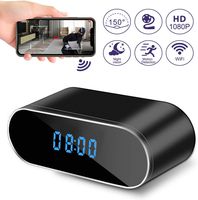
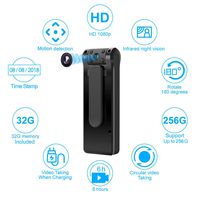
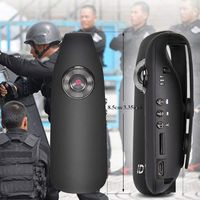
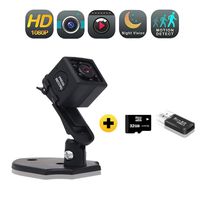
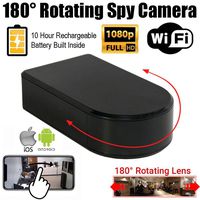
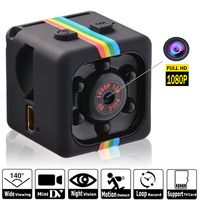
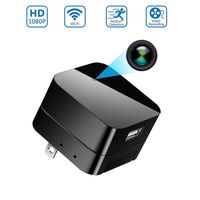
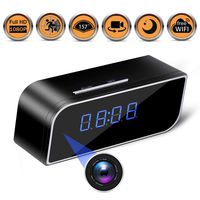
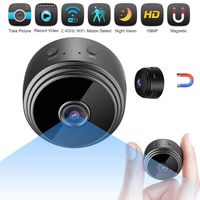
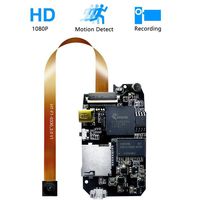
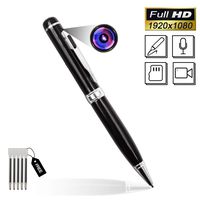
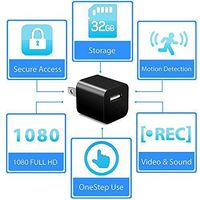
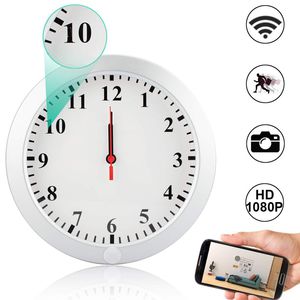
1) Real-time Video Recording, Support 1920x1080P Full HD Video Resolution
2) Video Format: H.264 25FPS AVI
3) Angle: 90°
4) Support Audio Recording, Support Motion Detection Recording, Support Snapshot, Support 64GB TF Card in max(Not included)
5) Distance of motion detection shooting:6 m straight-line distance
6) Rechargeable Battery Built-in ,Battery Capacity: 2000mAh
7) Continuous shooting time: Abov
1: Q: Why can't i find/connect the wifi(CM......)(or can not the find the camera on app)? A:First, please wait for a minute ; Second, maybe the camera is low battery, you should charge the camera about 4-6hours; Third: Please reset the camera, press the "Reset" button about 5 seconds or Until the indicator light goes off (or press the "Reset" hole via using a pin).
2:Q: SD card cannot save files.
A: First: SD must be formatted for first use. Second: Before Insert a micro sd card into the card slot, please make sure the camera is turned off.
3:Q:The video in SD card can not be played fluently on APP
A:It is due to different decoding capacity of mobile phones. You can adjust the definition of recording device to fit your mobile phone.
4:Q:The passwords are forgotten
A:Please reset the camera, Then set the camera to your home wifi(original password: 8888)
5:Q:Why does the camera after 1st using, show 'Device offline' on my app
A:First: maybe the camera is low battery, as it wasn't full charged as default setting. you should charge the camera about 4-6hours, if not this reason please contact our serves.
6: Q:How can I know when the camera is out of battery? When should I charge it?
A:More than 4 hours connection please charge your camera clock. After 3hours charging, you can reset up your spy camera again. If you want to non-stop recording, you can use it while charging.
Feature:
1) Real-time Video Recording, Support 1920x1080P Full HD Video Resolution
2) Video Format: H.264 25FPS AVI
3) Angle: 90°
4) Support Audio Recording, Support Motion Detection Recording, Support Snapshot, Support 64GB TF Card in max(Not included)
5) Distance of motion detection shooting:6 m straight-line distance
6) Rechargeable Battery Built-in ,Battery Capacity: 2000mAh
7) Continuous shooting time: Abov
Hidden Spy Wall Clock Camera, Camakt 1080P HD WiFi Wireless Digital Hidden Nanny Cam with Motion Detection/Loop Recording Cover Security Camera
Current Price
$65.99
Average
$65.99
Min Price
$65.99
Max Price
$65.99
Description
FAQ:
1: Q: Why can't i find/connect the wifi(CM......)(or can not the find the camera on app)? A:First, please wait for a minute ; Second, maybe the camera is low battery, you should charge the camera about 4-6hours; Third: Please reset the camera, press the "Reset" button about 5 seconds or Until the indicator light goes off (or press the "Reset" hole via using a pin).
2:Q: SD card cannot save files.
A: First: SD must be formatted for first use. Second: Before Insert a micro sd card into the card slot, please make sure the camera is turned off.
3:Q:The video in SD card can not be played fluently on APP
A:It is due to different decoding capacity of mobile phones. You can adjust the definition of recording device to fit your mobile phone.
4:Q:The passwords are forgotten
A:Please reset the camera, Then set the camera to your home wifi(original password: 8888)
5:Q:Why does the camera after 1st using, show 'Device offline' on my app
A:First: maybe the camera is low battery, as it wasn't full charged as default setting. you should charge the camera about 4-6hours, if not this reason please contact our serves.
6: Q:How can I know when the camera is out of battery? When should I charge it?
A:More than 4 hours connection please charge your camera clock. After 3hours charging, you can reset up your spy camera again. If you want to non-stop recording, you can use it while charging.
Feature:
1) Real-time Video Recording, Support 1920x1080P Full HD Video Resolution
2) Video Format: H.264 25FPS AVI
3) Angle: 90°
4) Support Audio Recording, Support Motion Detection Recording, Support Snapshot, Support 64GB TF Card in max(Not included)
5) Distance of motion detection shooting:6 m straight-line distance
6) Rechargeable Battery Built-in ,Battery Capacity: 2000mAh
7) Continuous shooting time: Abov
1: Q: Why can't i find/connect the wifi(CM......)(or can not the find the camera on app)? A:First, please wait for a minute ; Second, maybe the camera is low battery, you should charge the camera about 4-6hours; Third: Please reset the camera, press the "Reset" button about 5 seconds or Until the indicator light goes off (or press the "Reset" hole via using a pin).
2:Q: SD card cannot save files.
A: First: SD must be formatted for first use. Second: Before Insert a micro sd card into the card slot, please make sure the camera is turned off.
3:Q:The video in SD card can not be played fluently on APP
A:It is due to different decoding capacity of mobile phones. You can adjust the definition of recording device to fit your mobile phone.
4:Q:The passwords are forgotten
A:Please reset the camera, Then set the camera to your home wifi(original password: 8888)
5:Q:Why does the camera after 1st using, show 'Device offline' on my app
A:First: maybe the camera is low battery, as it wasn't full charged as default setting. you should charge the camera about 4-6hours, if not this reason please contact our serves.
6: Q:How can I know when the camera is out of battery? When should I charge it?
A:More than 4 hours connection please charge your camera clock. After 3hours charging, you can reset up your spy camera again. If you want to non-stop recording, you can use it while charging.
Feature:
1) Real-time Video Recording, Support 1920x1080P Full HD Video Resolution
2) Video Format: H.264 25FPS AVI
3) Angle: 90°
4) Support Audio Recording, Support Motion Detection Recording, Support Snapshot, Support 64GB TF Card in max(Not included)
5) Distance of motion detection shooting:6 m straight-line distance
6) Rechargeable Battery Built-in ,Battery Capacity: 2000mAh
7) Continuous shooting time: Abov
Price will be lower
in next 2 weeks
in next 2 weeks
According to the data, price will be lower in next two weeks, so not waste your money and track better price!
Similar products