- HomeElectronicsPortable Audio & VideoMP3 & MP4 Player AccessoriesBluetooth & FM TransmittersFM Transmitters
Description
Specifications:
Output Power: 100mW
Modulation Mode: standard FM
Equivalent Noise: >=30dB
Power Supply Voltage: DC 3.0V-5.0V
Operating Current: 35mA
Adaptive Antenna: 75cm bar antenna
Audio Frequency Response Range: 50Hz-18 KHz
Transmission Frequency: 76.0MHz to 108.0MHz (Campus broadcast: 76.0MHz-87.0MHz)
Frequency Adjustment Stepping: 0.1MHz/times (short press the key); 1.0MHz/times (long press the key)
Sound Track: LINE/USB channel (stereo); MIC channel (single channel)
Settings:
1. Setting of backlight LED mode
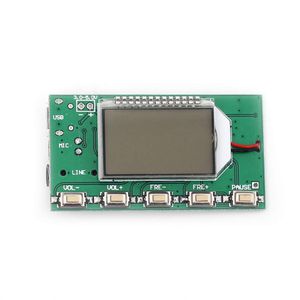
When the power is off, press the "FRE-" and "FRE+" button at the same time to start up. B1 indicates always bright. B0 indicates that the backlight is closed for 20 seconds, and the reset setting takes effect. (the factory defaults to 20 seconds of backlight delay).
2. Start/close the campus radio frequency band
Press VOL+ and VOL- key at the same time, and then connect the power supply.
LCD displays C1, which means to start the campus broadcast(76-87mhz). C0 means closing the campus radio frequency band.
Take effect after restart. (the factory defaults to close the campus radio frequency band).
3. Settings of stereo/mono transmission mode
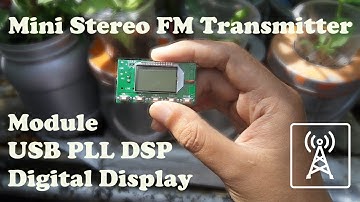
The back of the module has two solder joints M,G. Short connecting is the monophonic launch. Disconnecting these two points is the stereo system launch. (the factory defaults to stereo system launch).
Note: the stereo system must satisfy the input to the module's audio source is stereo and the radio is also stereo to achieve the stereo effect. When using a single speaker (monophonic) radio or input to the module's audio signal as mono, there is no stereo.
Package Includes:
1 * Digital FM Transmitter Module
Output Power: 100mW
Modulation Mode: standard FM
Equivalent Noise: >=30dB
Power Supply Voltage: DC 3.0V-5.0V
Operating Current: 35mA
Adaptive Antenna: 75cm bar antenna
Audio Frequency Response Range: 50Hz-18 KHz
Transmission Frequency: 76.0MHz to 108.0MHz (Campus broadcast: 76.0MHz-87.0MHz)
Frequency Adjustment Stepping: 0.1MHz/times (short press the key); 1.0MHz/times (long press the key)
Sound Track: LINE/USB channel (stereo); MIC channel (single channel)
Settings:
1. Setting of backlight LED mode
When the power is off, press the "FRE-" and "FRE+" button at the same time to start up. B1 indicates always bright. B0 indicates that the backlight is closed for 20 seconds, and the reset setting takes effect. (the factory defaults to 20 seconds of backlight delay).
2. Start/close the campus radio frequency band
Press VOL+ and VOL- key at the same time, and then connect the power supply.
LCD displays C1, which means to start the campus broadcast(76-87mhz). C0 means closing the campus radio frequency band.
Take effect after restart. (the factory defaults to close the campus radio frequency band).
3. Settings of stereo/mono transmission mode
The back of the module has two solder joints M,G. Short connecting is the monophonic launch. Disconnecting these two points is the stereo system launch. (the factory defaults to stereo system launch).
Note: the stereo system must satisfy the input to the module's audio source is stereo and the radio is also stereo to achieve the stereo effect. When using a single speaker (monophonic) radio or input to the module's audio signal as mono, there is no stereo.
Package Includes:
1 * Digital FM Transmitter Module
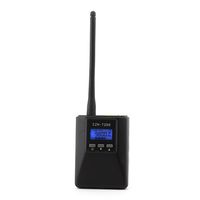
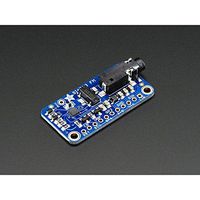
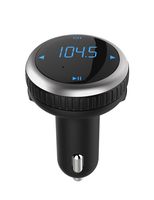
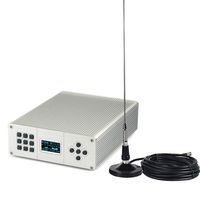
HiLetgo Digital FM Transmitter Module FM Transmitter Stereo Frequency Modulation DSP PLL 76.0-108.0MHz Multi-Function Frequency Modulation with LCD Display
Current Price
$12.49
Average
$12.49
Min Price
$12.49
Max Price
$12.49
Description
Specifications:
Output Power: 100mW
Modulation Mode: standard FM
Equivalent Noise: >=30dB
Power Supply Voltage: DC 3.0V-5.0V
Operating Current: 35mA
Adaptive Antenna: 75cm bar antenna
Audio Frequency Response Range: 50Hz-18 KHz
Transmission Frequency: 76.0MHz to 108.0MHz (Campus broadcast: 76.0MHz-87.0MHz)
Frequency Adjustment Stepping: 0.1MHz/times (short press the key); 1.0MHz/times (long press the key)
Sound Track: LINE/USB channel (stereo); MIC channel (single channel)
Settings:
1. Setting of backlight LED mode
When the power is off, press the "FRE-" and "FRE+" button at the same time to start up. B1 indicates always bright. B0 indicates that the backlight is closed for 20 seconds, and the reset setting takes effect. (the factory defaults to 20 seconds of backlight delay).
2. Start/close the campus radio frequency band
Press VOL+ and VOL- key at the same time, and then connect the power supply.
LCD displays C1, which means to start the campus broadcast(76-87mhz). C0 means closing the campus radio frequency band.
Take effect after restart. (the factory defaults to close the campus radio frequency band).
3. Settings of stereo/mono transmission mode
The back of the module has two solder joints M,G. Short connecting is the monophonic launch. Disconnecting these two points is the stereo system launch. (the factory defaults to stereo system launch).
Note: the stereo system must satisfy the input to the module's audio source is stereo and the radio is also stereo to achieve the stereo effect. When using a single speaker (monophonic) radio or input to the module's audio signal as mono, there is no stereo.
Package Includes:
1 * Digital FM Transmitter Module
Output Power: 100mW
Modulation Mode: standard FM
Equivalent Noise: >=30dB
Power Supply Voltage: DC 3.0V-5.0V
Operating Current: 35mA
Adaptive Antenna: 75cm bar antenna
Audio Frequency Response Range: 50Hz-18 KHz
Transmission Frequency: 76.0MHz to 108.0MHz (Campus broadcast: 76.0MHz-87.0MHz)
Frequency Adjustment Stepping: 0.1MHz/times (short press the key); 1.0MHz/times (long press the key)
Sound Track: LINE/USB channel (stereo); MIC channel (single channel)
Settings:
1. Setting of backlight LED mode
When the power is off, press the "FRE-" and "FRE+" button at the same time to start up. B1 indicates always bright. B0 indicates that the backlight is closed for 20 seconds, and the reset setting takes effect. (the factory defaults to 20 seconds of backlight delay).
2. Start/close the campus radio frequency band
Press VOL+ and VOL- key at the same time, and then connect the power supply.
LCD displays C1, which means to start the campus broadcast(76-87mhz). C0 means closing the campus radio frequency band.
Take effect after restart. (the factory defaults to close the campus radio frequency band).
3. Settings of stereo/mono transmission mode
The back of the module has two solder joints M,G. Short connecting is the monophonic launch. Disconnecting these two points is the stereo system launch. (the factory defaults to stereo system launch).
Note: the stereo system must satisfy the input to the module's audio source is stereo and the radio is also stereo to achieve the stereo effect. When using a single speaker (monophonic) radio or input to the module's audio signal as mono, there is no stereo.
Package Includes:
1 * Digital FM Transmitter Module
Price will be lower
in next 2 weeks
in next 2 weeks
According to the data, price will be lower in next two weeks, so not waste your money and track better price!
Product review & video
[Music] [Music] [Music] [Music] [Music] [Music] [Music] [Music] [Music] [Music] [Music] [Music] [Music] [Music]

Similar products