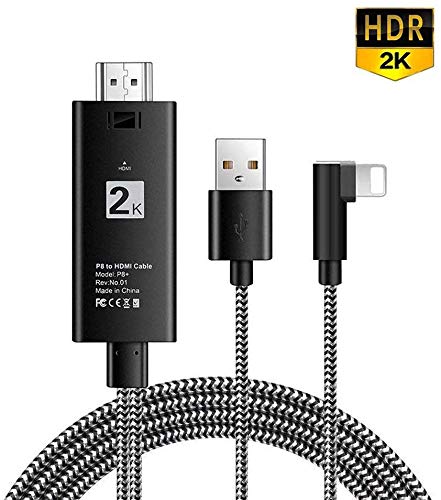
Hoidokly Phone to HDMI cable
Important note:
1.make sure that you plug the adapter cable to the power supply first before you use it. 5V/1A for Phone and 5V/2-2.4A for Pad ,it perfect if you use the original charger adapter
2.Due to copyright protection measures, you may not use multi-screen mirroring with some paid contents including Netflix, HULU, Prime videos, DIRECTV and other paid videos, please refer to the terms and conditions of those apps.
3. When it starts working, the battery sign suddenly jump to 100% charged. This is our programming language.It seems overcharge the phone and cause some misunderstanding. But it doesn't cause any danger and never ruin your phone.
4.This compatible with Phone to HDMI adapter cable isn't designed for charging purposes. It is mainly charge for the devices to make it work.
5.Only can connect the device which has HDMI interface, do not connect computer or laptop or tablet.
6.It works in full screen if the screen is within 70 inches, otherwise it won't.
7.If you have any questions, please email us and we will reply within 24 hours.
How to use:
1. Plug USB to power adapter or outlet
2.Plug HDMI cable to your TV(output device) and switch the TV(output device) to HDMI channel.
3. Plug data cable to your Cellphone or Tablet directly.
4. Click trust and it will sync successfully
5.It may show" not support this accessory" after you click "trust",please click close and wait ten seconds then it's OK
sales:
If you have any query or suggestion, just feel free to contact with us, 24hours friendly e-mail back! Thanks for supporting!









![USB C to HDMI Cable, uni [4K, High-Speed] USB Type C to HDMI Cable for Home Office, [Thunderbolt 3 Compatible] for MacBook Pro/Air 2020, iPad Air 4, iPad Pro 2021, iMac, S21, XPS 17, and More-6ft](https://use4coins.com/thumbs/unsafe/fit-in/200x200/https://images-na.ssl-images-amazon.com/images/I/41tTOcI7-KL.jpg)