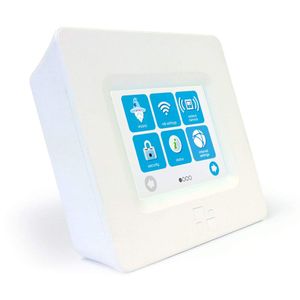
Description
HomeScreen (3 Minute Setup) TouchScreen
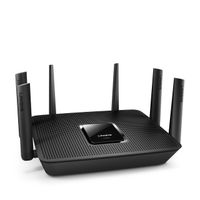
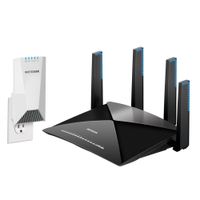
Effortlessly create a new WIFI network or extend your existing one with HomeScreen! It delivers blazing-fast dual-band 802.11ac signal. HomeScreen comes with an integrated touch screen, Cloud control (via any desktop, iOS/Android device), and custom apps add-ons. HomeScreen ensures quick and straightforward setup. Simply turn on the power, run the setup wizard, connect and go!
HomeScreen can be used as a dedicated dual-band wireless router (NOTE: doesn't replace your modem). It also works as a network range extender (2.4 GHz only). The Guest Networking feature is a great solution if you're running an office, hotel, restaurant, or other public space. You can limit the network access of your guests and protect your primary network from malware or network worms. Some experts recommend connecting your smart home appliances to the guest network too. This prevents any potential hacker from gaining access to your primary network's data.
HomeScreen is compatible with any internet modem (Cable, Fiber, DSL, etc.), with any provider (Comcast, Time Warner, Verizon, etc.). It also comes with built-in apps that allow you to monitor and control devices connected to the network.HomeScreen's touchscreen can also display the time, weather, or photos stored on your Cloud. Connect the stand on the back of HomeScreen, and you get an instant digital picture frame! Its attractive design can fit on your countertop or living room.
TECHNICAL SPECS:
Effortlessly create a new WIFI network or extend your existing one with HomeScreen! It delivers blazing-fast dual-band 802.11ac signal. HomeScreen comes with an integrated touch screen, Cloud control (via any desktop, iOS/Android device), and custom apps add-ons. HomeScreen ensures quick and straightforward setup. Simply turn on the power, run the setup wizard, connect and go!
HomeScreen can be used as a dedicated dual-band wireless router (NOTE: doesn't replace your modem). It also works as a network range extender (2.4 GHz only). The Guest Networking feature is a great solution if you're running an office, hotel, restaurant, or other public space. You can limit the network access of your guests and protect your primary network from malware or network worms. Some experts recommend connecting your smart home appliances to the guest network too. This prevents any potential hacker from gaining access to your primary network's data.
HomeScreen is compatible with any internet modem (Cable, Fiber, DSL, etc.), with any provider (Comcast, Time Warner, Verizon, etc.). It also comes with built-in apps that allow you to monitor and control devices connected to the network.HomeScreen's touchscreen can also display the time, weather, or photos stored on your Cloud. Connect the stand on the back of HomeScreen, and you get an instant digital picture frame! Its attractive design can fit on your countertop or living room.
TECHNICAL SPECS:
- Wireless Connection: Dual Band 802.11 AC, Also Supports a/b/g/n
- Modes: Wireless Router, Range Extender
- Software Features: Guest Network, MAC Filtering, USB File Sharing
- Other Features: ZigBee Home Automation 1.2, DMZ, Firewall, Port Forwarding, UPnP
- Security Types: WEP, WPA, WPA2
- Ports: 1 USB 2.0, 1 WAN, 2 LAN
- Power Supply: 12V, 1A (Input: 110V - 220V, 50-60 Hz)
- Dimensions: 4.5 x 4.2 x 1.4"
HomeScreen (3 Minute Setup) TouchScreen Dual Band Wireless Router / Range Extender AC750 (802.11ac)
Price is below average
Current Price
$14.99
Average
$65.86
Min Price
$14.99
Max Price
$138
Price dynamics
77%
Description
HomeScreen (3 Minute Setup) TouchScreen
Effortlessly create a new WIFI network or extend your existing one with HomeScreen! It delivers blazing-fast dual-band 802.11ac signal. HomeScreen comes with an integrated touch screen, Cloud control (via any desktop, iOS/Android device), and custom apps add-ons. HomeScreen ensures quick and straightforward setup. Simply turn on the power, run the setup wizard, connect and go!
HomeScreen can be used as a dedicated dual-band wireless router (NOTE: doesn't replace your modem). It also works as a network range extender (2.4 GHz only). The Guest Networking feature is a great solution if you're running an office, hotel, restaurant, or other public space. You can limit the network access of your guests and protect your primary network from malware or network worms. Some experts recommend connecting your smart home appliances to the guest network too. This prevents any potential hacker from gaining access to your primary network's data.
HomeScreen is compatible with any internet modem (Cable, Fiber, DSL, etc.), with any provider (Comcast, Time Warner, Verizon, etc.). It also comes with built-in apps that allow you to monitor and control devices connected to the network.HomeScreen's touchscreen can also display the time, weather, or photos stored on your Cloud. Connect the stand on the back of HomeScreen, and you get an instant digital picture frame! Its attractive design can fit on your countertop or living room.
TECHNICAL SPECS:
Effortlessly create a new WIFI network or extend your existing one with HomeScreen! It delivers blazing-fast dual-band 802.11ac signal. HomeScreen comes with an integrated touch screen, Cloud control (via any desktop, iOS/Android device), and custom apps add-ons. HomeScreen ensures quick and straightforward setup. Simply turn on the power, run the setup wizard, connect and go!
HomeScreen can be used as a dedicated dual-band wireless router (NOTE: doesn't replace your modem). It also works as a network range extender (2.4 GHz only). The Guest Networking feature is a great solution if you're running an office, hotel, restaurant, or other public space. You can limit the network access of your guests and protect your primary network from malware or network worms. Some experts recommend connecting your smart home appliances to the guest network too. This prevents any potential hacker from gaining access to your primary network's data.
HomeScreen is compatible with any internet modem (Cable, Fiber, DSL, etc.), with any provider (Comcast, Time Warner, Verizon, etc.). It also comes with built-in apps that allow you to monitor and control devices connected to the network.HomeScreen's touchscreen can also display the time, weather, or photos stored on your Cloud. Connect the stand on the back of HomeScreen, and you get an instant digital picture frame! Its attractive design can fit on your countertop or living room.
TECHNICAL SPECS:
- Wireless Connection: Dual Band 802.11 AC, Also Supports a/b/g/n
- Modes: Wireless Router, Range Extender
- Software Features: Guest Network, MAC Filtering, USB File Sharing
- Other Features: ZigBee Home Automation 1.2, DMZ, Firewall, Port Forwarding, UPnP
- Security Types: WEP, WPA, WPA2
- Ports: 1 USB 2.0, 1 WAN, 2 LAN
- Power Supply: 12V, 1A (Input: 110V - 220V, 50-60 Hz)
- Dimensions: 4.5 x 4.2 x 1.4"
Price will be lower
in next 2 weeks
in next 2 weeks
According to the data, price will be lower in next two weeks, so not waste your money and track better price!
Product review & video
hey what's up guys today we will be taking a closer look at a smart router as well as a Wi-Fi extender from homescreen calling this router a smart router as it is easy to set up has a touchscreen and can be controlled by an app available both for iOS and Android inside the box we get the router itself we will come to this in a bit then we have the kickstand power adapter and the ethernet cable let's take a closer look at the router now on the front we have the touchscreen to set up this device and at the back we have three LAN ports one USB port to connect an external storage for file-sharing and then we have the power input to this side we also get a stylus to control the touch screen of this device which is really nice so powering it up for the first time here we have the main screen now let's set this device let's go on to wizard and start wizard then we need to select between router