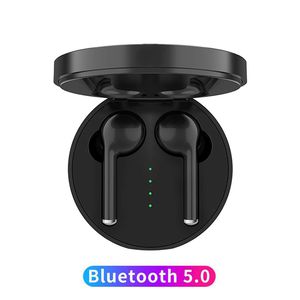
Description
Honktai Bluetooth Headset TW40 Wireless Earbud Noise Cancelling Stereo Bluetooth 5.0 Headphones Built in Mic Headset HiFi in Ear Headphones
MAIN FEATURES
True Wireless Design: Bluetooth Version: 5.0+edr
HD Stereo Sound
Built-in Microphones
Auto Paring and Wide Compatibilitys.
Single/Twin Mode
HOW TO PAIR?
First Time use:
-1.Take out both headphones from the charging box, they will be
automatically powered on and pairing.
-2.Turn on the Bluetooth of your phone or other Bluetooth devices.
-3.Click "TW40" in your device, then enjoy your music time!
Second Time use:
The headphone will automatically connect the last paired Bluetooth
device, no need of pairing again.
HOW TO USE THE TOUCH FUNCTION?
Click: Play/Pause, Answer phone call
Double Clicks: Left earbud for next song; right earbud for previous
song; Rejecting phone call
Triple clicks: Left ear voice volume +; right ear voice volume -
Five clicks: switch language in English and Chinese
Long Press 2 seconds: Activate Siri(IOS user only)
Long press 5 seconds: Power On/Off
HOW TO CHARGE?
To charge the earbuds
Simply put the earbud into the charging box, then cover the case. it
will be charging. When charging, the charging case indicator is
on, and the earbuds indicators are red.
When it is fuly charged, all LED indicators will be off.
To charge the charging case
Use DC 5V power to charge the charging box, when it is fully charged,
the 4 LED indicators will be all on
WHAT YOU GET
2 xbluetooth Earbuds
1 x Charging Case
1 x USB Charging Cable
3x Pair of Ear Pads (S / M/ L)
1 x User's Manual
MAIN FEATURES
True Wireless Design: Bluetooth Version: 5.0+edr
HD Stereo Sound
Built-in Microphones
Auto Paring and Wide Compatibilitys.
Single/Twin Mode
HOW TO PAIR?
First Time use:
-1.Take out both headphones from the charging box, they will be
automatically powered on and pairing.
-2.Turn on the Bluetooth of your phone or other Bluetooth devices.
-3.Click "TW40" in your device, then enjoy your music time!
Second Time use:
The headphone will automatically connect the last paired Bluetooth
device, no need of pairing again.
HOW TO USE THE TOUCH FUNCTION?
Click: Play/Pause, Answer phone call
Double Clicks: Left earbud for next song; right earbud for previous
song; Rejecting phone call
Triple clicks: Left ear voice volume +; right ear voice volume -
Five clicks: switch language in English and Chinese
Long Press 2 seconds: Activate Siri(IOS user only)
Long press 5 seconds: Power On/Off
HOW TO CHARGE?
To charge the earbuds
Simply put the earbud into the charging box, then cover the case. it
will be charging. When charging, the charging case indicator is
on, and the earbuds indicators are red.
When it is fuly charged, all LED indicators will be off.
To charge the charging case
Use DC 5V power to charge the charging box, when it is fully charged,
the 4 LED indicators will be all on
WHAT YOU GET
2 xbluetooth Earbuds
1 x Charging Case
1 x USB Charging Cable
3x Pair of Ear Pads (S / M/ L)
1 x User's Manual
HonkTai Bluetooth Headset TW40 Wireless Earbuds Noise Cancelling Stereo Bluetooth 5.0 Headphones Built in Mic Headset Sports in Ear Headphones Black
Current Price
$39.99
Average
$39.99
Min Price
$39.99
Max Price
$39.99
Description
Honktai Bluetooth Headset TW40 Wireless Earbud Noise Cancelling Stereo Bluetooth 5.0 Headphones Built in Mic Headset HiFi in Ear Headphones
MAIN FEATURES
True Wireless Design: Bluetooth Version: 5.0+edr
HD Stereo Sound
Built-in Microphones
Auto Paring and Wide Compatibilitys.
Single/Twin Mode
HOW TO PAIR?
First Time use:
-1.Take out both headphones from the charging box, they will be
automatically powered on and pairing.
-2.Turn on the Bluetooth of your phone or other Bluetooth devices.
-3.Click "TW40" in your device, then enjoy your music time!
Second Time use:
The headphone will automatically connect the last paired Bluetooth
device, no need of pairing again.
HOW TO USE THE TOUCH FUNCTION?
Click: Play/Pause, Answer phone call
Double Clicks: Left earbud for next song; right earbud for previous
song; Rejecting phone call
Triple clicks: Left ear voice volume +; right ear voice volume -
Five clicks: switch language in English and Chinese
Long Press 2 seconds: Activate Siri(IOS user only)
Long press 5 seconds: Power On/Off
HOW TO CHARGE?
To charge the earbuds
Simply put the earbud into the charging box, then cover the case. it
will be charging. When charging, the charging case indicator is
on, and the earbuds indicators are red.
When it is fuly charged, all LED indicators will be off.
To charge the charging case
Use DC 5V power to charge the charging box, when it is fully charged,
the 4 LED indicators will be all on
WHAT YOU GET
2 xbluetooth Earbuds
1 x Charging Case
1 x USB Charging Cable
3x Pair of Ear Pads (S / M/ L)
1 x User's Manual
MAIN FEATURES
True Wireless Design: Bluetooth Version: 5.0+edr
HD Stereo Sound
Built-in Microphones
Auto Paring and Wide Compatibilitys.
Single/Twin Mode
HOW TO PAIR?
First Time use:
-1.Take out both headphones from the charging box, they will be
automatically powered on and pairing.
-2.Turn on the Bluetooth of your phone or other Bluetooth devices.
-3.Click "TW40" in your device, then enjoy your music time!
Second Time use:
The headphone will automatically connect the last paired Bluetooth
device, no need of pairing again.
HOW TO USE THE TOUCH FUNCTION?
Click: Play/Pause, Answer phone call
Double Clicks: Left earbud for next song; right earbud for previous
song; Rejecting phone call
Triple clicks: Left ear voice volume +; right ear voice volume -
Five clicks: switch language in English and Chinese
Long Press 2 seconds: Activate Siri(IOS user only)
Long press 5 seconds: Power On/Off
HOW TO CHARGE?
To charge the earbuds
Simply put the earbud into the charging box, then cover the case. it
will be charging. When charging, the charging case indicator is
on, and the earbuds indicators are red.
When it is fuly charged, all LED indicators will be off.
To charge the charging case
Use DC 5V power to charge the charging box, when it is fully charged,
the 4 LED indicators will be all on
WHAT YOU GET
2 xbluetooth Earbuds
1 x Charging Case
1 x USB Charging Cable
3x Pair of Ear Pads (S / M/ L)
1 x User's Manual
Price will be lower
in next 2 weeks
in next 2 weeks
According to the data, price will be lower in next two weeks, so not waste your money and track better price!
Product review & video
hey everyone Digital David here today we're gonna be unboxing and reviewing the aguilar bluetooth 5.0 tws wireless earbuds they did send me this product review but any opinion expressed this video is strictly my own that being said if you're interested in this product the link to it will be in my video description below please go ahead check it out and do your shopping from there so here's how it comes packaged in a really nice retail box just says tws earphones on the front we have some cool logos on both the top and the bottom showing a phone icon a Wi-Fi icon we have a music icon a battery icon and a microphone icon so now guys let's go ahead let's open them up here all the package contents first up we have a really helpful user guide and user manual we have two additional earbuds for you we have your USB to microUSB charging cable and last but not least we have the earbuds themselve



Similar products



































