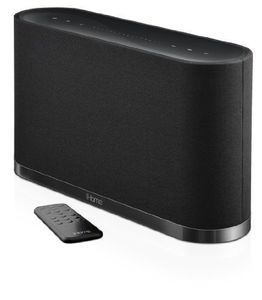
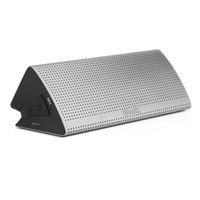
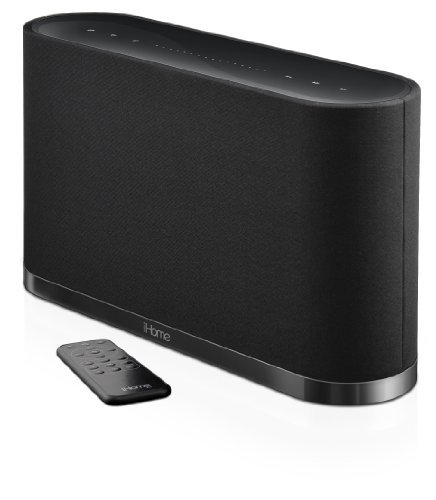
Play your music, in any room, wirelessly. With a slick, minimal design, iHome's iW1 is an elegant implementation of Apple's AirPlay technology. Stream your music from AirPlay sources--iTunes, iPod touch, iPhone, and iPad--anywhere you have a home Wi-Fi network. Enjoy remote control of your streaming playback, and digital processing from Bongiovi for uncompromising sound. You can also charge and playback your Apple device via USB, or connect nearly any audio player via an auxiliary input.
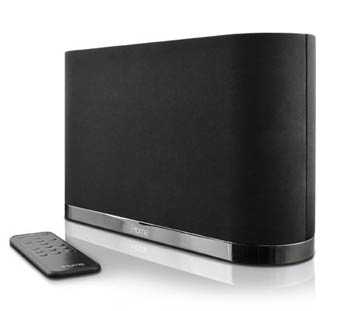
Go Wireless
Works with AirPlay
Stream wireless music directly to the iW1 via iTunes, iPad, iPhone, and iPod touch. AirPlay is a built-in feature in Apple devices that lets users stream audio wirelessly, wherever there is a Wi-Fi network.
Note: For AirPlay, the iW1 must be connected to Wi-Fi with networked access to a Mac or PC running iTunes 10.1 or later; or an iPad, iPhone, or iPod touch running iOS 4.2 or later.
Remote Control of Streaming Playback
Device in the other room? No problem, the iW1 supports play/pause, next track, previous track, and volume control of iPad, iPhone, iPod touch, and iTunes music playback from the speaker control panels, as well as the included IR remote.
Easy Setup
The iW1 is a breeze to get working, with a simple network setup and custom device naming. Just grab iHome Connect, a free app available on the App Store for iPad, iPhone, and iPod touch. Launch the app, connect via USB, and follow simple on-screen menus to configure Wi-Fi. You'll be enjoying AirPlay a few minutes after un-boxing.
iHome iW1 AirPlay Wireless Stereo Speaker System with Rechargeable Battery OPEN BOX OPEN BOX
Play your music, in any room, wirelessly. With a slick, minimal design, iHome's iW1 is an elegant implementation of Apple's AirPlay technology. Stream your music from AirPlay sources--iTunes, iPod touch, iPhone, and iPad--anywhere you have a home Wi-Fi network. Enjoy remote control of your streaming playback, and digital processing from Bongiovi for uncompromising sound. You can also charge and playback your Apple device via USB, or connect nearly any audio player via an auxiliary input.
Go Wireless
Works with AirPlay
Stream wireless music directly to the iW1 via iTunes, iPad, iPhone, and iPod touch. AirPlay is a built-in feature in Apple devices that lets users stream audio wirelessly, wherever there is a Wi-Fi network.
Note: For AirPlay, the iW1 must be connected to Wi-Fi with networked access to a Mac or PC running iTunes 10.1 or later; or an iPad, iPhone, or iPod touch running iOS 4.2 or later.
Remote Control of Streaming Playback
Device in the other room? No problem, the iW1 supports play/pause, next track, previous track, and volume control of iPad, iPhone, iPod touch, and iTunes music playback from the speaker control panels, as well as the included IR remote.
Easy Setup
The iW1 is a breeze to get working, with a simple network setup and custom device naming. Just grab iHome Connect, a free app available on the App Store for iPad, iPhone, and iPod touch. Launch the app, connect via USB, and follow simple on-screen menus to configure Wi-Fi. You'll be enjoying AirPlay a few minutes after un-boxing.
in next 2 weeks









By clicking "Accept All", you consent to our use of cookies.