Description
This Product is Designed, Assembled, and Distributed in the USA.
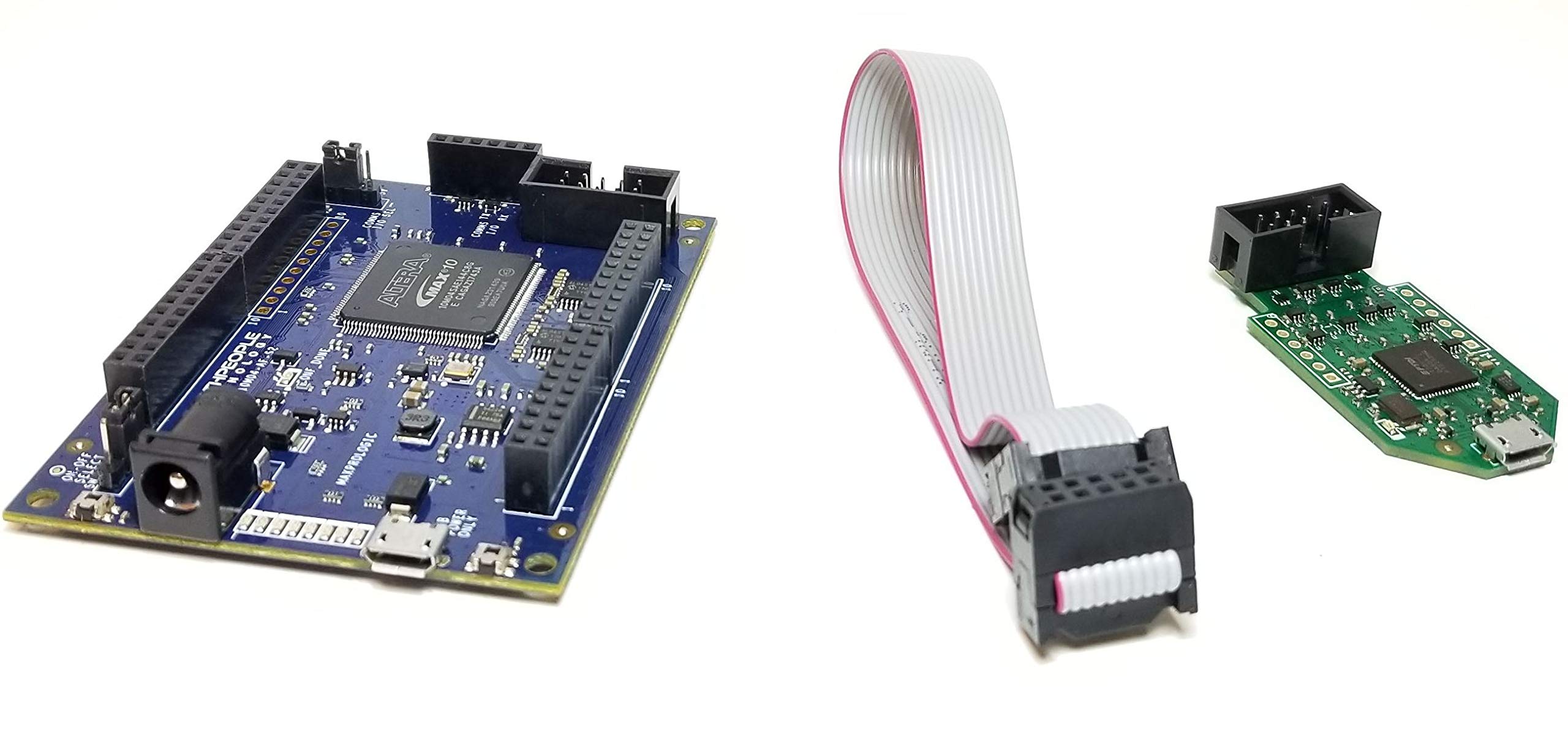
The MaxProLogic is an FPGA development board that is designed to be user friendly and a great introduction into digital design for anyone.
The core of the MaxProLogic is the Altera MAX10 FPGA. This powerful chip has 4,000 Logic Elements and 200Kbits of Memory. The MAX10 is easily scalable from the entry level college student to the most advanced projects like an audio sound meter with FFT.
Upon the many great features of the MaxProLogic is the MAX10 chip has a built in Flash for configuration and incorporates 8 channels of Analog to Digital Conversion.
It allows the user to create more diverse projects. The MaxProLogic is designed to make digital design easy and cost effective.
At Earth People Technology we have years of experience helping students and hobbyists get started with FPGA design. We know that the learning curve in getting started can be a time consuming and frustrating event. So, we created a User Manual that walks the user from unpacking to creating the first project to creating an epic project that will get attention. The Learning Curve with any new piece of hardware is always time consuming. We painstakingly crafted a guide that leaves out no details in creating a project under the Quartus Software Tool.
We will explain how to organize project user files into a folder system for easy navigation. We will explain how to: · Create a Project, · Add User Files · Add MegaFunction IP Files · Add Synopsys Design Constraints, · Assign Inputs and Outputs to pins of the MAX10 · Compile the Design · Synthesize the Project ·
Program into the MAX10 The MaxProLogic leverages the Quartus Prime Lite Software for compilation and synethsis. This software tool is completely free and provides very powerful tools for the user. Also included free in the software tools is the simulation tool, ModelSim.
The MaxProLogic is an FPGA development board that is designed to be user friendly and a great introduction into digital design for anyone.
The core of the MaxProLogic is the Altera MAX10 FPGA. This powerful chip has 4,000 Logic Elements and 200Kbits of Memory. The MAX10 is easily scalable from the entry level college student to the most advanced projects like an audio sound meter with FFT.
Upon the many great features of the MaxProLogic is the MAX10 chip has a built in Flash for configuration and incorporates 8 channels of Analog to Digital Conversion.
It allows the user to create more diverse projects. The MaxProLogic is designed to make digital design easy and cost effective.
At Earth People Technology we have years of experience helping students and hobbyists get started with FPGA design. We know that the learning curve in getting started can be a time consuming and frustrating event. So, we created a User Manual that walks the user from unpacking to creating the first project to creating an epic project that will get attention. The Learning Curve with any new piece of hardware is always time consuming. We painstakingly crafted a guide that leaves out no details in creating a project under the Quartus Software Tool.
We will explain how to organize project user files into a folder system for easy navigation. We will explain how to: · Create a Project, · Add User Files · Add MegaFunction IP Files · Add Synopsys Design Constraints, · Assign Inputs and Outputs to pins of the MAX10 · Compile the Design · Synthesize the Project ·
Program into the MAX10 The MaxProLogic leverages the Quartus Prime Lite Software for compilation and synethsis. This software tool is completely free and provides very powerful tools for the user. Also included free in the software tools is the simulation tool, ModelSim.
Intel/Altera MAX10 FPGA Max Package - MaxPro + JTAG + Cable
Current Price
$54.99
Average
$54.99
Min Price
$54.99
Max Price
$54.99
Description
This Product is Designed, Assembled, and Distributed in the USA.
The MaxProLogic is an FPGA development board that is designed to be user friendly and a great introduction into digital design for anyone.
The core of the MaxProLogic is the Altera MAX10 FPGA. This powerful chip has 4,000 Logic Elements and 200Kbits of Memory. The MAX10 is easily scalable from the entry level college student to the most advanced projects like an audio sound meter with FFT.
Upon the many great features of the MaxProLogic is the MAX10 chip has a built in Flash for configuration and incorporates 8 channels of Analog to Digital Conversion.
It allows the user to create more diverse projects. The MaxProLogic is designed to make digital design easy and cost effective.
At Earth People Technology we have years of experience helping students and hobbyists get started with FPGA design. We know that the learning curve in getting started can be a time consuming and frustrating event. So, we created a User Manual that walks the user from unpacking to creating the first project to creating an epic project that will get attention. The Learning Curve with any new piece of hardware is always time consuming. We painstakingly crafted a guide that leaves out no details in creating a project under the Quartus Software Tool.
We will explain how to organize project user files into a folder system for easy navigation. We will explain how to: · Create a Project, · Add User Files · Add MegaFunction IP Files · Add Synopsys Design Constraints, · Assign Inputs and Outputs to pins of the MAX10 · Compile the Design · Synthesize the Project ·
Program into the MAX10 The MaxProLogic leverages the Quartus Prime Lite Software for compilation and synethsis. This software tool is completely free and provides very powerful tools for the user. Also included free in the software tools is the simulation tool, ModelSim.
The MaxProLogic is an FPGA development board that is designed to be user friendly and a great introduction into digital design for anyone.
The core of the MaxProLogic is the Altera MAX10 FPGA. This powerful chip has 4,000 Logic Elements and 200Kbits of Memory. The MAX10 is easily scalable from the entry level college student to the most advanced projects like an audio sound meter with FFT.
Upon the many great features of the MaxProLogic is the MAX10 chip has a built in Flash for configuration and incorporates 8 channels of Analog to Digital Conversion.
It allows the user to create more diverse projects. The MaxProLogic is designed to make digital design easy and cost effective.
At Earth People Technology we have years of experience helping students and hobbyists get started with FPGA design. We know that the learning curve in getting started can be a time consuming and frustrating event. So, we created a User Manual that walks the user from unpacking to creating the first project to creating an epic project that will get attention. The Learning Curve with any new piece of hardware is always time consuming. We painstakingly crafted a guide that leaves out no details in creating a project under the Quartus Software Tool.
We will explain how to organize project user files into a folder system for easy navigation. We will explain how to: · Create a Project, · Add User Files · Add MegaFunction IP Files · Add Synopsys Design Constraints, · Assign Inputs and Outputs to pins of the MAX10 · Compile the Design · Synthesize the Project ·
Program into the MAX10 The MaxProLogic leverages the Quartus Prime Lite Software for compilation and synethsis. This software tool is completely free and provides very powerful tools for the user. Also included free in the software tools is the simulation tool, ModelSim.
Price will be lower
in next 2 weeks
in next 2 weeks
According to the data, price will be lower in next two weeks, so not waste your money and track better price!
Product review & video
okay so the first thing that we're gonna need to do in order to get started with the B Micromax 10 is we're gonna need to download the Quartus software package and this can be found on the Altera website i've already gone to the download center and I've actually logged into my own account I will put this link in the description of the video so you can easily get to this page and then you're also going to need to create an account the only thing that you're gonna need to do is give them a valid email address and a password and you're good to go so once you've created an account we can scroll down to the different versions of their software since we're gonna be programming on the B Micromax 10 we can select by device so we can go to the Mac series here and max10 there and what we're gonna do is use the free version and that is the web Edition there so let's do the 15th version which is on

Similar products