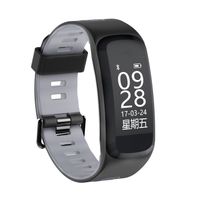
Description
The Other Features:
1. Messages reminder/Message push When there is new message, the device will vibrate to remind you and display the message on screen. The corresponding message displays the corresponding icon,it will retain the current 3 messages.And the messages support Multi-language display: Russian, English, Spanish, French, German, Italian, Portuguese,Ukrainian, Czech, Turkish, Japanese
2. More Function Incoming call remind, Drink water reminder, Alarm clock, Sedentary reminder, Find bracelet, Remote control camera.
Specification:
Screen Material: Color TFT
Charge: USB charger cable
Chip: nordic52832
Connection: Bluetooth 4.0
Screen Size: 1.3inch
Water resistant: IP67
Battery type: Polymer lithium battery
Capacity: 180mah
How to Use the Smart Watch?
(1) Fully charging the device before using.
(2) Open the [GPS] of your phone.
(3) Start scanning two-dimensional code to download the APP named [WearHealth] in your phone,you can find it
on the back of the retail box,or in the User Manual.There are three kinds to choose,please choose the system
of your phone to download.
(4) After the download is complete,new user registration or third-party login.
(5) Then Open the bluetooth of your phone and make sure it is on. (Do not connect the fitness tracker directly
via the bluetooth,follow the next step).
(6) Enter the app->Click [Mine]->Click [Connect a bracelet ]->Find the Q9 bluetooth name then connect it
successfully,and fill in the weaer's personal information.
(7) According to your own habits to star set the bracelet setting
More setting can be setup in the APP:Mine > Device Management.
1. Messages reminder/Message push When there is new message, the device will vibrate to remind you and display the message on screen. The corresponding message displays the corresponding icon,it will retain the current 3 messages.And the messages support Multi-language display: Russian, English, Spanish, French, German, Italian, Portuguese,Ukrainian, Czech, Turkish, Japanese
2. More Function Incoming call remind, Drink water reminder, Alarm clock, Sedentary reminder, Find bracelet, Remote control camera.
Specification:
Screen Material: Color TFT
Charge: USB charger cable
Chip: nordic52832
Connection: Bluetooth 4.0
Screen Size: 1.3inch
Water resistant: IP67
Battery type: Polymer lithium battery
Capacity: 180mah
How to Use the Smart Watch?
(1) Fully charging the device before using.
(2) Open the [GPS] of your phone.
(3) Start scanning two-dimensional code to download the APP named [WearHealth] in your phone,you can find it
on the back of the retail box,or in the User Manual.There are three kinds to choose,please choose the system
of your phone to download.
(4) After the download is complete,new user registration or third-party login.
(5) Then Open the bluetooth of your phone and make sure it is on. (Do not connect the fitness tracker directly
via the bluetooth,follow the next step).
(6) Enter the app->Click [Mine]->Click [Connect a bracelet ]->Find the Q9 bluetooth name then connect it
successfully,and fill in the weaer's personal information.
(7) According to your own habits to star set the bracelet setting
More setting can be setup in the APP:Mine > Device Management.
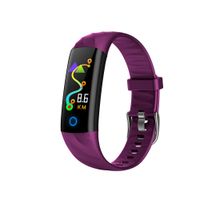
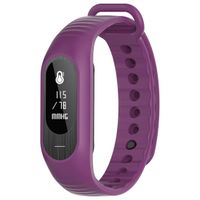
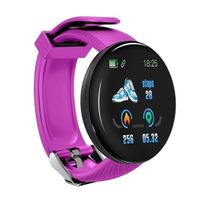
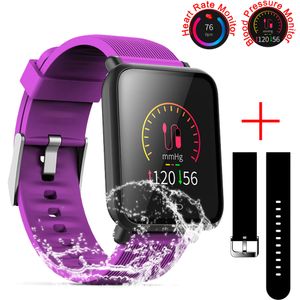
SZHAIYU Blood Pressure Heart Rate Monitor Smart Watch Android iOS IP67 Waterproof Sport Fitness Trakcer Watch Men Women Smartwatch (Purple)
Current Price
$37.99
Average
$37.99
Min Price
$34.99
Max Price
$42.99
Price dynamics
0%
Description
The Other Features:
1. Messages reminder/Message push When there is new message, the device will vibrate to remind you and display the message on screen. The corresponding message displays the corresponding icon,it will retain the current 3 messages.And the messages support Multi-language display: Russian, English, Spanish, French, German, Italian, Portuguese,Ukrainian, Czech, Turkish, Japanese
2. More Function Incoming call remind, Drink water reminder, Alarm clock, Sedentary reminder, Find bracelet, Remote control camera.
Specification:
Screen Material: Color TFT
Charge: USB charger cable
Chip: nordic52832
Connection: Bluetooth 4.0
Screen Size: 1.3inch
Water resistant: IP67
Battery type: Polymer lithium battery
Capacity: 180mah
How to Use the Smart Watch?
(1) Fully charging the device before using.
(2) Open the [GPS] of your phone.
(3) Start scanning two-dimensional code to download the APP named [WearHealth] in your phone,you can find it
on the back of the retail box,or in the User Manual.There are three kinds to choose,please choose the system
of your phone to download.
(4) After the download is complete,new user registration or third-party login.
(5) Then Open the bluetooth of your phone and make sure it is on. (Do not connect the fitness tracker directly
via the bluetooth,follow the next step).
(6) Enter the app->Click [Mine]->Click [Connect a bracelet ]->Find the Q9 bluetooth name then connect it
successfully,and fill in the weaer's personal information.
(7) According to your own habits to star set the bracelet setting
More setting can be setup in the APP:Mine > Device Management.
1. Messages reminder/Message push When there is new message, the device will vibrate to remind you and display the message on screen. The corresponding message displays the corresponding icon,it will retain the current 3 messages.And the messages support Multi-language display: Russian, English, Spanish, French, German, Italian, Portuguese,Ukrainian, Czech, Turkish, Japanese
2. More Function Incoming call remind, Drink water reminder, Alarm clock, Sedentary reminder, Find bracelet, Remote control camera.
Specification:
Screen Material: Color TFT
Charge: USB charger cable
Chip: nordic52832
Connection: Bluetooth 4.0
Screen Size: 1.3inch
Water resistant: IP67
Battery type: Polymer lithium battery
Capacity: 180mah
How to Use the Smart Watch?
(1) Fully charging the device before using.
(2) Open the [GPS] of your phone.
(3) Start scanning two-dimensional code to download the APP named [WearHealth] in your phone,you can find it
on the back of the retail box,or in the User Manual.There are three kinds to choose,please choose the system
of your phone to download.
(4) After the download is complete,new user registration or third-party login.
(5) Then Open the bluetooth of your phone and make sure it is on. (Do not connect the fitness tracker directly
via the bluetooth,follow the next step).
(6) Enter the app->Click [Mine]->Click [Connect a bracelet ]->Find the Q9 bluetooth name then connect it
successfully,and fill in the weaer's personal information.
(7) According to your own habits to star set the bracelet setting
More setting can be setup in the APP:Mine > Device Management.
Price will be lower
in next 2 weeks
in next 2 weeks
According to the data, price will be lower in next two weeks, so not waste your money and track better price!
Product review & video
hello guys welcome back to my channel I have come back with another product review video today I will be doing a product review today on lintel Eck SmartWatch now this is this has been a very popular product in Amazon and I have been reading a lot of good reviews for this watch and this is a really good looking decent watch I really liked the outer part out a design of this watch a lot and I got this watch in the mail yesterday is on the price was was very very very reasonable the price was only $35.99 with tax so this is a very reasonable SmartWatch I didn't on and so I figured out certain things that I like about it and certain things that I did so I can I can do a review on it so that you could also decide for yourself you wanna buy this watch and if it's worth it free alright guys so this was my lintel a smart watch that I received yesterday it came in does kind of a solid pretty bo


Similar products