- HomeElectronicsAccessories & SuppliesAudio & Video AccessoriesCables & InterconnectsVideo CablesHDMI Cables
Description
Description:
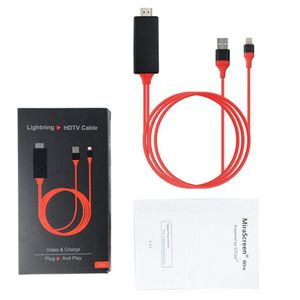
Plug & Play,Support for iPhone 7 & iPhone 7 Plus IPhone 8 & iPhone X
Use the Lightning Digital AV Cable with your iPhone, iPad with Lightning connector. The Lightning Digital AV Cable supports mirroring of what is displayed on your device screen ? including apps, presentations, websites, slideshows, and more ? to your HDMI-equipped TV, display, projector, or other compatible display in up to 1080p HD.
the second lightning interface can connect the device to a compatible HDMI display, could charge your device and sync at the same time.
Specification: Size: about 2m long (6.56ft)
Using Instruction
1.Connect the Lightning port to your phone;
2.Connect the USB port to power supply;
3.Connect the HDMI port to your TV or device with HDMI port;
4.Then a access permission notice will show up on your phone asking you if the device is allowed to visit your phone;
5.Please permit and then you will see your phone screen on your device. Done
Attention:
1.Most important:Your phone should be set to allow the device access firstly or it won't work due to no permission. You can check the setting first.
2.Power supply Over 5V,2A will be suitable and better not connect to PC in case of not enouth power
3.The HDMI on TV or monitor is compatible but notebook HDMI might not work with this device. Please kindly understand this.
Compatible :
iPhone 6
iPhone 6 Plus
iPhone 6s
iPhone 6s Plus
iPhone 7
iPhone 7 Plus
iPhone 8
iPhone 8 Plus
iPhone X
Package included : 1 x Dock Lightning to HDTV HDMI AV Cable Data
"
Plug & Play,Support for iPhone 7 & iPhone 7 Plus IPhone 8 & iPhone X
Use the Lightning Digital AV Cable with your iPhone, iPad with Lightning connector. The Lightning Digital AV Cable supports mirroring of what is displayed on your device screen ? including apps, presentations, websites, slideshows, and more ? to your HDMI-equipped TV, display, projector, or other compatible display in up to 1080p HD.
the second lightning interface can connect the device to a compatible HDMI display, could charge your device and sync at the same time.
Specification: Size: about 2m long (6.56ft)
Using Instruction
1.Connect the Lightning port to your phone;
2.Connect the USB port to power supply;
3.Connect the HDMI port to your TV or device with HDMI port;
4.Then a access permission notice will show up on your phone asking you if the device is allowed to visit your phone;
5.Please permit and then you will see your phone screen on your device. Done
Attention:
1.Most important:Your phone should be set to allow the device access firstly or it won't work due to no permission. You can check the setting first.
2.Power supply Over 5V,2A will be suitable and better not connect to PC in case of not enouth power
3.The HDMI on TV or monitor is compatible but notebook HDMI might not work with this device. Please kindly understand this.
Compatible :
iPhone 6
iPhone 6 Plus
iPhone 6s
iPhone 6s Plus
iPhone 7
iPhone 7 Plus
iPhone 8
iPhone 8 Plus
iPhone X
Package included : 1 x Dock Lightning to HDTV HDMI AV Cable Data
"
Jiad Kde for iPhone Screen to TV HDMI Cable 1080p 3 in 1 iOS & Android Adapter USB Charger Converter Cellphone Screen to TV/Projector/Monitor Adapter
Price is below average
Current Price
$8.7
Average
$8.83
Min Price
$8.7
Max Price
$8.99
Price dynamics
1%
Description
Description:
Plug & Play,Support for iPhone 7 & iPhone 7 Plus IPhone 8 & iPhone X
Use the Lightning Digital AV Cable with your iPhone, iPad with Lightning connector. The Lightning Digital AV Cable supports mirroring of what is displayed on your device screen ? including apps, presentations, websites, slideshows, and more ? to your HDMI-equipped TV, display, projector, or other compatible display in up to 1080p HD.
the second lightning interface can connect the device to a compatible HDMI display, could charge your device and sync at the same time.
Specification: Size: about 2m long (6.56ft)
Using Instruction
1.Connect the Lightning port to your phone;
2.Connect the USB port to power supply;
3.Connect the HDMI port to your TV or device with HDMI port;
4.Then a access permission notice will show up on your phone asking you if the device is allowed to visit your phone;
5.Please permit and then you will see your phone screen on your device. Done
Attention:
1.Most important:Your phone should be set to allow the device access firstly or it won't work due to no permission. You can check the setting first.
2.Power supply Over 5V,2A will be suitable and better not connect to PC in case of not enouth power
3.The HDMI on TV or monitor is compatible but notebook HDMI might not work with this device. Please kindly understand this.
Compatible :
iPhone 6
iPhone 6 Plus
iPhone 6s
iPhone 6s Plus
iPhone 7
iPhone 7 Plus
iPhone 8
iPhone 8 Plus
iPhone X
Package included : 1 x Dock Lightning to HDTV HDMI AV Cable Data
"
Plug & Play,Support for iPhone 7 & iPhone 7 Plus IPhone 8 & iPhone X
Use the Lightning Digital AV Cable with your iPhone, iPad with Lightning connector. The Lightning Digital AV Cable supports mirroring of what is displayed on your device screen ? including apps, presentations, websites, slideshows, and more ? to your HDMI-equipped TV, display, projector, or other compatible display in up to 1080p HD.
the second lightning interface can connect the device to a compatible HDMI display, could charge your device and sync at the same time.
Specification: Size: about 2m long (6.56ft)
Using Instruction
1.Connect the Lightning port to your phone;
2.Connect the USB port to power supply;
3.Connect the HDMI port to your TV or device with HDMI port;
4.Then a access permission notice will show up on your phone asking you if the device is allowed to visit your phone;
5.Please permit and then you will see your phone screen on your device. Done
Attention:
1.Most important:Your phone should be set to allow the device access firstly or it won't work due to no permission. You can check the setting first.
2.Power supply Over 5V,2A will be suitable and better not connect to PC in case of not enouth power
3.The HDMI on TV or monitor is compatible but notebook HDMI might not work with this device. Please kindly understand this.
Compatible :
iPhone 6
iPhone 6 Plus
iPhone 6s
iPhone 6s Plus
iPhone 7
iPhone 7 Plus
iPhone 8
iPhone 8 Plus
iPhone X
Package included : 1 x Dock Lightning to HDTV HDMI AV Cable Data
"
Price will be lower
in next 2 weeks
in next 2 weeks
According to the data, price will be lower in next two weeks, so not waste your money and track better price!
Product review & video
what's up guys this is Tammy Tech and I'm going to show you three ways to connect your phone to your TV screen let's go ahead and get started now the first way we're gonna be using an adapter this is an HDMI to type see I have an Android Samsung s9 phone which uses a taxi they also make cables for micro USB to HDMI now you can use this adapter connecting to an existing HDMI cable that's connected to your TV or you can connect this cable right here which is a longer extension cable and it's type C and connect that to your phone and of course the HDMI connects to one of the inputs on your TV and put one two or three as long as you have a free HDMI input that's good to go so with this adapter you simply just plug it in to your phone like so and plug it into an existing HDMI cable you can take it from your cable box or your PlayStation 4 whatever device is using HDMI cable but make sure you



Similar products






































