Description
<1>.Type: Plug & Play Rechargeable Li-ion Battery
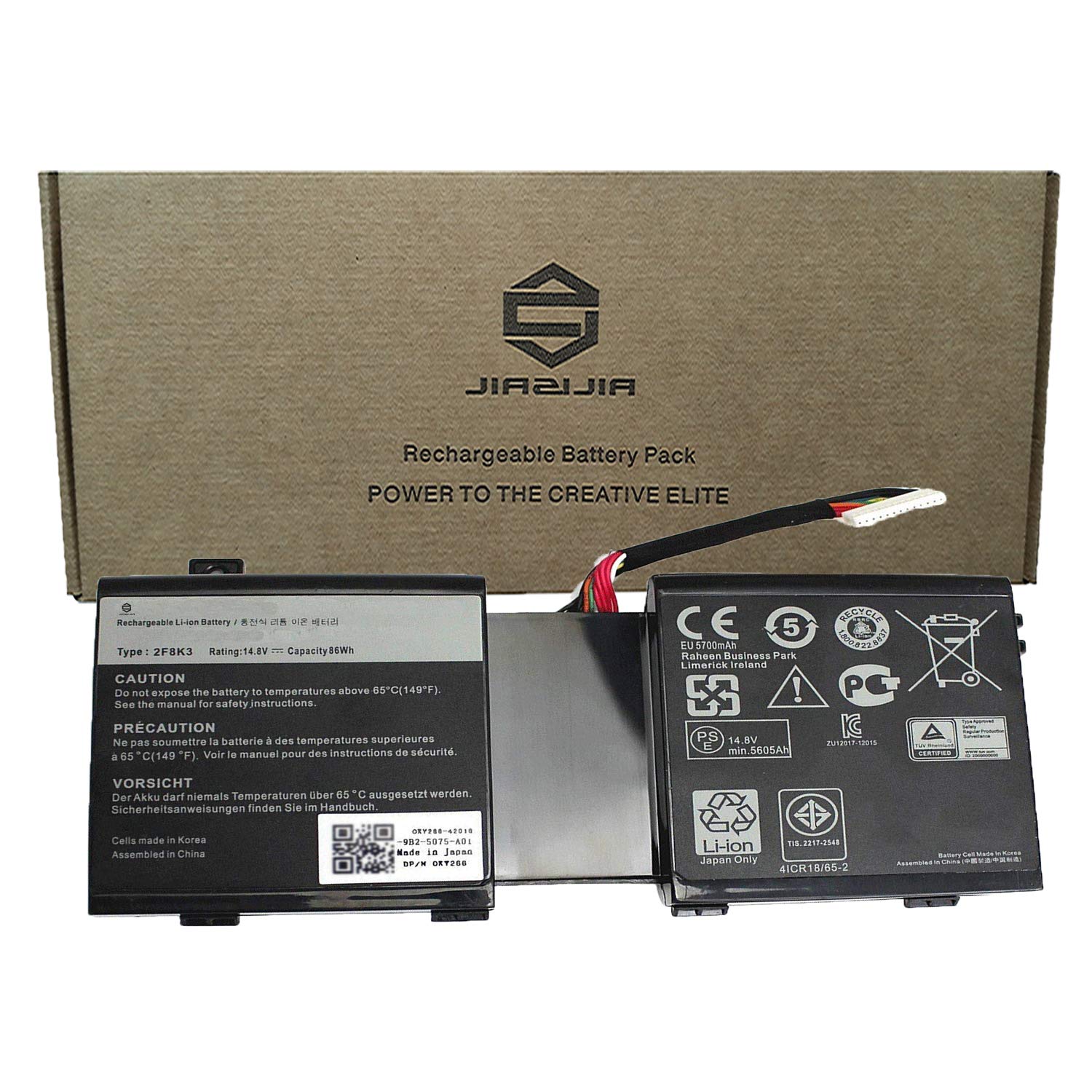
<2>.Model: 2F8K3
<3>.Voltage: 14.8V
<4>.Capatity: 86Wh 5605mAh
<5>.Interface: Refer to the picture! Please check it!
<6>.Color: Black
<7>.Warranty: 1 year warranty , 30 days' money back guarantee !
<8>.Replace Battery Part Number:
2F8K3 0XY266 KJ2PX 0KJ2PX G33TT 0G33TT
<9>.Compatible with: (use "ctrl+F" to find out your model quickly)
Fit for Dell Alienware 17 18 18X M17X R5 M18X R3 Series
<10>.Package included:
1X 2F8K3 Laptop Battery.
<11>.Note:
1.Before placing your order, we highly suggest you to open the back case of your latptop and check out the exact part number of your laptop's original battery.
2.Discharge the new battery use to 5%(not to 0%) and then charge to 95%, and cycle 3-4 times.
3.Do not disassemble, crush or puncture. Do not dispose of in fire or water.
4.If you remove battery for a long time, charge more than 80% at least one time within one months.
5.Don't connect adapter for a long time while using the battery. It may damage the battery.
6.When using the battery, care should be taken to prevent exposure and moisture.
<2>.Model: 2F8K3
<3>.Voltage: 14.8V
<4>.Capatity: 86Wh 5605mAh
<5>.Interface: Refer to the picture! Please check it!
<6>.Color: Black
<7>.Warranty: 1 year warranty , 30 days' money back guarantee !
<8>.Replace Battery Part Number:
2F8K3 0XY266 KJ2PX 0KJ2PX G33TT 0G33TT
<9>.Compatible with: (use "ctrl+F" to find out your model quickly)
Fit for Dell Alienware 17 18 18X M17X R5 M18X R3 Series
<10>.Package included:
1X 2F8K3 Laptop Battery.
<11>.Note:
1.Before placing your order, we highly suggest you to open the back case of your latptop and check out the exact part number of your laptop's original battery.
2.Discharge the new battery use to 5%(not to 0%) and then charge to 95%, and cycle 3-4 times.
3.Do not disassemble, crush or puncture. Do not dispose of in fire or water.
4.If you remove battery for a long time, charge more than 80% at least one time within one months.
5.Don't connect adapter for a long time while using the battery. It may damage the battery.
6.When using the battery, care should be taken to prevent exposure and moisture.
JIAZIJIA 2F8K3 Laptop Battery Replacement for DeLL Alienware 17 18 18X M17X R5 M18X R3 Series Notebook 0XY266 KJ2PX 0KJ2PX G33TT 0G33TT Black 14.8V 86Wh 5605mAh
Current Price
$79.99
Average
$51.18
Min Price
$38.94
Max Price
$79.99
Price dynamics
36%
Description
<1>.Type: Plug & Play Rechargeable Li-ion Battery
<2>.Model: 2F8K3
<3>.Voltage: 14.8V
<4>.Capatity: 86Wh 5605mAh
<5>.Interface: Refer to the picture! Please check it!
<6>.Color: Black
<7>.Warranty: 1 year warranty , 30 days' money back guarantee !
<8>.Replace Battery Part Number:
2F8K3 0XY266 KJ2PX 0KJ2PX G33TT 0G33TT
<9>.Compatible with: (use "ctrl+F" to find out your model quickly)
Fit for Dell Alienware 17 18 18X M17X R5 M18X R3 Series
<10>.Package included:
1X 2F8K3 Laptop Battery.
<11>.Note:
1.Before placing your order, we highly suggest you to open the back case of your latptop and check out the exact part number of your laptop's original battery.
2.Discharge the new battery use to 5%(not to 0%) and then charge to 95%, and cycle 3-4 times.
3.Do not disassemble, crush or puncture. Do not dispose of in fire or water.
4.If you remove battery for a long time, charge more than 80% at least one time within one months.
5.Don't connect adapter for a long time while using the battery. It may damage the battery.
6.When using the battery, care should be taken to prevent exposure and moisture.
<2>.Model: 2F8K3
<3>.Voltage: 14.8V
<4>.Capatity: 86Wh 5605mAh
<5>.Interface: Refer to the picture! Please check it!
<6>.Color: Black
<7>.Warranty: 1 year warranty , 30 days' money back guarantee !
<8>.Replace Battery Part Number:
2F8K3 0XY266 KJ2PX 0KJ2PX G33TT 0G33TT
<9>.Compatible with: (use "ctrl+F" to find out your model quickly)
Fit for Dell Alienware 17 18 18X M17X R5 M18X R3 Series
<10>.Package included:
1X 2F8K3 Laptop Battery.
<11>.Note:
1.Before placing your order, we highly suggest you to open the back case of your latptop and check out the exact part number of your laptop's original battery.
2.Discharge the new battery use to 5%(not to 0%) and then charge to 95%, and cycle 3-4 times.
3.Do not disassemble, crush or puncture. Do not dispose of in fire or water.
4.If you remove battery for a long time, charge more than 80% at least one time within one months.
5.Don't connect adapter for a long time while using the battery. It may damage the battery.
6.When using the battery, care should be taken to prevent exposure and moisture.
Price will be lower
in next 2 weeks
in next 2 weeks
According to the data, price will be lower in next two weeks, so not waste your money and track better price!

Similar products