Description
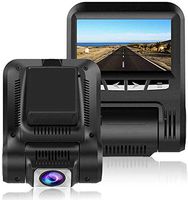
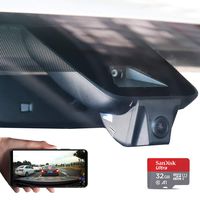
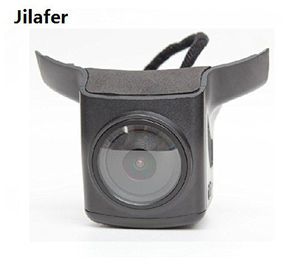
Product Information: Parameters Main control chip: AIT8328P Highest radio resolution: 2304*1296 Highest photo resolution: 1920*1080 Sensor(light sensitive chip): OV4689 Video resolution & frame rate: 2304*1296 30P Quantity of cameras: 1 Video angle: 170°wide angle Install Instruction: 1. Remove the back cover of the rear view mirror with two hands, need some power, sometimes may needs a small tool. 2. Press and take out the connected plugs, the big plug one the cam connect the small plug on the car, the smaller one connect the big one on the car. 3. Adjust the position and install the cam on the car, it will also need some power, after install it looks like an original part of the car. 4. Please down load the RORO cam App on your phone when you install the Tesla Model X dash cam. 5. Open the WIFI of your phone, it is Jilafer, the password is 1234567890, connect WIFI, then the cam works. Then you can see the video on your phone. This Tesla Model S dash cam is not compatible for Autopilot 2.0 Hardware Model S, It is only compatible for Autopilot 1.0 version.
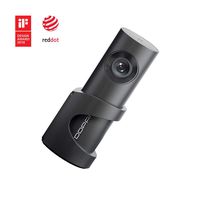
Jilafer Customized Car Dash Cam, Mini Driving Recorder,Car Dashboard Video Recorder Camera with 32 GB Storage Card for Tesla Model S with Autopilot 1.0 Hardware Version
Price is below average
Current Price
$198
Average
$232.66
Min Price
$198
Max Price
$260
Price dynamics
15%
Description
Product Information: Parameters Main control chip: AIT8328P Highest radio resolution: 2304*1296 Highest photo resolution: 1920*1080 Sensor(light sensitive chip): OV4689 Video resolution & frame rate: 2304*1296 30P Quantity of cameras: 1 Video angle: 170°wide angle Install Instruction: 1. Remove the back cover of the rear view mirror with two hands, need some power, sometimes may needs a small tool. 2. Press and take out the connected plugs, the big plug one the cam connect the small plug on the car, the smaller one connect the big one on the car. 3. Adjust the position and install the cam on the car, it will also need some power, after install it looks like an original part of the car. 4. Please down load the RORO cam App on your phone when you install the Tesla Model X dash cam. 5. Open the WIFI of your phone, it is Jilafer, the password is 1234567890, connect WIFI, then the cam works. Then you can see the video on your phone. This Tesla Model S dash cam is not compatible for Autopilot 2.0 Hardware Model S, It is only compatible for Autopilot 1.0 version.
Price will be lower
in next 2 weeks
in next 2 weeks
According to the data, price will be lower in next two weeks, so not waste your money and track better price!
Similar products