Description
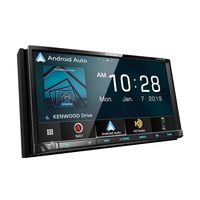
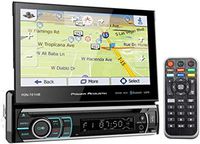
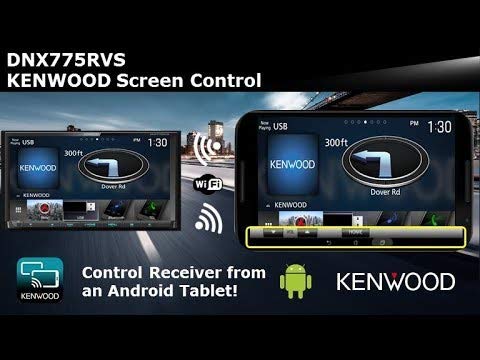
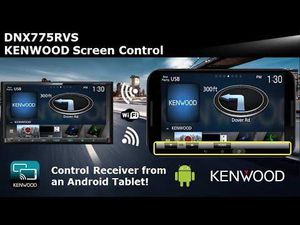
Road-readyrouting for your RV or rig If you own an RV or a tractor trailer, you already know about the extra work and care that go into keeping it running and rolling safely. Wouldn't it be nice if there was something that made owning your large vehicle a little easier ? Kenwood's DNX775RVS navigation receiver treats RV owners and truckerswith a sweet 6.95" touchscreen display, amazing phone integration with Apple CarPlay and Android Auto(tm), and vehicle-specific guidance from the experts at Garmin. It also gives you plenty of options for entertainment and killer sound, to boot. Apple CarPlay and Android Auto Kenwood designed theDNX775RVS to work seamlessly with both Apple CarPlay and Android Auto. No matter what phone you (or your passengers) prefer, you can access the apps you need without getting distracted from the matter at hand - driving your vehicle. TheDNX775RVS gives you fingertip or voice control of your apps, and its beautiful 6.95" resistive touchscreen display offers plenty of real estate to suss out your sources and other important info - you can even customize the source button locations for easier access. WebLinkmoves moresweetapps into your dash This Kenwood includes WebLink, which provides you simple in-dash control over select apps likeYouTubeand Yelp. What's especially nice is that WebLink works with both Android and iPhone. So load up the free WebLink for Kenwood app, plug in your phone, and you'll have quick access to some handy infotainment for your journey. Pair with two phones at once If you're driving with a passenger, the DNX775RVS can pair with up to two phones at once. You'll be able to designate one phone as the priority but be able to switch between the two with ease, as well as have access to both phonebooks. Turn your phone or Android tablet into a remote Kenwood's Remote S app turns mostiPhones and Android phones into a remote control for this stereo.
Kenwood DNX775RVS Navigation Receiver
Price is below average
Current Price
$1 499
Average
$1 499.49
Min Price
$1 499
Max Price
$1 499.99
Price dynamics
0%
Description
Road-readyrouting for your RV or rig If you own an RV or a tractor trailer, you already know about the extra work and care that go into keeping it running and rolling safely. Wouldn't it be nice if there was something that made owning your large vehicle a little easier ? Kenwood's DNX775RVS navigation receiver treats RV owners and truckerswith a sweet 6.95" touchscreen display, amazing phone integration with Apple CarPlay and Android Auto(tm), and vehicle-specific guidance from the experts at Garmin. It also gives you plenty of options for entertainment and killer sound, to boot. Apple CarPlay and Android Auto Kenwood designed theDNX775RVS to work seamlessly with both Apple CarPlay and Android Auto. No matter what phone you (or your passengers) prefer, you can access the apps you need without getting distracted from the matter at hand - driving your vehicle. TheDNX775RVS gives you fingertip or voice control of your apps, and its beautiful 6.95" resistive touchscreen display offers plenty of real estate to suss out your sources and other important info - you can even customize the source button locations for easier access. WebLinkmoves moresweetapps into your dash This Kenwood includes WebLink, which provides you simple in-dash control over select apps likeYouTubeand Yelp. What's especially nice is that WebLink works with both Android and iPhone. So load up the free WebLink for Kenwood app, plug in your phone, and you'll have quick access to some handy infotainment for your journey. Pair with two phones at once If you're driving with a passenger, the DNX775RVS can pair with up to two phones at once. You'll be able to designate one phone as the priority but be able to switch between the two with ease, as well as have access to both phonebooks. Turn your phone or Android tablet into a remote Kenwood's Remote S app turns mostiPhones and Android phones into a remote control for this stereo.
Price will be lower
in next 2 weeks
in next 2 weeks
According to the data, price will be lower in next two weeks, so not waste your money and track better price!
Product review & video
[Music] from the home screen menu down below pressing the home button you will see next to the home button is a menu button the menu button will provide quick and easy access to things like adjusting the screen backlight will select the back arrow different sources will have different screen brightness adjustments you can press the menu button again to turn the display completely off this is great if you're driving at nighttime and you don't want to have a lot of light flashing you can just simply have a black screen but you'll still have music source playback tap the screen to turn it back to on pressing the menu button again will bring up other functions if you have a camera connected this will simply force the rear camera on so that you can view the rear camera by touching the top center section it would toggle to a front camera if you had a front camera connected and then touching t


Similar products