Description
Accompany your child to grow together
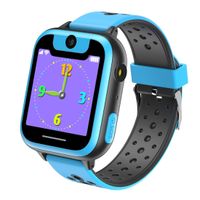
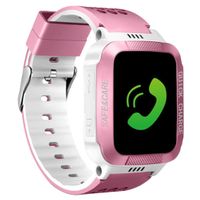
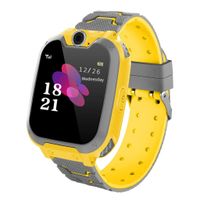
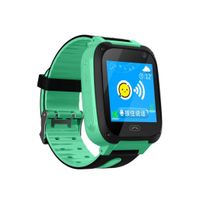
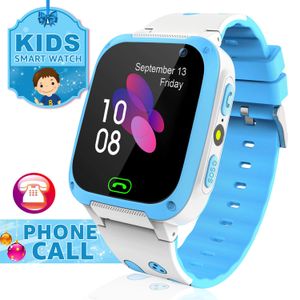
With two-way conversation, SOS emergency call, phone book, flashlight, alarm clock, camera, games, etc. You can call and chat with your child anytime anywhere. Parents can control and set the cell phone watch for kids through the app.
Install the Setracker App. And then scan the QR code behind the kids cell phone watch to register an account.
Sim Recommend
Speedtalk USD5.00 plan including 100MB data, 100min calls, 100 texts will be recommended.
Note Before Purchasing
1. Kids smartwatch is packed without sim card, you will need to purchase one and open Voice & Data Plan.
2. Not supported: Sprint,Verizon, AT&T.
3. Children watch works in 2G network, not 3G/4G/CDMA, please make sure your area is covered by 2G signal before place orders.
4. Compatible with IOS and Android cell phones.
5. This kid watch phone is using LBS (location based service) instead of GPS, which provides approximate positioning through local station base, maybe 0.3-4 miles off reality.
How to set up the watch?
1. Activate your SpeedTalk sim card, try to call out with your cellphone.
2. Make sure your area is covered with 2G.
3. Turn off the watch (must). Insert the sim card in the slot correctly.
4. Turn on the watch. Check signal bars are strong enough or not.
5. Download app SeTracker2 by scanning bar codes on the back of the watch or directly search app. Choose your area correctly.
6. Keep the watch awake when you do the IP & APN settings. Setting method please refer to user manuals.
Any question you can contact us via email: meritsoar@outlook.com, thanks.
With two-way conversation, SOS emergency call, phone book, flashlight, alarm clock, camera, games, etc. You can call and chat with your child anytime anywhere. Parents can control and set the cell phone watch for kids through the app.
Install the Setracker App. And then scan the QR code behind the kids cell phone watch to register an account.
Sim Recommend
Speedtalk USD5.00 plan including 100MB data, 100min calls, 100 texts will be recommended.
Note Before Purchasing
1. Kids smartwatch is packed without sim card, you will need to purchase one and open Voice & Data Plan.
2. Not supported: Sprint,Verizon, AT&T.
3. Children watch works in 2G network, not 3G/4G/CDMA, please make sure your area is covered by 2G signal before place orders.
4. Compatible with IOS and Android cell phones.
5. This kid watch phone is using LBS (location based service) instead of GPS, which provides approximate positioning through local station base, maybe 0.3-4 miles off reality.
How to set up the watch?
1. Activate your SpeedTalk sim card, try to call out with your cellphone.
2. Make sure your area is covered with 2G.
3. Turn off the watch (must). Insert the sim card in the slot correctly.
4. Turn on the watch. Check signal bars are strong enough or not.
5. Download app SeTracker2 by scanning bar codes on the back of the watch or directly search app. Choose your area correctly.
6. Keep the watch awake when you do the IP & APN settings. Setting method please refer to user manuals.
Any question you can contact us via email: meritsoar@outlook.com, thanks.
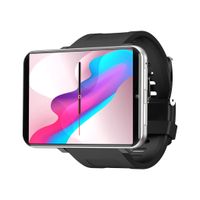
Kids Smart Watch for Call Voice Chat Text Telephone HD Touch Screen Watch for Kids with Alarm Clock Flashlight Camera SOS Games Phonebook Group Chat for iOS and Android System Gift for Kids
Price is below average
Current Price
$29.98
Average
$32.98
Min Price
$29.98
Max Price
$35.99
Price dynamics
9%
Description
Accompany your child to grow together
With two-way conversation, SOS emergency call, phone book, flashlight, alarm clock, camera, games, etc. You can call and chat with your child anytime anywhere. Parents can control and set the cell phone watch for kids through the app.
Install the Setracker App. And then scan the QR code behind the kids cell phone watch to register an account.
Sim Recommend
Speedtalk USD5.00 plan including 100MB data, 100min calls, 100 texts will be recommended.
Note Before Purchasing
1. Kids smartwatch is packed without sim card, you will need to purchase one and open Voice & Data Plan.
2. Not supported: Sprint,Verizon, AT&T.
3. Children watch works in 2G network, not 3G/4G/CDMA, please make sure your area is covered by 2G signal before place orders.
4. Compatible with IOS and Android cell phones.
5. This kid watch phone is using LBS (location based service) instead of GPS, which provides approximate positioning through local station base, maybe 0.3-4 miles off reality.
How to set up the watch?
1. Activate your SpeedTalk sim card, try to call out with your cellphone.
2. Make sure your area is covered with 2G.
3. Turn off the watch (must). Insert the sim card in the slot correctly.
4. Turn on the watch. Check signal bars are strong enough or not.
5. Download app SeTracker2 by scanning bar codes on the back of the watch or directly search app. Choose your area correctly.
6. Keep the watch awake when you do the IP & APN settings. Setting method please refer to user manuals.
Any question you can contact us via email: meritsoar@outlook.com, thanks.
With two-way conversation, SOS emergency call, phone book, flashlight, alarm clock, camera, games, etc. You can call and chat with your child anytime anywhere. Parents can control and set the cell phone watch for kids through the app.
Install the Setracker App. And then scan the QR code behind the kids cell phone watch to register an account.
Sim Recommend
Speedtalk USD5.00 plan including 100MB data, 100min calls, 100 texts will be recommended.
Note Before Purchasing
1. Kids smartwatch is packed without sim card, you will need to purchase one and open Voice & Data Plan.
2. Not supported: Sprint,Verizon, AT&T.
3. Children watch works in 2G network, not 3G/4G/CDMA, please make sure your area is covered by 2G signal before place orders.
4. Compatible with IOS and Android cell phones.
5. This kid watch phone is using LBS (location based service) instead of GPS, which provides approximate positioning through local station base, maybe 0.3-4 miles off reality.
How to set up the watch?
1. Activate your SpeedTalk sim card, try to call out with your cellphone.
2. Make sure your area is covered with 2G.
3. Turn off the watch (must). Insert the sim card in the slot correctly.
4. Turn on the watch. Check signal bars are strong enough or not.
5. Download app SeTracker2 by scanning bar codes on the back of the watch or directly search app. Choose your area correctly.
6. Keep the watch awake when you do the IP & APN settings. Setting method please refer to user manuals.
Any question you can contact us via email: meritsoar@outlook.com, thanks.
Price will be lower
in next 2 weeks
in next 2 weeks
According to the data, price will be lower in next two weeks, so not waste your money and track better price!
Similar products