Description
How to set up a watch?
1. Turn off the clock and insert the Micro Sim card correctly (turning on the watch will display the signal, then you can make a call.).
2. Download the seTracker2 app from your phone and register your account to choose your language and region.
If you are in the US, please choose North America
3. Bind the watch and app and scan the REG QR code on the back of the watch at the application prompt.
4. Log in and get all the features.
5. If the application is not available and the display is offline: Please use your mobile phone to send a text message to your watch to activate your watch
(the phone card for your watch must be our recommended carrier: Speedtalk Regular, IoT devices).
Select the type of SIM card you are using and follow the steps below to send it. Click
1. APN SMS:
Speedtalk Regular SIM:
apn,wholesale,,,310260#
IoT device SIM:
apn,mobilenet,,,310260#
The watch will automatically respond to APN information.
2. Restart the SMS:
pw,123456,reset#
The watch will automatically respond to the reset
6. Try the application again.
You can use the functions of the app and clock normally.
1. Turn off the clock and insert the Micro Sim card correctly (turning on the watch will display the signal, then you can make a call.).
2. Download the seTracker2 app from your phone and register your account to choose your language and region.
If you are in the US, please choose North America
3. Bind the watch and app and scan the REG QR code on the back of the watch at the application prompt.
4. Log in and get all the features.
5. If the application is not available and the display is offline: Please use your mobile phone to send a text message to your watch to activate your watch
(the phone card for your watch must be our recommended carrier: Speedtalk Regular, IoT devices).
Select the type of SIM card you are using and follow the steps below to send it. Click
1. APN SMS:
Speedtalk Regular SIM:
apn,wholesale,,,310260#
IoT device SIM:
apn,mobilenet,,,310260#
The watch will automatically respond to APN information.
2. Restart the SMS:
pw,123456,reset#
The watch will automatically respond to the reset
6. Try the application again.
You can use the functions of the app and clock normally.
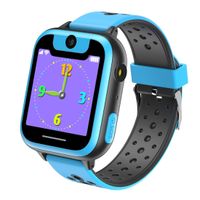
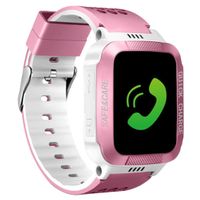
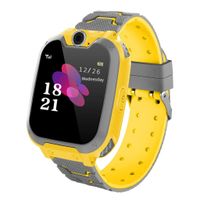
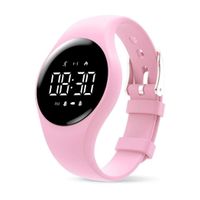
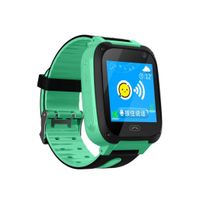
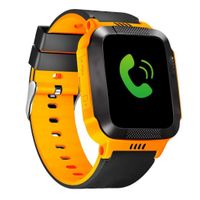
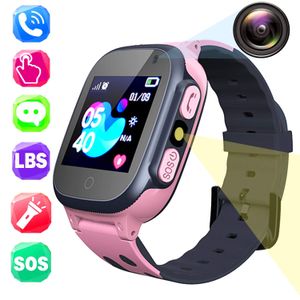
Kids Smart Watch Phone for Girls Boys, Students Touch Screen Smartwatch with AGPS/LBS Tracker Voice Chat One-Key SOS Help Anti-Lost Calling Phone Watches, Wrist Watch Suitable for Children (S3 Pink)
Current Price
$33.99
Average
$33.99
Min Price
$33.99
Max Price
$33.99
Description
How to set up a watch?
1. Turn off the clock and insert the Micro Sim card correctly (turning on the watch will display the signal, then you can make a call.).
2. Download the seTracker2 app from your phone and register your account to choose your language and region.
If you are in the US, please choose North America
3. Bind the watch and app and scan the REG QR code on the back of the watch at the application prompt.
4. Log in and get all the features.
5. If the application is not available and the display is offline: Please use your mobile phone to send a text message to your watch to activate your watch
(the phone card for your watch must be our recommended carrier: Speedtalk Regular, IoT devices).
Select the type of SIM card you are using and follow the steps below to send it. Click
1. APN SMS:
Speedtalk Regular SIM:
apn,wholesale,,,310260#
IoT device SIM:
apn,mobilenet,,,310260#
The watch will automatically respond to APN information.
2. Restart the SMS:
pw,123456,reset#
The watch will automatically respond to the reset
6. Try the application again.
You can use the functions of the app and clock normally.
1. Turn off the clock and insert the Micro Sim card correctly (turning on the watch will display the signal, then you can make a call.).
2. Download the seTracker2 app from your phone and register your account to choose your language and region.
If you are in the US, please choose North America
3. Bind the watch and app and scan the REG QR code on the back of the watch at the application prompt.
4. Log in and get all the features.
5. If the application is not available and the display is offline: Please use your mobile phone to send a text message to your watch to activate your watch
(the phone card for your watch must be our recommended carrier: Speedtalk Regular, IoT devices).
Select the type of SIM card you are using and follow the steps below to send it. Click
1. APN SMS:
Speedtalk Regular SIM:
apn,wholesale,,,310260#
IoT device SIM:
apn,mobilenet,,,310260#
The watch will automatically respond to APN information.
2. Restart the SMS:
pw,123456,reset#
The watch will automatically respond to the reset
6. Try the application again.
You can use the functions of the app and clock normally.
Price will be lower
in next 2 weeks
in next 2 weeks
According to the data, price will be lower in next two weeks, so not waste your money and track better price!
Similar products