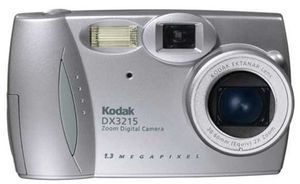
Kodak's DX3215 sets new standards for simplicity and picture quality in an entry-level digital camera. The 1.3-megapixel resolution captures plenty of detail for most needs, producing sharp prints at sizes up to 5 by 7 inches. A lower-resolution 640 x 480 (0.3 megapixel) mode is perfect for pictures you're sharing online, and lets you store four times as many images in the camera's memory. The DX3215 is clearly designed for people who prefer a camera that's easy to use to one that's packed with manual controls--it's a true point-and-shoot. Turn it on, aim, and press the button, and the camera does the rest, selecting exposure and activating the flash when necessary. The photographer does have a few options, including a 2x optical zoom lens to aid in image composition, plus manual control of the flash (if desired).
Numerous battery options make it easy to keep the camera ready for action. For the longest life between changes, use a disposable CRV3 lithium battery (included). A more efficient solution is to use a pair of rechargeable nickel-metal hydride (NiMH) AA batteries, or the rechargeable battery pack that comes with the optional dock. If you're on vacation and you've run out of power, you can throw in any pair of ordinary AA batteries. Though this is a very handy option, it's also an expensive one, as alkalines have a relatively short lifespan in a digital camera.
Transferring images to your computer is also a snap with the included Kodak software and USB cable. Simply connect the cable between the camera and your Mac or PC, launch the software, and start moving your pictures.
For even simpler operation, pick up the optional docking station. Drop the camera into the dock, press the button, and images are transferred automatically. In addition, an included battery pack recharges automatically when the camera is in the dock.
Images are stored in the camera's 8 MB of internal RAM--enough memory for 20 high-resolution photos or 80 low-resolution snap