Description
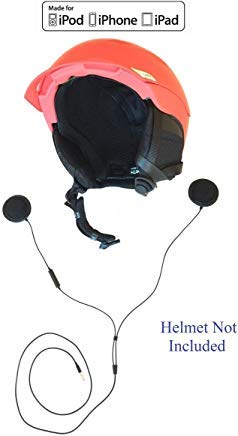
Motorcycle/ski/snowboard/sky-diving/extreme-sports helmet earphones with Microphone. Provide quality music and voice quality, while you bike and/or enjoy your sporting activity.
Specifications:
- 3.5mm plug/jack, compatible with 3.5mm audio devices, and Lightning to 3.5mm audio adapter
- ~4 ft cable (Black color cable) length
- Speakers attach easily, securely to inside of helmets via Velcro
- Microphone positioned for best voice quality
- Remote control for iPod, iPhone, iPad, Mac models that support remote control
Buttons on remote, microphone
- Plus button on top of microphone turns volume up
- Minus button on bottom turns volume down
- Center button is phone's play/pause button for songs and call pick-up/hang-up
Music, podcast, audio-book or video controls
- Play/pause song: press center button once
- Skip song: press center button rapidly twice
- Fast forward: press center button twice and hold
- Previous song: Press center button three times
- Rewind: Press center button three times rapidly and hold
- Volume up: plus button
- Volume down: minus button
Phone controls
- Answer call: press center button
- Hang up: press center button again
- Decline incoming call: hold down center button for 2 seconds and release, 2 low beeps confirm call was denied
- Place current call on hold while swapping to other call: Press center button, repeat after delay to swap to other call
- Hang up current call and answer incoming call: Hold center button down for 2 seconds, when you release, 2 beeps will let you know old call is terminated and you are on new call
Voice control (if supported)
- Hold down center button till you hear a tone, use voice control as directed on your iPhone
Does not include helmet, audio player/phone, Bluetooth receiver device.
Specifications:
- 3.5mm plug/jack, compatible with 3.5mm audio devices, and Lightning to 3.5mm audio adapter
- ~4 ft cable (Black color cable) length
- Speakers attach easily, securely to inside of helmets via Velcro
- Microphone positioned for best voice quality
- Remote control for iPod, iPhone, iPad, Mac models that support remote control
Buttons on remote, microphone
- Plus button on top of microphone turns volume up
- Minus button on bottom turns volume down
- Center button is phone's play/pause button for songs and call pick-up/hang-up
Music, podcast, audio-book or video controls
- Play/pause song: press center button once
- Skip song: press center button rapidly twice
- Fast forward: press center button twice and hold
- Previous song: Press center button three times
- Rewind: Press center button three times rapidly and hold
- Volume up: plus button
- Volume down: minus button
Phone controls
- Answer call: press center button
- Hang up: press center button again
- Decline incoming call: hold down center button for 2 seconds and release, 2 low beeps confirm call was denied
- Place current call on hold while swapping to other call: Press center button, repeat after delay to swap to other call
- Hang up current call and answer incoming call: Hold center button down for 2 seconds, when you release, 2 beeps will let you know old call is terminated and you are on new call
Voice control (if supported)
- Hold down center button till you hear a tone, use voice control as directed on your iPhone
Does not include helmet, audio player/phone, Bluetooth receiver device.
KOKKIA iGear : Sports/Motorcycle Helmet Earphones with Remote Control and Microphone, Compatible with Apple iPod, iPhone, iPad, Mac, Through 3.5mm Port.
Current Price
$25
Average
$25
Min Price
$25
Max Price
$25
Price dynamics
0%
Description
Motorcycle/ski/snowboard/sky-diving/extreme-sports helmet earphones with Microphone. Provide quality music and voice quality, while you bike and/or enjoy your sporting activity.
Specifications:
- 3.5mm plug/jack, compatible with 3.5mm audio devices, and Lightning to 3.5mm audio adapter
- ~4 ft cable (Black color cable) length
- Speakers attach easily, securely to inside of helmets via Velcro
- Microphone positioned for best voice quality
- Remote control for iPod, iPhone, iPad, Mac models that support remote control
Buttons on remote, microphone
- Plus button on top of microphone turns volume up
- Minus button on bottom turns volume down
- Center button is phone's play/pause button for songs and call pick-up/hang-up
Music, podcast, audio-book or video controls
- Play/pause song: press center button once
- Skip song: press center button rapidly twice
- Fast forward: press center button twice and hold
- Previous song: Press center button three times
- Rewind: Press center button three times rapidly and hold
- Volume up: plus button
- Volume down: minus button
Phone controls
- Answer call: press center button
- Hang up: press center button again
- Decline incoming call: hold down center button for 2 seconds and release, 2 low beeps confirm call was denied
- Place current call on hold while swapping to other call: Press center button, repeat after delay to swap to other call
- Hang up current call and answer incoming call: Hold center button down for 2 seconds, when you release, 2 beeps will let you know old call is terminated and you are on new call
Voice control (if supported)
- Hold down center button till you hear a tone, use voice control as directed on your iPhone
Does not include helmet, audio player/phone, Bluetooth receiver device.
Specifications:
- 3.5mm plug/jack, compatible with 3.5mm audio devices, and Lightning to 3.5mm audio adapter
- ~4 ft cable (Black color cable) length
- Speakers attach easily, securely to inside of helmets via Velcro
- Microphone positioned for best voice quality
- Remote control for iPod, iPhone, iPad, Mac models that support remote control
Buttons on remote, microphone
- Plus button on top of microphone turns volume up
- Minus button on bottom turns volume down
- Center button is phone's play/pause button for songs and call pick-up/hang-up
Music, podcast, audio-book or video controls
- Play/pause song: press center button once
- Skip song: press center button rapidly twice
- Fast forward: press center button twice and hold
- Previous song: Press center button three times
- Rewind: Press center button three times rapidly and hold
- Volume up: plus button
- Volume down: minus button
Phone controls
- Answer call: press center button
- Hang up: press center button again
- Decline incoming call: hold down center button for 2 seconds and release, 2 low beeps confirm call was denied
- Place current call on hold while swapping to other call: Press center button, repeat after delay to swap to other call
- Hang up current call and answer incoming call: Hold center button down for 2 seconds, when you release, 2 beeps will let you know old call is terminated and you are on new call
Voice control (if supported)
- Hold down center button till you hear a tone, use voice control as directed on your iPhone
Does not include helmet, audio player/phone, Bluetooth receiver device.
Price will be lower
in next 2 weeks
in next 2 weeks
According to the data, price will be lower in next two weeks, so not waste your money and track better price!

Similar products