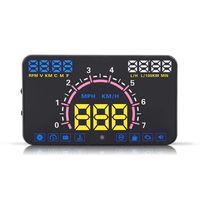
Description
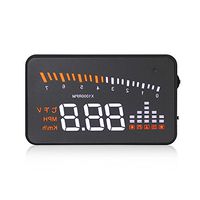
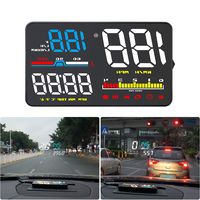
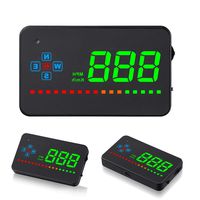
1) True speed display:
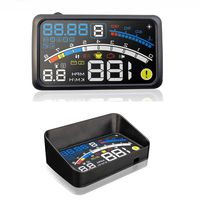
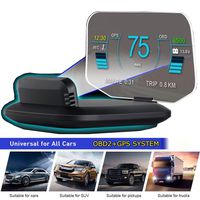
The HUD uses GPS to calculate the true speed of the vehicle. There are several reasons why cause a speed difference, which include:
calibration set by vehicle manufacturers to read high value to ensure their speedometers never indicate a lower speed than the actual speed of the vehicle.
speedometer inaccuracy due to aftermarket modifications such as different tire and wheel sizes or different differential gearing.
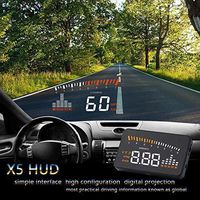
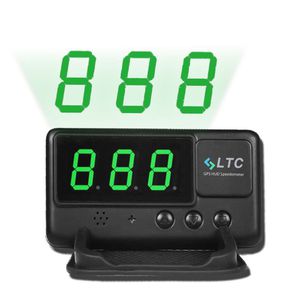
2) Head-up display - projects vehicle speed on windshield
Project display model:
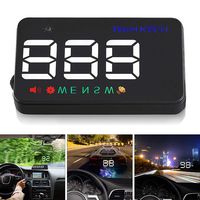
Touch and hold setting button to model '222'. The speed will reflect in windshield. 222 refer to Reflecting display mode, content will be shown on the screen in opposite side in order to be reflected on the windscreen correctly.
Regular display model:
Touch and hold setting button to model '111' or '333', the speed will display in the screen.
111 refers to Normal display mode, data will be shown on the screen in normal condition.
333 refer to Upside-down display mode, data will be shown on the screen upside-down in order to fit the specific position in the car, such as behind the front rearview mirror.
3) Over Speed Warning Setting -- Alarm Mute Function.
A: The default alarm speed rate is 120KM/h.
B: Driver can press the Up Button or Down Button to increase or decrease the speed rate freely
Driver can set up the setting speed alarm through '↑'and '↓'button. When driving speed is over the setting value, C60 will alarm for 3 seconds alarm beep and flash display will keep warning to the driver.
Note:
1. The unit needs to work in relatively open environments (outdoors) and avoid rainy days, otherwise it will affect the GPS signal acquisition
2. Wearing some sunglasses will filter out the green light data.
The HUD uses GPS to calculate the true speed of the vehicle. There are several reasons why cause a speed difference, which include:
calibration set by vehicle manufacturers to read high value to ensure their speedometers never indicate a lower speed than the actual speed of the vehicle.
speedometer inaccuracy due to aftermarket modifications such as different tire and wheel sizes or different differential gearing.
2) Head-up display - projects vehicle speed on windshield
Project display model:
Touch and hold setting button to model '222'. The speed will reflect in windshield. 222 refer to Reflecting display mode, content will be shown on the screen in opposite side in order to be reflected on the windscreen correctly.
Regular display model:
Touch and hold setting button to model '111' or '333', the speed will display in the screen.
111 refers to Normal display mode, data will be shown on the screen in normal condition.
333 refer to Upside-down display mode, data will be shown on the screen upside-down in order to fit the specific position in the car, such as behind the front rearview mirror.
3) Over Speed Warning Setting -- Alarm Mute Function.
A: The default alarm speed rate is 120KM/h.
B: Driver can press the Up Button or Down Button to increase or decrease the speed rate freely
Driver can set up the setting speed alarm through '↑'and '↓'button. When driving speed is over the setting value, C60 will alarm for 3 seconds alarm beep and flash display will keep warning to the driver.
Note:
1. The unit needs to work in relatively open environments (outdoors) and avoid rainy days, otherwise it will affect the GPS signal acquisition
2. Wearing some sunglasses will filter out the green light data.
LeaningTech Original Digital Universal Car HUD GPS Speedometer Overspeed Alarm Windshield Project for All Vehicle
Price is below average
Current Price
$28.99
Average
$32.52
Min Price
$25.99
Max Price
$38
Price dynamics
11%
Description
1) True speed display:
The HUD uses GPS to calculate the true speed of the vehicle. There are several reasons why cause a speed difference, which include:
calibration set by vehicle manufacturers to read high value to ensure their speedometers never indicate a lower speed than the actual speed of the vehicle.
speedometer inaccuracy due to aftermarket modifications such as different tire and wheel sizes or different differential gearing.
2) Head-up display - projects vehicle speed on windshield
Project display model:
Touch and hold setting button to model '222'. The speed will reflect in windshield. 222 refer to Reflecting display mode, content will be shown on the screen in opposite side in order to be reflected on the windscreen correctly.
Regular display model:
Touch and hold setting button to model '111' or '333', the speed will display in the screen.
111 refers to Normal display mode, data will be shown on the screen in normal condition.
333 refer to Upside-down display mode, data will be shown on the screen upside-down in order to fit the specific position in the car, such as behind the front rearview mirror.
3) Over Speed Warning Setting -- Alarm Mute Function.
A: The default alarm speed rate is 120KM/h.
B: Driver can press the Up Button or Down Button to increase or decrease the speed rate freely
Driver can set up the setting speed alarm through '↑'and '↓'button. When driving speed is over the setting value, C60 will alarm for 3 seconds alarm beep and flash display will keep warning to the driver.
Note:
1. The unit needs to work in relatively open environments (outdoors) and avoid rainy days, otherwise it will affect the GPS signal acquisition
2. Wearing some sunglasses will filter out the green light data.
The HUD uses GPS to calculate the true speed of the vehicle. There are several reasons why cause a speed difference, which include:
calibration set by vehicle manufacturers to read high value to ensure their speedometers never indicate a lower speed than the actual speed of the vehicle.
speedometer inaccuracy due to aftermarket modifications such as different tire and wheel sizes or different differential gearing.
2) Head-up display - projects vehicle speed on windshield
Project display model:
Touch and hold setting button to model '222'. The speed will reflect in windshield. 222 refer to Reflecting display mode, content will be shown on the screen in opposite side in order to be reflected on the windscreen correctly.
Regular display model:
Touch and hold setting button to model '111' or '333', the speed will display in the screen.
111 refers to Normal display mode, data will be shown on the screen in normal condition.
333 refer to Upside-down display mode, data will be shown on the screen upside-down in order to fit the specific position in the car, such as behind the front rearview mirror.
3) Over Speed Warning Setting -- Alarm Mute Function.
A: The default alarm speed rate is 120KM/h.
B: Driver can press the Up Button or Down Button to increase or decrease the speed rate freely
Driver can set up the setting speed alarm through '↑'and '↓'button. When driving speed is over the setting value, C60 will alarm for 3 seconds alarm beep and flash display will keep warning to the driver.
Note:
1. The unit needs to work in relatively open environments (outdoors) and avoid rainy days, otherwise it will affect the GPS signal acquisition
2. Wearing some sunglasses will filter out the green light data.
Price will be lower
in next 2 weeks
in next 2 weeks
According to the data, price will be lower in next two weeks, so not waste your money and track better price!
Product review & video
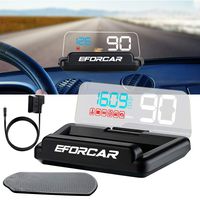
hi this dr. class here and in this video I'll be unboxing and installing this head-up display unit that I got off a website called gearbest.com it cost just under fifty dollars and this unit what it does is that it will project the data it collects from the obd2 diagnostic port onto your windshield let me open this up and show you what's inside here we have the 5.5 inch LED display unit it's very low profile here's the back here is the obd2 cable that connects the obd2 port on your vehicle to the display unit here is the user manual here we have an anti-slip pad for the display unit sit on the back here is the reflective windshield screen let's not very closer look at the unit now the model number on this head-up display unit is simply called the 88 and I will put the product link in the description below now this unit does have an auto illumination so what that means is that during the


Similar products