Description
Operation:
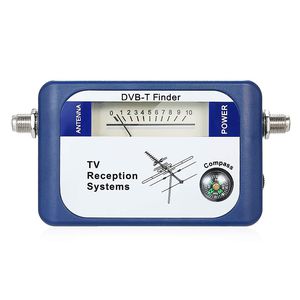
1.Connect the antenna cable to the left F Female and the battery pack cable to the right F Female. Remove any external amplifier* that may be connected to the antenna.
2.Adjust the antenna to the best position by watching the meter's reading. Higher up the scale gives a better signal. If the finder's reading becomes full scale, adjust the level control knob to reduce the reading to around 5 (Turning the knob clockwise will decrease the reading), continue to move the antenna until you have the highest possible meter reading.
3.Remove the finder and replace any amplifier that was disconnected.
Important Note:
-If your antenna has an internal amplifer, (eg: 01MM-SQ01), it should be powered by an external power supply via a DC power inserter. Make sure the power inserter is positioned between the finder and the antenna.
Specifications:
Color: blue
Material: plastic
Frequency range: 170-860MHz
Input level range: 65-95dBuv
Impedance: 75Ω
Insertion Loss: ≤5.0dB
Power supply: 9-12V DC
Item Size: Approx. 127 * 63 * 35 mm / 5 * 2.48 * 1.38in
Item Weight: Approx. 90g / 3.2oz
Package Size: Approx. 18.6 * 14.1 * 4.3cm / 7.32 * 5.55 * 1.69in
Package Weight: Approx. 197g / 6.97oz
Package List:
1 * Satellite Finder
1 * English User Manual
1 * Battery Holder
1 * Power Cable
1.Connect the antenna cable to the left F Female and the battery pack cable to the right F Female. Remove any external amplifier* that may be connected to the antenna.
2.Adjust the antenna to the best position by watching the meter's reading. Higher up the scale gives a better signal. If the finder's reading becomes full scale, adjust the level control knob to reduce the reading to around 5 (Turning the knob clockwise will decrease the reading), continue to move the antenna until you have the highest possible meter reading.
3.Remove the finder and replace any amplifier that was disconnected.
Important Note:
-If your antenna has an internal amplifer, (eg: 01MM-SQ01), it should be powered by an external power supply via a DC power inserter. Make sure the power inserter is positioned between the finder and the antenna.
Specifications:
Color: blue
Material: plastic
Frequency range: 170-860MHz
Input level range: 65-95dBuv
Impedance: 75Ω
Insertion Loss: ≤5.0dB
Power supply: 9-12V DC
Item Size: Approx. 127 * 63 * 35 mm / 5 * 2.48 * 1.38in
Item Weight: Approx. 90g / 3.2oz
Package Size: Approx. 18.6 * 14.1 * 4.3cm / 7.32 * 5.55 * 1.69in
Package Weight: Approx. 197g / 6.97oz
Package List:
1 * Satellite Finder
1 * English User Manual
1 * Battery Holder
1 * Power Cable
Leepesx DVB-T Digital Satellite Signal Finder Meter Aerial Terrestrial TV Antenna with Compass TV Reception Systems
Current Price
$10.99
Average
$10.99
Min Price
$10.99
Max Price
$10.99
Description
Operation:
1.Connect the antenna cable to the left F Female and the battery pack cable to the right F Female. Remove any external amplifier* that may be connected to the antenna.
2.Adjust the antenna to the best position by watching the meter's reading. Higher up the scale gives a better signal. If the finder's reading becomes full scale, adjust the level control knob to reduce the reading to around 5 (Turning the knob clockwise will decrease the reading), continue to move the antenna until you have the highest possible meter reading.
3.Remove the finder and replace any amplifier that was disconnected.
Important Note:
-If your antenna has an internal amplifer, (eg: 01MM-SQ01), it should be powered by an external power supply via a DC power inserter. Make sure the power inserter is positioned between the finder and the antenna.
Specifications:
Color: blue
Material: plastic
Frequency range: 170-860MHz
Input level range: 65-95dBuv
Impedance: 75Ω
Insertion Loss: ≤5.0dB
Power supply: 9-12V DC
Item Size: Approx. 127 * 63 * 35 mm / 5 * 2.48 * 1.38in
Item Weight: Approx. 90g / 3.2oz
Package Size: Approx. 18.6 * 14.1 * 4.3cm / 7.32 * 5.55 * 1.69in
Package Weight: Approx. 197g / 6.97oz
Package List:
1 * Satellite Finder
1 * English User Manual
1 * Battery Holder
1 * Power Cable
1.Connect the antenna cable to the left F Female and the battery pack cable to the right F Female. Remove any external amplifier* that may be connected to the antenna.
2.Adjust the antenna to the best position by watching the meter's reading. Higher up the scale gives a better signal. If the finder's reading becomes full scale, adjust the level control knob to reduce the reading to around 5 (Turning the knob clockwise will decrease the reading), continue to move the antenna until you have the highest possible meter reading.
3.Remove the finder and replace any amplifier that was disconnected.
Important Note:
-If your antenna has an internal amplifer, (eg: 01MM-SQ01), it should be powered by an external power supply via a DC power inserter. Make sure the power inserter is positioned between the finder and the antenna.
Specifications:
Color: blue
Material: plastic
Frequency range: 170-860MHz
Input level range: 65-95dBuv
Impedance: 75Ω
Insertion Loss: ≤5.0dB
Power supply: 9-12V DC
Item Size: Approx. 127 * 63 * 35 mm / 5 * 2.48 * 1.38in
Item Weight: Approx. 90g / 3.2oz
Package Size: Approx. 18.6 * 14.1 * 4.3cm / 7.32 * 5.55 * 1.69in
Package Weight: Approx. 197g / 6.97oz
Package List:
1 * Satellite Finder
1 * English User Manual
1 * Battery Holder
1 * Power Cable
Price will be lower
in next 2 weeks
in next 2 weeks
According to the data, price will be lower in next two weeks, so not waste your money and track better price!
Product review & video
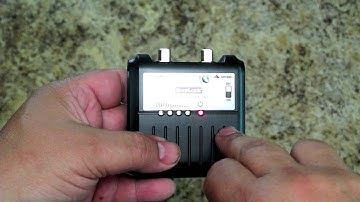
this is a review of the Sherlock digital TV signal finer from king controls now this thing is actually designed to be used if you look on the back here it will give you the instructions it's actually designed to be used to help to peak your antenna signal by tuning your antenna to different direction however this is basically just a signal strength meter so we can use it for troubleshooting as well and what we're going to do is use this thing to troubleshoot the various points along our coax path to see if we can find out where we're having problems so I'm going to open this up and then we'll get to testing well the Sherlock signal strength meter comes with the meter itself some 3m velcro battery and a little jumper cable so it gives you everything you need to get started there's basically just two controls here there is an offline control which kind of has counter to it if you turn it

Similar products