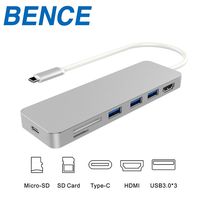
Description
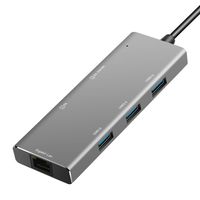
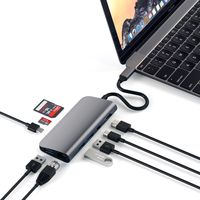
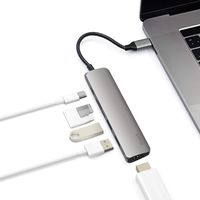
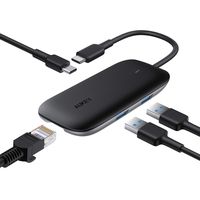
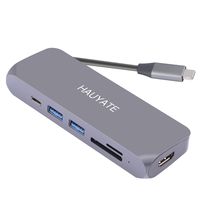
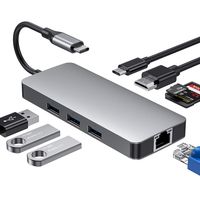
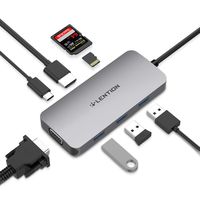
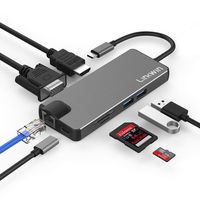
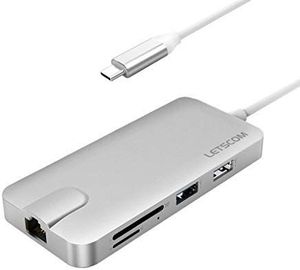
This 8-in-1 Letscom USB Type-C Hub can instantly expand your computer capabilities.
HDMI output port: up to 4K UHD (3840x2160 @ 30Hz) or 2K/1080p/720p/480p/360p
Ethernet port (RJ-45 port): Support 10/100/1000 Mbps
USB 3.0 Type-A port: Data transfer: up to 5Gbps
USB 2.0 Type-A port: Data transfer: up to 480Mbps
SD/TF card slot: Supported memory card capacity: up to 512GB, Read/write speed: up to 104MB/S
USB Type-C female PD charging port: Charging: Up to 87W of power delivery (Only for laptop charging)
System requirements: Laptop with an available USB-C port, Windows 7/8/8.1/10, macOS X v10.0 or above operating systems
Notes
1. The USB-A pot of this product supports Max. 5V 900mAh total charging output.
2. For stable connection, connect a power adapter to the hub when using high-power devices.
3. The USB-C female port of this product is only for charging USB-C laptops whose USB-C port supports USB Power Delivery (PD) and does not support data transfer.
4. A4K-capable display and HDMl cable are required to achieve 3840x2160 resolution.
Tips
4 ways to help reduce the USB 3.0 radio frequency interference to the wireless connection of some laptops.
1. Connect the laptop to a 5GHz Wi-Fi network.
2. Connect devices (e.g. mouse and keyboard) to USB 2.0 ports on the laptop.
3. Connect the USB 3.0 hub to the laptop with a high-quality 1-foot or longer USB 3.0 extension cable; keep USB 3.0 devices away from the host computer.
4. Use high-quality shielded USB 3.0 devices/cables/connectors.
SPECIFICATIONS
Product Model: Letscom USB C Hub (USBC002)
Material: Aluminium alloy, ABS
Interface:
HDMI output port x 1
Ethernet port (RJ-45 port) x 1
USB 3.0 Type-A port x 2
USB 2.0 Type-A port x 1
SD card slot x 1
TF card slot x 1
USB Type-C charging port x 1
Connector: USB 3.1 Type-C connector
Dimension: 4.25 x 1.97 x 0.59inch/108 x 50 x 15mm
Weight: 2.43oz/69g
HDMI output port: up to 4K UHD (3840x2160 @ 30Hz) or 2K/1080p/720p/480p/360p
Ethernet port (RJ-45 port): Support 10/100/1000 Mbps
USB 3.0 Type-A port: Data transfer: up to 5Gbps
USB 2.0 Type-A port: Data transfer: up to 480Mbps
SD/TF card slot: Supported memory card capacity: up to 512GB, Read/write speed: up to 104MB/S
USB Type-C female PD charging port: Charging: Up to 87W of power delivery (Only for laptop charging)
System requirements: Laptop with an available USB-C port, Windows 7/8/8.1/10, macOS X v10.0 or above operating systems
Notes
1. The USB-A pot of this product supports Max. 5V 900mAh total charging output.
2. For stable connection, connect a power adapter to the hub when using high-power devices.
3. The USB-C female port of this product is only for charging USB-C laptops whose USB-C port supports USB Power Delivery (PD) and does not support data transfer.
4. A4K-capable display and HDMl cable are required to achieve 3840x2160 resolution.
Tips
4 ways to help reduce the USB 3.0 radio frequency interference to the wireless connection of some laptops.
1. Connect the laptop to a 5GHz Wi-Fi network.
2. Connect devices (e.g. mouse and keyboard) to USB 2.0 ports on the laptop.
3. Connect the USB 3.0 hub to the laptop with a high-quality 1-foot or longer USB 3.0 extension cable; keep USB 3.0 devices away from the host computer.
4. Use high-quality shielded USB 3.0 devices/cables/connectors.
SPECIFICATIONS
Product Model: Letscom USB C Hub (USBC002)
Material: Aluminium alloy, ABS
Interface:
HDMI output port x 1
Ethernet port (RJ-45 port) x 1
USB 3.0 Type-A port x 2
USB 2.0 Type-A port x 1
SD card slot x 1
TF card slot x 1
USB Type-C charging port x 1
Connector: USB 3.1 Type-C connector
Dimension: 4.25 x 1.97 x 0.59inch/108 x 50 x 15mm
Weight: 2.43oz/69g
LETSCOM USB C Hub, 8-in-1 USB C Adapter with Ethernet Adapter, 4K HDMI Output, Type C Charging Port, 2 USB 3.0 Ports, Compatible for USB C Device(Silver)
Price is below average
Current Price
$54.99
Average
$56
Min Price
$49.99
Max Price
$66.88
Price dynamics
2%
Description
This 8-in-1 Letscom USB Type-C Hub can instantly expand your computer capabilities.
HDMI output port: up to 4K UHD (3840x2160 @ 30Hz) or 2K/1080p/720p/480p/360p
Ethernet port (RJ-45 port): Support 10/100/1000 Mbps
USB 3.0 Type-A port: Data transfer: up to 5Gbps
USB 2.0 Type-A port: Data transfer: up to 480Mbps
SD/TF card slot: Supported memory card capacity: up to 512GB, Read/write speed: up to 104MB/S
USB Type-C female PD charging port: Charging: Up to 87W of power delivery (Only for laptop charging)
System requirements: Laptop with an available USB-C port, Windows 7/8/8.1/10, macOS X v10.0 or above operating systems
Notes
1. The USB-A pot of this product supports Max. 5V 900mAh total charging output.
2. For stable connection, connect a power adapter to the hub when using high-power devices.
3. The USB-C female port of this product is only for charging USB-C laptops whose USB-C port supports USB Power Delivery (PD) and does not support data transfer.
4. A4K-capable display and HDMl cable are required to achieve 3840x2160 resolution.
Tips
4 ways to help reduce the USB 3.0 radio frequency interference to the wireless connection of some laptops.
1. Connect the laptop to a 5GHz Wi-Fi network.
2. Connect devices (e.g. mouse and keyboard) to USB 2.0 ports on the laptop.
3. Connect the USB 3.0 hub to the laptop with a high-quality 1-foot or longer USB 3.0 extension cable; keep USB 3.0 devices away from the host computer.
4. Use high-quality shielded USB 3.0 devices/cables/connectors.
SPECIFICATIONS
Product Model: Letscom USB C Hub (USBC002)
Material: Aluminium alloy, ABS
Interface:
HDMI output port x 1
Ethernet port (RJ-45 port) x 1
USB 3.0 Type-A port x 2
USB 2.0 Type-A port x 1
SD card slot x 1
TF card slot x 1
USB Type-C charging port x 1
Connector: USB 3.1 Type-C connector
Dimension: 4.25 x 1.97 x 0.59inch/108 x 50 x 15mm
Weight: 2.43oz/69g
HDMI output port: up to 4K UHD (3840x2160 @ 30Hz) or 2K/1080p/720p/480p/360p
Ethernet port (RJ-45 port): Support 10/100/1000 Mbps
USB 3.0 Type-A port: Data transfer: up to 5Gbps
USB 2.0 Type-A port: Data transfer: up to 480Mbps
SD/TF card slot: Supported memory card capacity: up to 512GB, Read/write speed: up to 104MB/S
USB Type-C female PD charging port: Charging: Up to 87W of power delivery (Only for laptop charging)
System requirements: Laptop with an available USB-C port, Windows 7/8/8.1/10, macOS X v10.0 or above operating systems
Notes
1. The USB-A pot of this product supports Max. 5V 900mAh total charging output.
2. For stable connection, connect a power adapter to the hub when using high-power devices.
3. The USB-C female port of this product is only for charging USB-C laptops whose USB-C port supports USB Power Delivery (PD) and does not support data transfer.
4. A4K-capable display and HDMl cable are required to achieve 3840x2160 resolution.
Tips
4 ways to help reduce the USB 3.0 radio frequency interference to the wireless connection of some laptops.
1. Connect the laptop to a 5GHz Wi-Fi network.
2. Connect devices (e.g. mouse and keyboard) to USB 2.0 ports on the laptop.
3. Connect the USB 3.0 hub to the laptop with a high-quality 1-foot or longer USB 3.0 extension cable; keep USB 3.0 devices away from the host computer.
4. Use high-quality shielded USB 3.0 devices/cables/connectors.
SPECIFICATIONS
Product Model: Letscom USB C Hub (USBC002)
Material: Aluminium alloy, ABS
Interface:
HDMI output port x 1
Ethernet port (RJ-45 port) x 1
USB 3.0 Type-A port x 2
USB 2.0 Type-A port x 1
SD card slot x 1
TF card slot x 1
USB Type-C charging port x 1
Connector: USB 3.1 Type-C connector
Dimension: 4.25 x 1.97 x 0.59inch/108 x 50 x 15mm
Weight: 2.43oz/69g
Price will be lower
in next 2 weeks
in next 2 weeks
According to the data, price will be lower in next two weeks, so not waste your money and track better price!
Product review & video
- Let's be honest, USB-C
is kind of a nightmare. Sure, one day we might
get to the point where every cable, every gadget, every screen uses the same next generation connector, but we're nowhere near that point today. Which means, if you've
got a new USB-C laptop, like a MacBook Pro, or
Dell's latest XPS 13, and you wanna use those old
ports from your old computer, stuff like regular USB, HDMI, ethernet, display port, SD, micro SD. All those old connectors that
you used to use every day. You're gonna need a USB-C hub. (slow funky music) To be clear, for the
sake of this comparison, we're only looking at a
small subset of USB-C hubs. That means that we're
only talking about ones that offer some sort
of pass through powers, that you can keep charging your computer while you're using other stuff, and ones that don't need their
own integrated power supply. That means unfortunately,
all those

Similar products