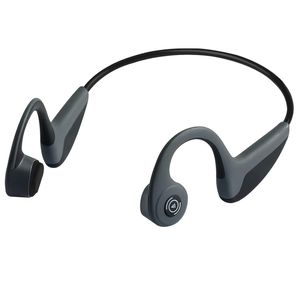
Description
Why These Wireless Earphones Are More Suitable For Outdoor Sports?
1. Unlike traditional headphones they will block your surrounding sound more or less, so you may expose in danger while you're running or cycling.
2. Bone conduction headphones works by vibrations, sound transmit via cheekbone to your cochleas, which avoids hearing impairment compare to ordinary earphones.
3. The Miardo wireless earphones are lightweight and they will never fall out no matter what kinds of strenuous exercise, enable you do sports freely.
User Instructions:
1. Charging
Use the Micro USB charging cable (included) to charge the headphone. Red LED means it's charging. When charging is completed the red LED will turn into blue.
2. Turn on/off
Keep pressing the power button for 3 secs, you will hear voice prompt "Power on, ready to pair", press again for 3 secs the headphone will turn off, voice prompt - "Power off".
3. Pairing and connection
While you hear the voice prompt "ready to pair". Enable your Bluetooth in your device and find the device named "Z8" and click it to connect the Bluetooth headphone. After connected you will hear "Paired".
4. Basic operations
Single press the MFB on the left ear to pause songs and press again to re-play songs.
Single press the MFB to answer phone calls when there are coming calls. Press again to end calls. Long press (2 sec) to reject calls.
Single press the vol +/- to volume up or volume down.
Long press (2 sec) the vol +/- to skip forward or backward songs.
Specifications:
Charging time: 2 hrs
Talking time: 6 hrs
Music time: 5 hrs
Standby time: 240 hrs
Battery capacity: 200 mAh
Transmission range: 33 ft
1. Unlike traditional headphones they will block your surrounding sound more or less, so you may expose in danger while you're running or cycling.
2. Bone conduction headphones works by vibrations, sound transmit via cheekbone to your cochleas, which avoids hearing impairment compare to ordinary earphones.
3. The Miardo wireless earphones are lightweight and they will never fall out no matter what kinds of strenuous exercise, enable you do sports freely.
User Instructions:
1. Charging
Use the Micro USB charging cable (included) to charge the headphone. Red LED means it's charging. When charging is completed the red LED will turn into blue.
2. Turn on/off
Keep pressing the power button for 3 secs, you will hear voice prompt "Power on, ready to pair", press again for 3 secs the headphone will turn off, voice prompt - "Power off".
3. Pairing and connection
While you hear the voice prompt "ready to pair". Enable your Bluetooth in your device and find the device named "Z8" and click it to connect the Bluetooth headphone. After connected you will hear "Paired".
4. Basic operations
Single press the MFB on the left ear to pause songs and press again to re-play songs.
Single press the MFB to answer phone calls when there are coming calls. Press again to end calls. Long press (2 sec) to reject calls.
Single press the vol +/- to volume up or volume down.
Long press (2 sec) the vol +/- to skip forward or backward songs.
Specifications:
Charging time: 2 hrs
Talking time: 6 hrs
Music time: 5 hrs
Standby time: 240 hrs
Battery capacity: 200 mAh
Transmission range: 33 ft
Bone Conduction Headphones - Wireless Earbuds Bluetooth 5.0 Upgraded IP56 Waterproof Sports Bluetooth Earphones w/Mic HD Stereo Sweatproof Premium Sound with Deep Bass for Sport,Lightweight-1.2 oz
Current Price
$43.99
Average
$43.42
Min Price
$39.99
Max Price
$44.99
Price dynamics
1%
Description
Why These Wireless Earphones Are More Suitable For Outdoor Sports?
1. Unlike traditional headphones they will block your surrounding sound more or less, so you may expose in danger while you're running or cycling.
2. Bone conduction headphones works by vibrations, sound transmit via cheekbone to your cochleas, which avoids hearing impairment compare to ordinary earphones.
3. The Miardo wireless earphones are lightweight and they will never fall out no matter what kinds of strenuous exercise, enable you do sports freely.
User Instructions:
1. Charging
Use the Micro USB charging cable (included) to charge the headphone. Red LED means it's charging. When charging is completed the red LED will turn into blue.
2. Turn on/off
Keep pressing the power button for 3 secs, you will hear voice prompt "Power on, ready to pair", press again for 3 secs the headphone will turn off, voice prompt - "Power off".
3. Pairing and connection
While you hear the voice prompt "ready to pair". Enable your Bluetooth in your device and find the device named "Z8" and click it to connect the Bluetooth headphone. After connected you will hear "Paired".
4. Basic operations
Single press the MFB on the left ear to pause songs and press again to re-play songs.
Single press the MFB to answer phone calls when there are coming calls. Press again to end calls. Long press (2 sec) to reject calls.
Single press the vol +/- to volume up or volume down.
Long press (2 sec) the vol +/- to skip forward or backward songs.
Specifications:
Charging time: 2 hrs
Talking time: 6 hrs
Music time: 5 hrs
Standby time: 240 hrs
Battery capacity: 200 mAh
Transmission range: 33 ft
1. Unlike traditional headphones they will block your surrounding sound more or less, so you may expose in danger while you're running or cycling.
2. Bone conduction headphones works by vibrations, sound transmit via cheekbone to your cochleas, which avoids hearing impairment compare to ordinary earphones.
3. The Miardo wireless earphones are lightweight and they will never fall out no matter what kinds of strenuous exercise, enable you do sports freely.
User Instructions:
1. Charging
Use the Micro USB charging cable (included) to charge the headphone. Red LED means it's charging. When charging is completed the red LED will turn into blue.
2. Turn on/off
Keep pressing the power button for 3 secs, you will hear voice prompt "Power on, ready to pair", press again for 3 secs the headphone will turn off, voice prompt - "Power off".
3. Pairing and connection
While you hear the voice prompt "ready to pair". Enable your Bluetooth in your device and find the device named "Z8" and click it to connect the Bluetooth headphone. After connected you will hear "Paired".
4. Basic operations
Single press the MFB on the left ear to pause songs and press again to re-play songs.
Single press the MFB to answer phone calls when there are coming calls. Press again to end calls. Long press (2 sec) to reject calls.
Single press the vol +/- to volume up or volume down.
Long press (2 sec) the vol +/- to skip forward or backward songs.
Specifications:
Charging time: 2 hrs
Talking time: 6 hrs
Music time: 5 hrs
Standby time: 240 hrs
Battery capacity: 200 mAh
Transmission range: 33 ft
Price will be lower
in next 2 weeks
in next 2 weeks
According to the data, price will be lower in next two weeks, so not waste your money and track better price!
Product review & video
what's happenin paid Anisha Peter I'm payin to hear with this you can listen to your music and hear everything around you I love bone conduction headphones a really clever I wish that maybe they were slightly less audible to people near you and it's just kind of the way they work they they basically press against your cheekbones and vibrated and that's that vibration that's conducted through the bone bone conduction into your I guess your ear canals now I really have liked a lot of these and this is what the cheapest set of bone conduction headphones I could find and they look pretty good and I have a giant size head so you know kind of take that into account some of them are a little tight on my head but that's not any fault of the bone connection it's just that they're catering to 99.9% of the market what was really interesting on these is that they have a nice look we kind of have th



Similar products



































