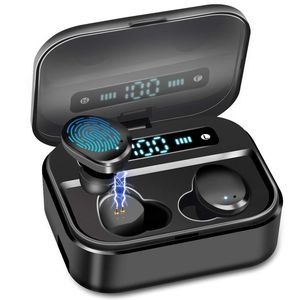
Description
Afrog - Fullfill Your Life with Passion and Creative.
Features
Bluetooth specification: V5.0
Bluetooth protocol: HSP,HFP, A2DP, AVRCP
Support system: All Bluetooth devices and mobile phones
Valid Range: 33ft (10 m)
Charging voltage: 5V/1A
Batterly capacity of the headset: 50MAH
Batterly capacity of the Station: 3600MAH
Charge Time: 30 Min (Earbud) / 2-3H (Station)
Play Time: 3-4 Hour x 12-15 times
Call Time: 6-9Hour x 12-15times
Standby Time: 90 Hour
Package Contents: Charging box*1,Headset:L/R,Data cable*1
FAQ
Question:How to charge the headset?
A:Put the headset into the charging box,press the headset with finger slightly,when the lihgt flashing red and blue, close the lid of the charging box.
Question:How to pair the headset manually if they are not paired automatically?
A:1.Turn off your phone's bluetooth. 2.Press and hold the touch function buttons of the left and right earphones at the same time until the red and blue lights flash alternately,then release the hand. 3.Double-click the right ear touch function button to pair. When successful pairing,the Left earphone light flashes red and blue,and the Right earphone light does not flash. 4.Turn on your phone's Bluetooth and tap Connect to use it.
Question:What can I do if the earbuds suddenly make a zizzy sound?
A:This problem can be solved by restar the earbuds through following steps: 1.Clear the record of TWSX-7 on your phone's bluetooth, and then turn off your phone's bluetooth. 2. Turn off the earbuds for one minute. 3. Turn on the earbuds.Turn on your phone's Bluetooth and tap Connect to use it.
Features
Bluetooth specification: V5.0
Bluetooth protocol: HSP,HFP, A2DP, AVRCP
Support system: All Bluetooth devices and mobile phones
Valid Range: 33ft (10 m)
Charging voltage: 5V/1A
Batterly capacity of the headset: 50MAH
Batterly capacity of the Station: 3600MAH
Charge Time: 30 Min (Earbud) / 2-3H (Station)
Play Time: 3-4 Hour x 12-15 times
Call Time: 6-9Hour x 12-15times
Standby Time: 90 Hour
Package Contents: Charging box*1,Headset:L/R,Data cable*1
FAQ
Question:How to charge the headset?
A:Put the headset into the charging box,press the headset with finger slightly,when the lihgt flashing red and blue, close the lid of the charging box.
Question:How to pair the headset manually if they are not paired automatically?
A:1.Turn off your phone's bluetooth. 2.Press and hold the touch function buttons of the left and right earphones at the same time until the red and blue lights flash alternately,then release the hand. 3.Double-click the right ear touch function button to pair. When successful pairing,the Left earphone light flashes red and blue,and the Right earphone light does not flash. 4.Turn on your phone's Bluetooth and tap Connect to use it.
Question:What can I do if the earbuds suddenly make a zizzy sound?
A:This problem can be solved by restar the earbuds through following steps: 1.Clear the record of TWSX-7 on your phone's bluetooth, and then turn off your phone's bluetooth. 2. Turn off the earbuds for one minute. 3. Turn on the earbuds.Turn on your phone's Bluetooth and tap Connect to use it.
Super Audio Wireless Earbud, IPX8 Waterproof Wireless Earbud,Premium Sound with Deep Bass for Sport,Bluetooth 5.0 Microphone, Auto Pairing, LED Digital Shows 3500mAh Charging Case Total 135 Hours
Current Price
$37.99
Average
$33.31
Min Price
$24.99
Max Price
$42.99
Price dynamics
12%
Description
Afrog - Fullfill Your Life with Passion and Creative.
Features
Bluetooth specification: V5.0
Bluetooth protocol: HSP,HFP, A2DP, AVRCP
Support system: All Bluetooth devices and mobile phones
Valid Range: 33ft (10 m)
Charging voltage: 5V/1A
Batterly capacity of the headset: 50MAH
Batterly capacity of the Station: 3600MAH
Charge Time: 30 Min (Earbud) / 2-3H (Station)
Play Time: 3-4 Hour x 12-15 times
Call Time: 6-9Hour x 12-15times
Standby Time: 90 Hour
Package Contents: Charging box*1,Headset:L/R,Data cable*1
FAQ
Question:How to charge the headset?
A:Put the headset into the charging box,press the headset with finger slightly,when the lihgt flashing red and blue, close the lid of the charging box.
Question:How to pair the headset manually if they are not paired automatically?
A:1.Turn off your phone's bluetooth. 2.Press and hold the touch function buttons of the left and right earphones at the same time until the red and blue lights flash alternately,then release the hand. 3.Double-click the right ear touch function button to pair. When successful pairing,the Left earphone light flashes red and blue,and the Right earphone light does not flash. 4.Turn on your phone's Bluetooth and tap Connect to use it.
Question:What can I do if the earbuds suddenly make a zizzy sound?
A:This problem can be solved by restar the earbuds through following steps: 1.Clear the record of TWSX-7 on your phone's bluetooth, and then turn off your phone's bluetooth. 2. Turn off the earbuds for one minute. 3. Turn on the earbuds.Turn on your phone's Bluetooth and tap Connect to use it.
Features
Bluetooth specification: V5.0
Bluetooth protocol: HSP,HFP, A2DP, AVRCP
Support system: All Bluetooth devices and mobile phones
Valid Range: 33ft (10 m)
Charging voltage: 5V/1A
Batterly capacity of the headset: 50MAH
Batterly capacity of the Station: 3600MAH
Charge Time: 30 Min (Earbud) / 2-3H (Station)
Play Time: 3-4 Hour x 12-15 times
Call Time: 6-9Hour x 12-15times
Standby Time: 90 Hour
Package Contents: Charging box*1,Headset:L/R,Data cable*1
FAQ
Question:How to charge the headset?
A:Put the headset into the charging box,press the headset with finger slightly,when the lihgt flashing red and blue, close the lid of the charging box.
Question:How to pair the headset manually if they are not paired automatically?
A:1.Turn off your phone's bluetooth. 2.Press and hold the touch function buttons of the left and right earphones at the same time until the red and blue lights flash alternately,then release the hand. 3.Double-click the right ear touch function button to pair. When successful pairing,the Left earphone light flashes red and blue,and the Right earphone light does not flash. 4.Turn on your phone's Bluetooth and tap Connect to use it.
Question:What can I do if the earbuds suddenly make a zizzy sound?
A:This problem can be solved by restar the earbuds through following steps: 1.Clear the record of TWSX-7 on your phone's bluetooth, and then turn off your phone's bluetooth. 2. Turn off the earbuds for one minute. 3. Turn on the earbuds.Turn on your phone's Bluetooth and tap Connect to use it.
Price will be lower
in next 2 weeks
in next 2 weeks
According to the data, price will be lower in next two weeks, so not waste your money and track better price!
Product review & video
hey guys digital David its I'm excited to be unboxing or viewing for you also wireless earbuds right here they do connect via bluetooth so this is really cool I did receive these products to review my channel but any opinion expressed in this video is truly my own so that being said this is feel the music it's the tws dual ear training wireless earbuds and this is how they come packaged tree from amazon go ahead I'll throw a link in my video scription below go ahead check it out let me know what you think you can go see photos read some more tech details on these earbuds from Amazon and see the most accurate price so these are definitely for somebody that's on a budget and they're really cool so it's wireless earbuds seriously no ear no wire between the two buds it's truly wireless so they sync to each other than they seem to your phone and it has that charging case built-in which is re


Similar products



































