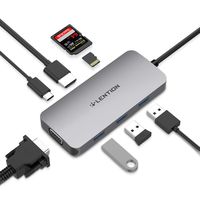
Description
Feature:
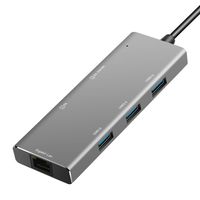
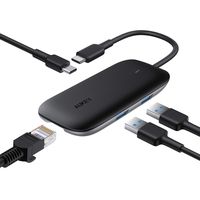
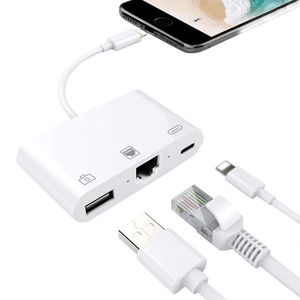
--No software installation was needed. Just plug in the cables: one to your device and one to network cable.
--The important thing is that it can also power the equipment. In the setting, you can also configure to use the Ethernet and connect to your network.
--Supper fast & stable, connect your iPhone/iPad to the Ethernet by this adapter you will get a supper fast in speed and stable network when you surfing the internet or play games, no more buffer and disconnecting like Wi-Fi or LTE.
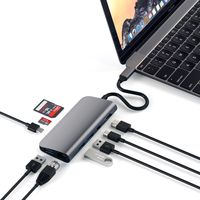
--With lightning to USB reader adapter, you can import the video from your camera/U disk/SD/TF directly into your phone, share your photos and video anytime, anywhere.
Tips for using:
--1. Disable Wi-Fi on your iPad or iPhone.
--2. Insert your router-connected Ethernet cable into RJ45 port of the adapter, and connect the lightning end to your iPad or iPhone.
--3. Press "Setting" of your iPad or iPhone, then you can find an Ethernet on your screen.
--4. Open Safari and check the network.
Compatible devices:
-- System required: iOS 10.x (iOS 10.0.1- iOS 10.3.3) + iOS 11.x (11.0.1-11.0.3)
-- iPhone Models:X8 Plus/8/7 Plus/7/6s Plus/6s/6Plus/6/SE/5s/5
-- iPad Models: iPad Pro/ iPad Air 2/ iPad Air/ iPad mini4/ iPad mini3/ iPad mini2
Attention please:
1. Make sure your USB device current is less than 100mah, otherwise will can not work normally. Such as current more than 100mah keyboards, USB flash, hub...
2. This adapter only support photos and videos one-way transfer from your digital camera.
3. The format of your photo's must be in a root directory (DCIM) on the flash drive. The photo's must be in the format (IMG_XXXX.jpg). If this is done, your photo's will appear on your iPhone and be ready to import.
Package contain:
1*Lighting to Ethernet adapter
1*User Manual
--No software installation was needed. Just plug in the cables: one to your device and one to network cable.
--The important thing is that it can also power the equipment. In the setting, you can also configure to use the Ethernet and connect to your network.
--Supper fast & stable, connect your iPhone/iPad to the Ethernet by this adapter you will get a supper fast in speed and stable network when you surfing the internet or play games, no more buffer and disconnecting like Wi-Fi or LTE.
--With lightning to USB reader adapter, you can import the video from your camera/U disk/SD/TF directly into your phone, share your photos and video anytime, anywhere.
Tips for using:
--1. Disable Wi-Fi on your iPad or iPhone.
--2. Insert your router-connected Ethernet cable into RJ45 port of the adapter, and connect the lightning end to your iPad or iPhone.
--3. Press "Setting" of your iPad or iPhone, then you can find an Ethernet on your screen.
--4. Open Safari and check the network.
Compatible devices:
-- System required: iOS 10.x (iOS 10.0.1- iOS 10.3.3) + iOS 11.x (11.0.1-11.0.3)
-- iPhone Models:X8 Plus/8/7 Plus/7/6s Plus/6s/6Plus/6/SE/5s/5
-- iPad Models: iPad Pro/ iPad Air 2/ iPad Air/ iPad mini4/ iPad mini3/ iPad mini2
Attention please:
1. Make sure your USB device current is less than 100mah, otherwise will can not work normally. Such as current more than 100mah keyboards, USB flash, hub...
2. This adapter only support photos and videos one-way transfer from your digital camera.
3. The format of your photo's must be in a root directory (DCIM) on the flash drive. The photo's must be in the format (IMG_XXXX.jpg). If this is done, your photo's will appear on your iPhone and be ready to import.
Package contain:
1*Lighting to Ethernet adapter
1*User Manual
Lukkahh 3 in 1 Phone to 100Mbps RJ45 Ethernet LAN Wired Network Adapter, Phone to USB Camera Adapter, Charging & Data Sync OTG Adapter Compatible for iPhone/iPad
Current Price
$22.99
Average
$21.99
Min Price
$20.99
Max Price
$22.99
Price dynamics
4%
Description
Feature:
--No software installation was needed. Just plug in the cables: one to your device and one to network cable.
--The important thing is that it can also power the equipment. In the setting, you can also configure to use the Ethernet and connect to your network.
--Supper fast & stable, connect your iPhone/iPad to the Ethernet by this adapter you will get a supper fast in speed and stable network when you surfing the internet or play games, no more buffer and disconnecting like Wi-Fi or LTE.
--With lightning to USB reader adapter, you can import the video from your camera/U disk/SD/TF directly into your phone, share your photos and video anytime, anywhere.
Tips for using:
--1. Disable Wi-Fi on your iPad or iPhone.
--2. Insert your router-connected Ethernet cable into RJ45 port of the adapter, and connect the lightning end to your iPad or iPhone.
--3. Press "Setting" of your iPad or iPhone, then you can find an Ethernet on your screen.
--4. Open Safari and check the network.
Compatible devices:
-- System required: iOS 10.x (iOS 10.0.1- iOS 10.3.3) + iOS 11.x (11.0.1-11.0.3)
-- iPhone Models:X8 Plus/8/7 Plus/7/6s Plus/6s/6Plus/6/SE/5s/5
-- iPad Models: iPad Pro/ iPad Air 2/ iPad Air/ iPad mini4/ iPad mini3/ iPad mini2
Attention please:
1. Make sure your USB device current is less than 100mah, otherwise will can not work normally. Such as current more than 100mah keyboards, USB flash, hub...
2. This adapter only support photos and videos one-way transfer from your digital camera.
3. The format of your photo's must be in a root directory (DCIM) on the flash drive. The photo's must be in the format (IMG_XXXX.jpg). If this is done, your photo's will appear on your iPhone and be ready to import.
Package contain:
1*Lighting to Ethernet adapter
1*User Manual
--No software installation was needed. Just plug in the cables: one to your device and one to network cable.
--The important thing is that it can also power the equipment. In the setting, you can also configure to use the Ethernet and connect to your network.
--Supper fast & stable, connect your iPhone/iPad to the Ethernet by this adapter you will get a supper fast in speed and stable network when you surfing the internet or play games, no more buffer and disconnecting like Wi-Fi or LTE.
--With lightning to USB reader adapter, you can import the video from your camera/U disk/SD/TF directly into your phone, share your photos and video anytime, anywhere.
Tips for using:
--1. Disable Wi-Fi on your iPad or iPhone.
--2. Insert your router-connected Ethernet cable into RJ45 port of the adapter, and connect the lightning end to your iPad or iPhone.
--3. Press "Setting" of your iPad or iPhone, then you can find an Ethernet on your screen.
--4. Open Safari and check the network.
Compatible devices:
-- System required: iOS 10.x (iOS 10.0.1- iOS 10.3.3) + iOS 11.x (11.0.1-11.0.3)
-- iPhone Models:X8 Plus/8/7 Plus/7/6s Plus/6s/6Plus/6/SE/5s/5
-- iPad Models: iPad Pro/ iPad Air 2/ iPad Air/ iPad mini4/ iPad mini3/ iPad mini2
Attention please:
1. Make sure your USB device current is less than 100mah, otherwise will can not work normally. Such as current more than 100mah keyboards, USB flash, hub...
2. This adapter only support photos and videos one-way transfer from your digital camera.
3. The format of your photo's must be in a root directory (DCIM) on the flash drive. The photo's must be in the format (IMG_XXXX.jpg). If this is done, your photo's will appear on your iPhone and be ready to import.
Package contain:
1*Lighting to Ethernet adapter
1*User Manual
Price will be lower
in next 2 weeks
in next 2 weeks
According to the data, price will be lower in next two weeks, so not waste your money and track better price!
Product review & video
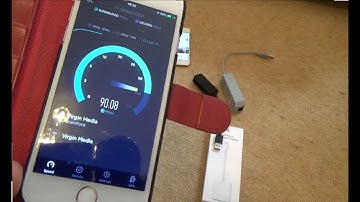
hi there my name is Vince from my mate Vince calm and in this video today I'm going to show you how you can connect up an Ethernet cable so this is a network cable to your Apple devices so here we have a iPhone success we also have an iPad and an iPod as well just to show you that it works on all the different ones and everything is fully up to date including this adapter here now in order to get this to work you will need to use an adapter because obviously there's no Ethernet port on any of these devices now why would you want to do this it's not ideal because these are portable devices and obviously you don't really want to be tethered to it via record but there might be instances where for example you might have a room in your house where you don't have a great Wi-Fi signal in which case then if you've got a network cable in there this might be an option for you or more importantly

Similar products