Description
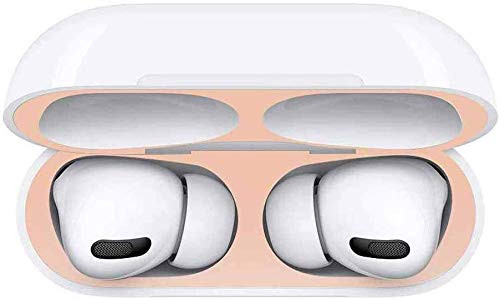
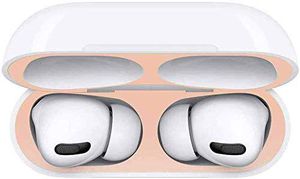
Dust Guard for Airpods
How to Install:
Attach the bottom sticker on the body portion by aligning it with the
LED indicator light.
Place the top sticker upside down on the bottom portion so that the
adhesive side faces upwards on the body portion.Close lid over the
upward facing dust guard so that it sticks perfectly to the inner ceiling
once shut.
Place your fingers in the AirPods inserts to check if the dust guard is
applied properly. If it is not attached properly, it may scratch the
AirPods.
Q: Will it work for AirPods 2 wireless charging case?
A: Does NOT support airpods 2nd wireless charging case
Q: Does the dust sticker 1 set include top and bottom?
A: Yes, 1 set include one tops and one bottoms.
Q: Do I need to clean it really hardcore before adding this?
A: Clean the AirPods with wet/dry wipe and then apply the dust guard.
How to Install:
Attach the bottom sticker on the body portion by aligning it with the
LED indicator light.
Place the top sticker upside down on the bottom portion so that the
adhesive side faces upwards on the body portion.Close lid over the
upward facing dust guard so that it sticks perfectly to the inner ceiling
once shut.
Place your fingers in the AirPods inserts to check if the dust guard is
applied properly. If it is not attached properly, it may scratch the
AirPods.
Q: Will it work for AirPods 2 wireless charging case?
A: Does NOT support airpods 2nd wireless charging case
Q: Does the dust sticker 1 set include top and bottom?
A: Yes, 1 set include one tops and one bottoms.
Q: Do I need to clean it really hardcore before adding this?
A: Clean the AirPods with wet/dry wipe and then apply the dust guard.
Womdee Dust Guard for AirPods Pro, Airpod Kit Dustproof Metal Protection Plate Cover for 2019 New Apple AirPods Pro Charging Case, Ultra-Thin 0.03mm | Dustproof | Shockproof | Scratch Resistant
Current Price
$5.99
Average
$5.99
Min Price
$5.99
Max Price
$5.99
Description
Dust Guard for Airpods
How to Install:
Attach the bottom sticker on the body portion by aligning it with the
LED indicator light.
Place the top sticker upside down on the bottom portion so that the
adhesive side faces upwards on the body portion.Close lid over the
upward facing dust guard so that it sticks perfectly to the inner ceiling
once shut.
Place your fingers in the AirPods inserts to check if the dust guard is
applied properly. If it is not attached properly, it may scratch the
AirPods.
Q: Will it work for AirPods 2 wireless charging case?
A: Does NOT support airpods 2nd wireless charging case
Q: Does the dust sticker 1 set include top and bottom?
A: Yes, 1 set include one tops and one bottoms.
Q: Do I need to clean it really hardcore before adding this?
A: Clean the AirPods with wet/dry wipe and then apply the dust guard.
How to Install:
Attach the bottom sticker on the body portion by aligning it with the
LED indicator light.
Place the top sticker upside down on the bottom portion so that the
adhesive side faces upwards on the body portion.Close lid over the
upward facing dust guard so that it sticks perfectly to the inner ceiling
once shut.
Place your fingers in the AirPods inserts to check if the dust guard is
applied properly. If it is not attached properly, it may scratch the
AirPods.
Q: Will it work for AirPods 2 wireless charging case?
A: Does NOT support airpods 2nd wireless charging case
Q: Does the dust sticker 1 set include top and bottom?
A: Yes, 1 set include one tops and one bottoms.
Q: Do I need to clean it really hardcore before adding this?
A: Clean the AirPods with wet/dry wipe and then apply the dust guard.
Price will be lower
in next 2 weeks
in next 2 weeks
According to the data, price will be lower in next two weeks, so not waste your money and track better price!
Similar products