- HomeElectronicsAccessories & SuppliesAudio & Video AccessoriesCables & InterconnectsVideo CablesHDMI Cables
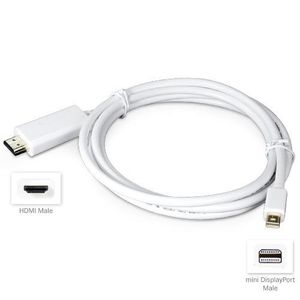
Description
Ready. Set. Accessory
Our Ready. Set. Accessories deliver instant functionality right out of the package. Accessory line products are designed to make your life easier, more compatible, and less expensive.
The mini DisplayPort to HDMI Cable from BoxWave turns your mini DisplayPort device into a home theatre PC. Now you can stream full 1080p digital HD content through your HD-TV, and other HDMI input devices.
With our HMDI Cable you will have instant access to:
Watch Video:
Instantly stream content from sources like Netflix, YouTube and Hulu+. The video streams in the same native resolution as on your device (if it's HD on your device, it will be HD on your TV). Full 8 channel (7.1 surround sound) digital audio is supported as well, allowing the ability for surround sound through your TV's speakers or home theatre system.
Play Games on the Big Screen:
Blow up the playing field. Grab a wireless keyboard and mouse and enjoy a big screen gaming experience.
Full Screen Web Browsing:
Easily switch between gaming, videos, and web browsing. Pull up your device's browser and pull out your Bluetooth keyboard for a full screen Internet experience.
Easily Show-Off Photos:
No more complicated cables. With the mini DisplayPort to HDMI Cable, your photos are easily displayed on your HD-TV in their original high-resolution quality. No pixel loss. No blur.
The mini DisplayPort to HDMI Cable from BoxWave: One Connection. Endless Options.
MacBook Pro 15" (2012) Cable, BoxWave [Mini DisplayPort to HDMI Cable] 70" Display Port to HDMI Cable for Apple MacBook Pro 15" (2012)
Current Price
$9.95
Average
$9.95
Min Price
$9.95
Max Price
$9.95
Description
Ready. Set. Accessory
Our Ready. Set. Accessories deliver instant functionality right out of the package. Accessory line products are designed to make your life easier, more compatible, and less expensive.
The mini DisplayPort to HDMI Cable from BoxWave turns your mini DisplayPort device into a home theatre PC. Now you can stream full 1080p digital HD content through your HD-TV, and other HDMI input devices.
With our HMDI Cable you will have instant access to:
Watch Video:
Instantly stream content from sources like Netflix, YouTube and Hulu+. The video streams in the same native resolution as on your device (if it's HD on your device, it will be HD on your TV). Full 8 channel (7.1 surround sound) digital audio is supported as well, allowing the ability for surround sound through your TV's speakers or home theatre system.
Play Games on the Big Screen:
Blow up the playing field. Grab a wireless keyboard and mouse and enjoy a big screen gaming experience.
Full Screen Web Browsing:
Easily switch between gaming, videos, and web browsing. Pull up your device's browser and pull out your Bluetooth keyboard for a full screen Internet experience.
Easily Show-Off Photos:
No more complicated cables. With the mini DisplayPort to HDMI Cable, your photos are easily displayed on your HD-TV in their original high-resolution quality. No pixel loss. No blur.
The mini DisplayPort to HDMI Cable from BoxWave: One Connection. Endless Options.
Price will be lower
in next 2 weeks
in next 2 weeks
According to the data, price will be lower in next two weeks, so not waste your money and track better price!
Product review & video
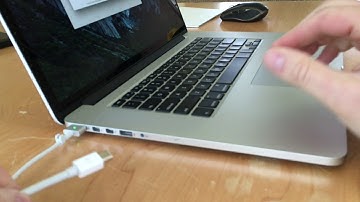
hi-tec 128 here today I want to show you how to connect a MacBook Pro to an external display or monitor now I have here a 15-inch MacBook Pro retina this is a mid 2015 model and the way you would connect your macbook to a display will depend on what type of Mac you have but I'll show you how to do it for mine now first thing you need to understand is what kind of ports you have on the side of your macbook or MacBook Pro now on my macbook pro you'll see I have the MagSafe 2 power connector and then there are 2 ports next to that these are Thunderbolt 2 ports and they use mini display connectors so with Mac's you need to understand what type of port it is and then what type of connector it uses so again Thunderbolt 2 with mini display connectors now we can use either of these ports for connecting your MacBook to a monitor now next to that there are a couple other ports there's a USB port


Similar products






































