Description
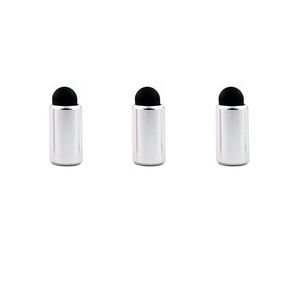
Just Only Fit For Apple Pencil -- Replaces the hard end cap of the Apple Pencil with a soft tip that works well as a stylus that can be used on any touchscreen.
A Magnetic Tip -- Have not had any problems with it falling off as it is a nice magnetic snug fit.
One Of The Best Accessory You Can Get For Your Apple Pencil -- Not only protects the charger, but this one turns the Pencil into a stylus that can be used on any touchscreen, without the charged Pencil and in drawing apps as a perfect eraser to stand in for a fingertip.
Sensitive and Require Less Pressure to Work -- In Procreate, You can also use it as a tool to make perfectly round small dots, which can come in handy (to make star fields, for instance). Can also serve as a rough drawing tool when the Apple Pencil runs out of juice.
Package With 3 Caps, You can replace it easy -- Also It doesn't affect the weight and balance in a negative way.
Wanna to use your Apple pencil for your Smartphones also ? -- The Cap will do for you ! Whatever Your Apple Pencil comes from iPad 9.7, 10.5, 12.9, all you can use the cap for.
It ends up being able to switch between writing tip and stuylus makes the iPad a real joy to use!
By having a nice long stuylus always in hand you have to move your arm around less to use the big iPad which makes it that little bit better that really feels nice.
Additionally always having the pencil in hand turns it from a thing you have to explicitly decide to pickup and use to something always ready to go.
You can move between your touch laptop screen, smartphone and iPad Pro without having to put down the apple pencil each time.
You can go into the settings of certain art apps like Procreate and set the finger gesture to erase only to add to the functionality of the product. This is particularly useful in note taking apps that don't allow for fine control of what you can erase.
A Magnetic Tip -- Have not had any problems with it falling off as it is a nice magnetic snug fit.
One Of The Best Accessory You Can Get For Your Apple Pencil -- Not only protects the charger, but this one turns the Pencil into a stylus that can be used on any touchscreen, without the charged Pencil and in drawing apps as a perfect eraser to stand in for a fingertip.
Sensitive and Require Less Pressure to Work -- In Procreate, You can also use it as a tool to make perfectly round small dots, which can come in handy (to make star fields, for instance). Can also serve as a rough drawing tool when the Apple Pencil runs out of juice.
Package With 3 Caps, You can replace it easy -- Also It doesn't affect the weight and balance in a negative way.
Wanna to use your Apple pencil for your Smartphones also ? -- The Cap will do for you ! Whatever Your Apple Pencil comes from iPad 9.7, 10.5, 12.9, all you can use the cap for.
It ends up being able to switch between writing tip and stuylus makes the iPad a real joy to use!
By having a nice long stuylus always in hand you have to move your arm around less to use the big iPad which makes it that little bit better that really feels nice.
Additionally always having the pencil in hand turns it from a thing you have to explicitly decide to pickup and use to something always ready to go.
You can move between your touch laptop screen, smartphone and iPad Pro without having to put down the apple pencil each time.
You can go into the settings of certain art apps like Procreate and set the finger gesture to erase only to add to the functionality of the product. This is particularly useful in note taking apps that don't allow for fine control of what you can erase.
Magnetic Cap for Apple Pencil Metal Pen Tip for iPad Pro 10.5 9.7 12.9 inch Accessory 3pcs Pne Cap with Conductive Nib (3PCS Silver)
Price is below average
Current Price
$12.9
Average
$13.23
Min Price
$12.9
Max Price
$13.9
Price dynamics
2%
Description
Just Only Fit For Apple Pencil -- Replaces the hard end cap of the Apple Pencil with a soft tip that works well as a stylus that can be used on any touchscreen.
A Magnetic Tip -- Have not had any problems with it falling off as it is a nice magnetic snug fit.
One Of The Best Accessory You Can Get For Your Apple Pencil -- Not only protects the charger, but this one turns the Pencil into a stylus that can be used on any touchscreen, without the charged Pencil and in drawing apps as a perfect eraser to stand in for a fingertip.
Sensitive and Require Less Pressure to Work -- In Procreate, You can also use it as a tool to make perfectly round small dots, which can come in handy (to make star fields, for instance). Can also serve as a rough drawing tool when the Apple Pencil runs out of juice.
Package With 3 Caps, You can replace it easy -- Also It doesn't affect the weight and balance in a negative way.
Wanna to use your Apple pencil for your Smartphones also ? -- The Cap will do for you ! Whatever Your Apple Pencil comes from iPad 9.7, 10.5, 12.9, all you can use the cap for.
It ends up being able to switch between writing tip and stuylus makes the iPad a real joy to use!
By having a nice long stuylus always in hand you have to move your arm around less to use the big iPad which makes it that little bit better that really feels nice.
Additionally always having the pencil in hand turns it from a thing you have to explicitly decide to pickup and use to something always ready to go.
You can move between your touch laptop screen, smartphone and iPad Pro without having to put down the apple pencil each time.
You can go into the settings of certain art apps like Procreate and set the finger gesture to erase only to add to the functionality of the product. This is particularly useful in note taking apps that don't allow for fine control of what you can erase.
A Magnetic Tip -- Have not had any problems with it falling off as it is a nice magnetic snug fit.
One Of The Best Accessory You Can Get For Your Apple Pencil -- Not only protects the charger, but this one turns the Pencil into a stylus that can be used on any touchscreen, without the charged Pencil and in drawing apps as a perfect eraser to stand in for a fingertip.
Sensitive and Require Less Pressure to Work -- In Procreate, You can also use it as a tool to make perfectly round small dots, which can come in handy (to make star fields, for instance). Can also serve as a rough drawing tool when the Apple Pencil runs out of juice.
Package With 3 Caps, You can replace it easy -- Also It doesn't affect the weight and balance in a negative way.
Wanna to use your Apple pencil for your Smartphones also ? -- The Cap will do for you ! Whatever Your Apple Pencil comes from iPad 9.7, 10.5, 12.9, all you can use the cap for.
It ends up being able to switch between writing tip and stuylus makes the iPad a real joy to use!
By having a nice long stuylus always in hand you have to move your arm around less to use the big iPad which makes it that little bit better that really feels nice.
Additionally always having the pencil in hand turns it from a thing you have to explicitly decide to pickup and use to something always ready to go.
You can move between your touch laptop screen, smartphone and iPad Pro without having to put down the apple pencil each time.
You can go into the settings of certain art apps like Procreate and set the finger gesture to erase only to add to the functionality of the product. This is particularly useful in note taking apps that don't allow for fine control of what you can erase.
Price will be lower
in next 2 weeks
in next 2 weeks
According to the data, price will be lower in next two weeks, so not waste your money and track better price!
Product review & video
okay so whether you're using ipads for a while or whether you've just bought your first ipad and you want to do some art on it you're going to encounter the experience of a slippy screen a glass screen and it's not necessarily going to be something that you enjoy using the hard apple pencil tip on that glass screen so one of the alternatives obviously is a screen protector there's loads of those on the market you can get a completely glass type screen protector smooth so you can barely see that it's on there or you can get a matte screen protector which gives you a texture which gives you some feedback to actually create a grippier surface feels different when you're actually drawing on it but one of the downsides of that is that it slightly lowers the resolution of your screen and it slightly distorts the colors it can also wear down the apple pencil nib because this actual nib is a sl


Similar products


































