Description
PLEASE CONTACT US IN TIME IF YOU MEET PROBLEMS THAT YOU CAN'T SOLVE :
Dear Buyer: If you meet any problems, please don't worry, just send us an email, we will solve your problems in time, sometimes you may just don't know why, please contact us, we will try our best to make you have a happy shopping experience. BRING BACK A FITNESS TRACKER TO LOOK AT YOUR BOD'S HIDDEN DATAS!
( Take a little time to learn about it, it will be a data machine. If you don't, it may just a beautiful watch.)
Next, I will briefly introduce the correct use method and answer common questions.
1. When you get your smart fitness tracker, press the touch point below the smart watch screen for 5sec to start up. ( If it's not on, don't worry, there should be no electricity, just charge it for two hours)
2. Install APP: Scan QR code by mobile phone or search for "JYoupro" in APP store or Google Play to download the APP, then enter into the app, click setting-bind the device, select the corresponding device to connect.
3. After download the APP, please spend a little time to learn the functions in app, you will understand your smart watch more fully with app. Also please turn on the phone app permissions.
4. There total TWO types operating gestures: "Long press" (3-5sec) and "Click"
Long press: Starting up/Power off/Change home screen/Sports model/Check message/Stopwatch/Set
Click: Switching operation interface.
5. Sleep detection: No need to operate, when you take a rest and wear the smart bracelet, it will automatically detect sleep situation of yours. Next day, you can check your sleep date on App.
IF YOU STILL HAVE SOME QUESTIONS OR MEET SOME PROBLEMS AFTER TAKE TIME TO LEARN ABOUT IT, PLEASE FEEL FREE TO CONTACT US, WE WILL HELP YOU IN TIME!
Dear Buyer: If you meet any problems, please don't worry, just send us an email, we will solve your problems in time, sometimes you may just don't know why, please contact us, we will try our best to make you have a happy shopping experience. BRING BACK A FITNESS TRACKER TO LOOK AT YOUR BOD'S HIDDEN DATAS!
( Take a little time to learn about it, it will be a data machine. If you don't, it may just a beautiful watch.)
Next, I will briefly introduce the correct use method and answer common questions.
1. When you get your smart fitness tracker, press the touch point below the smart watch screen for 5sec to start up. ( If it's not on, don't worry, there should be no electricity, just charge it for two hours)
2. Install APP: Scan QR code by mobile phone or search for "JYoupro" in APP store or Google Play to download the APP, then enter into the app, click setting-bind the device, select the corresponding device to connect.
3. After download the APP, please spend a little time to learn the functions in app, you will understand your smart watch more fully with app. Also please turn on the phone app permissions.
4. There total TWO types operating gestures: "Long press" (3-5sec) and "Click"
Long press: Starting up/Power off/Change home screen/Sports model/Check message/Stopwatch/Set
Click: Switching operation interface.
5. Sleep detection: No need to operate, when you take a rest and wear the smart bracelet, it will automatically detect sleep situation of yours. Next day, you can check your sleep date on App.
IF YOU STILL HAVE SOME QUESTIONS OR MEET SOME PROBLEMS AFTER TAKE TIME TO LEARN ABOUT IT, PLEASE FEEL FREE TO CONTACT US, WE WILL HELP YOU IN TIME!
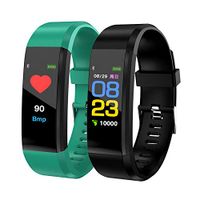
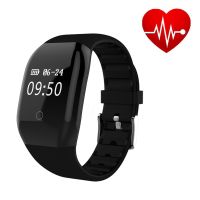
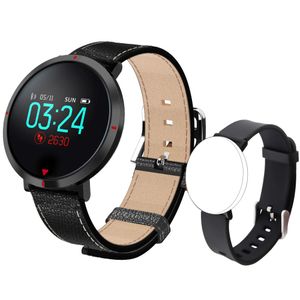
maxtop Smart Watches for Women - Heart Rate Monitor Blood Pressure Sleep Monitor Fitness Tracker Compatible with Android and iOS - Black
Price is below average
Current Price
$48.99
Average
$50.89
Min Price
$45.99
Max Price
$59.99
Price dynamics
4%
Description
PLEASE CONTACT US IN TIME IF YOU MEET PROBLEMS THAT YOU CAN'T SOLVE :
Dear Buyer: If you meet any problems, please don't worry, just send us an email, we will solve your problems in time, sometimes you may just don't know why, please contact us, we will try our best to make you have a happy shopping experience. BRING BACK A FITNESS TRACKER TO LOOK AT YOUR BOD'S HIDDEN DATAS!
( Take a little time to learn about it, it will be a data machine. If you don't, it may just a beautiful watch.)
Next, I will briefly introduce the correct use method and answer common questions.
1. When you get your smart fitness tracker, press the touch point below the smart watch screen for 5sec to start up. ( If it's not on, don't worry, there should be no electricity, just charge it for two hours)
2. Install APP: Scan QR code by mobile phone or search for "JYoupro" in APP store or Google Play to download the APP, then enter into the app, click setting-bind the device, select the corresponding device to connect.
3. After download the APP, please spend a little time to learn the functions in app, you will understand your smart watch more fully with app. Also please turn on the phone app permissions.
4. There total TWO types operating gestures: "Long press" (3-5sec) and "Click"
Long press: Starting up/Power off/Change home screen/Sports model/Check message/Stopwatch/Set
Click: Switching operation interface.
5. Sleep detection: No need to operate, when you take a rest and wear the smart bracelet, it will automatically detect sleep situation of yours. Next day, you can check your sleep date on App.
IF YOU STILL HAVE SOME QUESTIONS OR MEET SOME PROBLEMS AFTER TAKE TIME TO LEARN ABOUT IT, PLEASE FEEL FREE TO CONTACT US, WE WILL HELP YOU IN TIME!
Dear Buyer: If you meet any problems, please don't worry, just send us an email, we will solve your problems in time, sometimes you may just don't know why, please contact us, we will try our best to make you have a happy shopping experience. BRING BACK A FITNESS TRACKER TO LOOK AT YOUR BOD'S HIDDEN DATAS!
( Take a little time to learn about it, it will be a data machine. If you don't, it may just a beautiful watch.)
Next, I will briefly introduce the correct use method and answer common questions.
1. When you get your smart fitness tracker, press the touch point below the smart watch screen for 5sec to start up. ( If it's not on, don't worry, there should be no electricity, just charge it for two hours)
2. Install APP: Scan QR code by mobile phone or search for "JYoupro" in APP store or Google Play to download the APP, then enter into the app, click setting-bind the device, select the corresponding device to connect.
3. After download the APP, please spend a little time to learn the functions in app, you will understand your smart watch more fully with app. Also please turn on the phone app permissions.
4. There total TWO types operating gestures: "Long press" (3-5sec) and "Click"
Long press: Starting up/Power off/Change home screen/Sports model/Check message/Stopwatch/Set
Click: Switching operation interface.
5. Sleep detection: No need to operate, when you take a rest and wear the smart bracelet, it will automatically detect sleep situation of yours. Next day, you can check your sleep date on App.
IF YOU STILL HAVE SOME QUESTIONS OR MEET SOME PROBLEMS AFTER TAKE TIME TO LEARN ABOUT IT, PLEASE FEEL FREE TO CONTACT US, WE WILL HELP YOU IN TIME!
Price will be lower
in next 2 weeks
in next 2 weeks
According to the data, price will be lower in next two weeks, so not waste your money and track better price!

Similar products