- HomeElectronicsAccessories & SuppliesAudio & Video AccessoriesCables & InterconnectsVideo CablesHDMI Cables
Description
Support Models:
5 Pin devices: Galaxy S2(i777),HTC EVO View 4G HTC One M8,Opti
11 Pin devices: Galaxy S5, S4(i9500, i9505), S3(i9300, i9305), Galaxy Note 4(SM-N910A, SM-N910P, SM-N910T, SM-N910V), Galaxy Note 3(N5100, N9000, N9006), Galaxy Note 2(N7100, N7105), Galaxy Tab 3 8.0 (T310), Tab 3 10.1(P5210), Note 8(N5110), Note Pro
Not Support Model:
Samsung Galaxy S9, Samsung Galaxy S9 PLUS, Samsung Galaxy S8, Samsung Galaxy S8 PLUS, Samsung Galaxy S7 Edge, Samsung Galaxy S7, Samsung Galaxy S6, Samsung Galaxy S6 Edge, Samsung Galaxy Tab 3 7.0, Samsung Galaxy Note 3 N9008V, Samsung Galaxy Note 5, Samsung Galaxy Note 10.1, Samsung Galaxy Grand Prime, Samsung Galaxy Stratosphere II, Google Nexus 5, Google Nexus 7, LG G2 G3 G4 V10 Vista, Kindle Fire, Nokia 635, ZTE ZMAX 2, and other device don't support MHL function.
How to Connect:
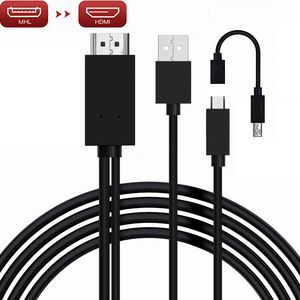
1 The 5-pin mobile device directly plugs the Micro USB cable into the device; the 11-pin device moves through the adapter to the Micro USB and plugs it into the device.
2 Plug the HDMI connector to the TV (Projector/Monitor) hdmi port. Switch the TV to corresponding HDMI channel.
3 Plug the USB cable to power adapter (at lease 5V 1A).
4 Restart your devices after all connection finished.
Cable length: 6.5 feet
Package: 1 Piece MHL to HDMI Adapter
5 Pin devices: Galaxy S2(i777),HTC EVO View 4G HTC One M8,Opti
11 Pin devices: Galaxy S5, S4(i9500, i9505), S3(i9300, i9305), Galaxy Note 4(SM-N910A, SM-N910P, SM-N910T, SM-N910V), Galaxy Note 3(N5100, N9000, N9006), Galaxy Note 2(N7100, N7105), Galaxy Tab 3 8.0 (T310), Tab 3 10.1(P5210), Note 8(N5110), Note Pro
Not Support Model:
Samsung Galaxy S9, Samsung Galaxy S9 PLUS, Samsung Galaxy S8, Samsung Galaxy S8 PLUS, Samsung Galaxy S7 Edge, Samsung Galaxy S7, Samsung Galaxy S6, Samsung Galaxy S6 Edge, Samsung Galaxy Tab 3 7.0, Samsung Galaxy Note 3 N9008V, Samsung Galaxy Note 5, Samsung Galaxy Note 10.1, Samsung Galaxy Grand Prime, Samsung Galaxy Stratosphere II, Google Nexus 5, Google Nexus 7, LG G2 G3 G4 V10 Vista, Kindle Fire, Nokia 635, ZTE ZMAX 2, and other device don't support MHL function.
How to Connect:
1 The 5-pin mobile device directly plugs the Micro USB cable into the device; the 11-pin device moves through the adapter to the Micro USB and plugs it into the device.
2 Plug the HDMI connector to the TV (Projector/Monitor) hdmi port. Switch the TV to corresponding HDMI channel.
3 Plug the USB cable to power adapter (at lease 5V 1A).
4 Restart your devices after all connection finished.
Cable length: 6.5 feet
Package: 1 Piece MHL to HDMI Adapter
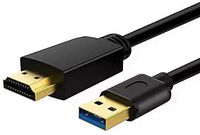
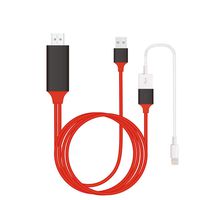
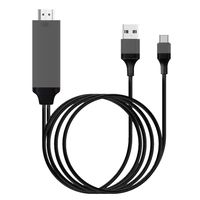
MHL Micro USB to HDMI Adapter Cable, MHL to HDMI Adapter for Android Devices, MHL to HDMI Adapter with 1080P Video Output, MHL to HDMI HDTV Converter Cable (5pin+11pin)
Current Price
$10.99
Average
$10.62
Min Price
$6.99
Max Price
$13.99
Price dynamics
3%
Description
Support Models:
5 Pin devices: Galaxy S2(i777),HTC EVO View 4G HTC One M8,Opti
11 Pin devices: Galaxy S5, S4(i9500, i9505), S3(i9300, i9305), Galaxy Note 4(SM-N910A, SM-N910P, SM-N910T, SM-N910V), Galaxy Note 3(N5100, N9000, N9006), Galaxy Note 2(N7100, N7105), Galaxy Tab 3 8.0 (T310), Tab 3 10.1(P5210), Note 8(N5110), Note Pro
Not Support Model:
Samsung Galaxy S9, Samsung Galaxy S9 PLUS, Samsung Galaxy S8, Samsung Galaxy S8 PLUS, Samsung Galaxy S7 Edge, Samsung Galaxy S7, Samsung Galaxy S6, Samsung Galaxy S6 Edge, Samsung Galaxy Tab 3 7.0, Samsung Galaxy Note 3 N9008V, Samsung Galaxy Note 5, Samsung Galaxy Note 10.1, Samsung Galaxy Grand Prime, Samsung Galaxy Stratosphere II, Google Nexus 5, Google Nexus 7, LG G2 G3 G4 V10 Vista, Kindle Fire, Nokia 635, ZTE ZMAX 2, and other device don't support MHL function.
How to Connect:
1 The 5-pin mobile device directly plugs the Micro USB cable into the device; the 11-pin device moves through the adapter to the Micro USB and plugs it into the device.
2 Plug the HDMI connector to the TV (Projector/Monitor) hdmi port. Switch the TV to corresponding HDMI channel.
3 Plug the USB cable to power adapter (at lease 5V 1A).
4 Restart your devices after all connection finished.
Cable length: 6.5 feet
Package: 1 Piece MHL to HDMI Adapter
5 Pin devices: Galaxy S2(i777),HTC EVO View 4G HTC One M8,Opti
11 Pin devices: Galaxy S5, S4(i9500, i9505), S3(i9300, i9305), Galaxy Note 4(SM-N910A, SM-N910P, SM-N910T, SM-N910V), Galaxy Note 3(N5100, N9000, N9006), Galaxy Note 2(N7100, N7105), Galaxy Tab 3 8.0 (T310), Tab 3 10.1(P5210), Note 8(N5110), Note Pro
Not Support Model:
Samsung Galaxy S9, Samsung Galaxy S9 PLUS, Samsung Galaxy S8, Samsung Galaxy S8 PLUS, Samsung Galaxy S7 Edge, Samsung Galaxy S7, Samsung Galaxy S6, Samsung Galaxy S6 Edge, Samsung Galaxy Tab 3 7.0, Samsung Galaxy Note 3 N9008V, Samsung Galaxy Note 5, Samsung Galaxy Note 10.1, Samsung Galaxy Grand Prime, Samsung Galaxy Stratosphere II, Google Nexus 5, Google Nexus 7, LG G2 G3 G4 V10 Vista, Kindle Fire, Nokia 635, ZTE ZMAX 2, and other device don't support MHL function.
How to Connect:
1 The 5-pin mobile device directly plugs the Micro USB cable into the device; the 11-pin device moves through the adapter to the Micro USB and plugs it into the device.
2 Plug the HDMI connector to the TV (Projector/Monitor) hdmi port. Switch the TV to corresponding HDMI channel.
3 Plug the USB cable to power adapter (at lease 5V 1A).
4 Restart your devices after all connection finished.
Cable length: 6.5 feet
Package: 1 Piece MHL to HDMI Adapter
Price will be lower
in next 2 weeks
in next 2 weeks
According to the data, price will be lower in next two weeks, so not waste your money and track better price!
Product review & video
everybody this is Dennis from ATX power supplies coming at you again here with another little device today I'm going to be looking at this Samsung Galaxy mobile phone for HD TV so basically what this is supposed to do is take the HDMI port on your cell phone and send it out to the TV so that way you can watch your Netflix and all that kind of stuff so I want to try this out it works good we're going to sell a few of them so what we got here is basically a little cord adapter here that's gonna HDMI it goes to your TV it's got a small HDMI for your cell phone it looks a lot like a Micro Micro USB fan I'm gonna go from there and then they've got a USB that it actually uses to power the HDMI circuit so let's see what this is all about I'm trying this for the first time there has been no practice on this video here so what you're seeing is exactly what I see we're having the first impression


Similar products