- HomeElectronicsAccessories & SuppliesAudio & Video AccessoriesCables & InterconnectsVideo CablesHDMI Cables
Description
Before your purchase, please check if it support MHL function by this website: http://www.mhltech.org/devices.aspx Support:
Galaxy S5 (SM-G900A, SM-G900D, SM-G900FQ, SM-G900I, SM-G900J, SM-G900K, SM-G900L, SM-G900M, SM-G900P, SM-G900R4, SM-G900R6, SM-G900R7, SM-G900S, SM-G900T, SM-G900T1, SM-G900V, SM-G900W8)
Galaxy S4 (GT-I9500, GT-I9505 ), Galaxy S4 TD-LTE (GT-I9507, GT-I9506 ), S4 Active
Galaxy S3 (i9300, SCH-R530X ), AT&T Galaxy S III (i747 ), Cricket Galaxy S III (SCH-R530C ), Sprint Galaxy S III (L710, SPH-L710T ), Straight Talk Galaxy S III (SCH-S968C), T-Mobile Galaxy S III (T999 ), U.S. Cellular Galaxy S III (R530), Verizon Galaxy S III (SCH-I535PP, i535 )
Galaxy S II (i9100, GT-I9100)
Samsung Galaxy Note 4, Note 3(N5100 N9000 N9006), Note 2 (N7100 N7105)
Galaxy Mega
Galaxy Tab 3 10.1, Tab 3 8.0
Galaxy Tab S 10.5, Tab S 8.4
Galaxy TabPRO 12.2, TabPRO 10.1, TabPRO 8.4
Galaxy Note(8.0 inch tablet model; GT-N5100, GT-N5105, GT-N5120), Note Pro
Not Support:
Samsung Galaxy S8, Samsung Galaxy S8 PLUS, Samsung Galaxy S7 Edge, Samsung Galaxy S7, Samsung Galaxy S6, Samsung Galaxy S6 Edge, Samsung Galaxy Tab 3 7.0, Samsung Galaxy Note 3 N9008V, Samsung Galaxy Note 5, Samsung Galaxy Note 10.1 (20XX Edition), Samsung Galaxy Grand Prime, Samsung Galaxy Stratosphere II, Google Nexus 5, Google Nexus 7, LG G2 G3 G4 V10 Vista, Kindle Fire, Nokia 635, ZTE ZMAX 2, Asus Zenfone 2, and other devices doesn't support MHL function.
How to use?
1. For 5 Pin devices: plug the Mirco USB cable to your devices directly; For 11 Pin devices: connect the adapter to Mirco USB first, then plug it to your devices
2. Plug the HDMI cable to your TV and switch the TV to HDMI channel
3. Plug the USB cable to power adapter (at lease 5V 1A)
4. Restart your devices after all connection finished
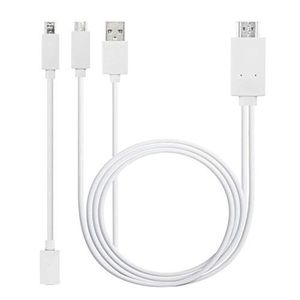
Package Includes: 1 Piece MHL to HDMI Adapter with a 5 pin to 11 pin converter.
Galaxy S5 (SM-G900A, SM-G900D, SM-G900FQ, SM-G900I, SM-G900J, SM-G900K, SM-G900L, SM-G900M, SM-G900P, SM-G900R4, SM-G900R6, SM-G900R7, SM-G900S, SM-G900T, SM-G900T1, SM-G900V, SM-G900W8)
Galaxy S4 (GT-I9500, GT-I9505 ), Galaxy S4 TD-LTE (GT-I9507, GT-I9506 ), S4 Active
Galaxy S3 (i9300, SCH-R530X ), AT&T Galaxy S III (i747 ), Cricket Galaxy S III (SCH-R530C ), Sprint Galaxy S III (L710, SPH-L710T ), Straight Talk Galaxy S III (SCH-S968C), T-Mobile Galaxy S III (T999 ), U.S. Cellular Galaxy S III (R530), Verizon Galaxy S III (SCH-I535PP, i535 )
Galaxy S II (i9100, GT-I9100)
Samsung Galaxy Note 4, Note 3(N5100 N9000 N9006), Note 2 (N7100 N7105)
Galaxy Mega
Galaxy Tab 3 10.1, Tab 3 8.0
Galaxy Tab S 10.5, Tab S 8.4
Galaxy TabPRO 12.2, TabPRO 10.1, TabPRO 8.4
Galaxy Note(8.0 inch tablet model; GT-N5100, GT-N5105, GT-N5120), Note Pro
Not Support:
Samsung Galaxy S8, Samsung Galaxy S8 PLUS, Samsung Galaxy S7 Edge, Samsung Galaxy S7, Samsung Galaxy S6, Samsung Galaxy S6 Edge, Samsung Galaxy Tab 3 7.0, Samsung Galaxy Note 3 N9008V, Samsung Galaxy Note 5, Samsung Galaxy Note 10.1 (20XX Edition), Samsung Galaxy Grand Prime, Samsung Galaxy Stratosphere II, Google Nexus 5, Google Nexus 7, LG G2 G3 G4 V10 Vista, Kindle Fire, Nokia 635, ZTE ZMAX 2, Asus Zenfone 2, and other devices doesn't support MHL function.
How to use?
1. For 5 Pin devices: plug the Mirco USB cable to your devices directly; For 11 Pin devices: connect the adapter to Mirco USB first, then plug it to your devices
2. Plug the HDMI cable to your TV and switch the TV to HDMI channel
3. Plug the USB cable to power adapter (at lease 5V 1A)
4. Restart your devices after all connection finished
Package Includes: 1 Piece MHL to HDMI Adapter with a 5 pin to 11 pin converter.

Micro USB to HDMI Cable, MHL to HDMI Cable, MHL 5PIN&11PIN to HDMI, Micro USB to HDMI Converter for Android Smart Phones & Tablets with 1080P
Current Price
$13.99
Average
$11.99
Min Price
$10.99
Max Price
$13.99
Price dynamics
14%
Description
Before your purchase, please check if it support MHL function by this website: http://www.mhltech.org/devices.aspx Support:
Galaxy S5 (SM-G900A, SM-G900D, SM-G900FQ, SM-G900I, SM-G900J, SM-G900K, SM-G900L, SM-G900M, SM-G900P, SM-G900R4, SM-G900R6, SM-G900R7, SM-G900S, SM-G900T, SM-G900T1, SM-G900V, SM-G900W8)
Galaxy S4 (GT-I9500, GT-I9505 ), Galaxy S4 TD-LTE (GT-I9507, GT-I9506 ), S4 Active
Galaxy S3 (i9300, SCH-R530X ), AT&T Galaxy S III (i747 ), Cricket Galaxy S III (SCH-R530C ), Sprint Galaxy S III (L710, SPH-L710T ), Straight Talk Galaxy S III (SCH-S968C), T-Mobile Galaxy S III (T999 ), U.S. Cellular Galaxy S III (R530), Verizon Galaxy S III (SCH-I535PP, i535 )
Galaxy S II (i9100, GT-I9100)
Samsung Galaxy Note 4, Note 3(N5100 N9000 N9006), Note 2 (N7100 N7105)
Galaxy Mega
Galaxy Tab 3 10.1, Tab 3 8.0
Galaxy Tab S 10.5, Tab S 8.4
Galaxy TabPRO 12.2, TabPRO 10.1, TabPRO 8.4
Galaxy Note(8.0 inch tablet model; GT-N5100, GT-N5105, GT-N5120), Note Pro
Not Support:
Samsung Galaxy S8, Samsung Galaxy S8 PLUS, Samsung Galaxy S7 Edge, Samsung Galaxy S7, Samsung Galaxy S6, Samsung Galaxy S6 Edge, Samsung Galaxy Tab 3 7.0, Samsung Galaxy Note 3 N9008V, Samsung Galaxy Note 5, Samsung Galaxy Note 10.1 (20XX Edition), Samsung Galaxy Grand Prime, Samsung Galaxy Stratosphere II, Google Nexus 5, Google Nexus 7, LG G2 G3 G4 V10 Vista, Kindle Fire, Nokia 635, ZTE ZMAX 2, Asus Zenfone 2, and other devices doesn't support MHL function.
How to use?
1. For 5 Pin devices: plug the Mirco USB cable to your devices directly; For 11 Pin devices: connect the adapter to Mirco USB first, then plug it to your devices
2. Plug the HDMI cable to your TV and switch the TV to HDMI channel
3. Plug the USB cable to power adapter (at lease 5V 1A)
4. Restart your devices after all connection finished
Package Includes: 1 Piece MHL to HDMI Adapter with a 5 pin to 11 pin converter.

Galaxy S5 (SM-G900A, SM-G900D, SM-G900FQ, SM-G900I, SM-G900J, SM-G900K, SM-G900L, SM-G900M, SM-G900P, SM-G900R4, SM-G900R6, SM-G900R7, SM-G900S, SM-G900T, SM-G900T1, SM-G900V, SM-G900W8)
Galaxy S4 (GT-I9500, GT-I9505 ), Galaxy S4 TD-LTE (GT-I9507, GT-I9506 ), S4 Active
Galaxy S3 (i9300, SCH-R530X ), AT&T Galaxy S III (i747 ), Cricket Galaxy S III (SCH-R530C ), Sprint Galaxy S III (L710, SPH-L710T ), Straight Talk Galaxy S III (SCH-S968C), T-Mobile Galaxy S III (T999 ), U.S. Cellular Galaxy S III (R530), Verizon Galaxy S III (SCH-I535PP, i535 )
Galaxy S II (i9100, GT-I9100)
Samsung Galaxy Note 4, Note 3(N5100 N9000 N9006), Note 2 (N7100 N7105)
Galaxy Mega
Galaxy Tab 3 10.1, Tab 3 8.0
Galaxy Tab S 10.5, Tab S 8.4
Galaxy TabPRO 12.2, TabPRO 10.1, TabPRO 8.4
Galaxy Note(8.0 inch tablet model; GT-N5100, GT-N5105, GT-N5120), Note Pro
Not Support:
Samsung Galaxy S8, Samsung Galaxy S8 PLUS, Samsung Galaxy S7 Edge, Samsung Galaxy S7, Samsung Galaxy S6, Samsung Galaxy S6 Edge, Samsung Galaxy Tab 3 7.0, Samsung Galaxy Note 3 N9008V, Samsung Galaxy Note 5, Samsung Galaxy Note 10.1 (20XX Edition), Samsung Galaxy Grand Prime, Samsung Galaxy Stratosphere II, Google Nexus 5, Google Nexus 7, LG G2 G3 G4 V10 Vista, Kindle Fire, Nokia 635, ZTE ZMAX 2, Asus Zenfone 2, and other devices doesn't support MHL function.
How to use?
1. For 5 Pin devices: plug the Mirco USB cable to your devices directly; For 11 Pin devices: connect the adapter to Mirco USB first, then plug it to your devices
2. Plug the HDMI cable to your TV and switch the TV to HDMI channel
3. Plug the USB cable to power adapter (at lease 5V 1A)
4. Restart your devices after all connection finished
Package Includes: 1 Piece MHL to HDMI Adapter with a 5 pin to 11 pin converter.

Price will be lower
in next 2 weeks
in next 2 weeks
According to the data, price will be lower in next two weeks, so not waste your money and track better price!
Similar products




































